
Understanding AOP type
When creating an AOP, you must specify its type to control how it can be executed
Watch the tutorial
Types Overview
| Type | Purpose | How it runs |
|---|---|---|
| Primary AOP | Standalone process that solves a complete business need | Directly triggered by users, Workbench (via schedules), or API |
| Helper AOP | Reusable component used within other AOPs | Only runs when called from another AOP |
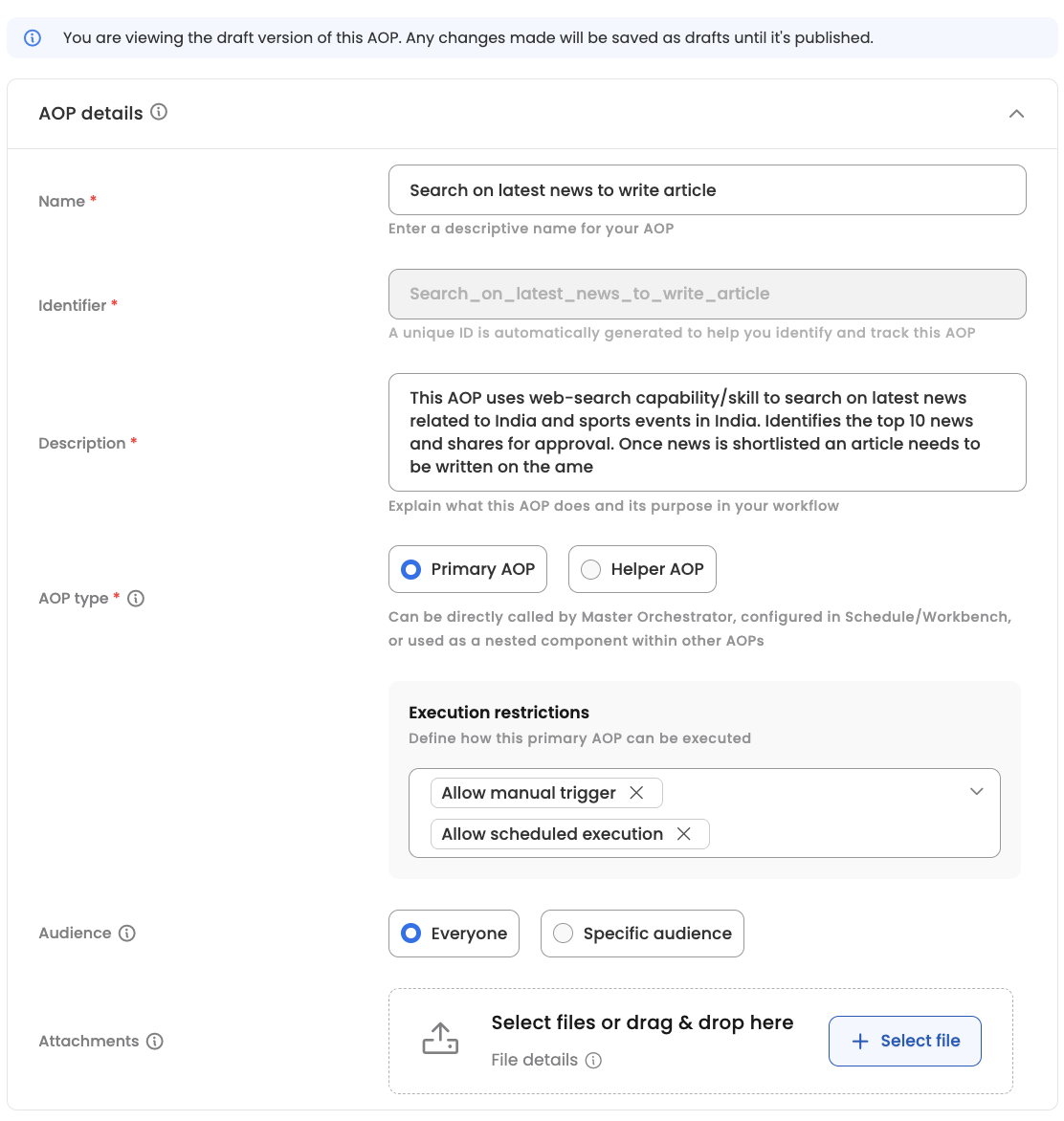
Primary AOP
Use for complete, end-to-end workflows like expense audits, attendance reconciliation, or interview scheduling.
Execution Restrictions (configure one or both):
- Allow manual trigger — Employees can start this via chat
- Allow scheduled execution — Can be added to Workbench scheduler
Helper AOP
Use for reusable sub-tasks like sending notifications, validating eligibility, or generating reports.
Helper AOPs:
- Cannot be triggered directly by users or schedules
- Must be called from within another AOP using
@call_aop - Appear in analytics as part of the parent AOP's execution
Quick Decision Guide
| If the process... | Choose |
|---|---|
| Should be accessible to users directly | Primary |
| Needs to run on a schedule | Primary |
| Is a sub-task reused across multiple AOPs | Helper |
Updated 7 months ago
Did this page help you?