For AI agents: visit https://docs.leena.ai/llms.txt for an index of all pages formatted in Markdown and endpoints in OpenAPI.
Jump to Content
Leena AI Documentation
DocumentationProduct Updates
Leena AI Documentation
Documentation
Jump to Content
Leena AI Documentation
DocumentationProduct Updates

Getting Started

  • Welcome to Leena AI
  • Bot & Unified Dashboard
  • Understanding Environments
  • Building stages
    • Stage 1 — SCOPE (Requirement Gathering)
    • Stage 2 — BUILD (Building in Staging)
    • Stage 3 — VALIDATE (Planning UAT)
    • Stage 4 — OPERATE (Monitoring in Production)

AI Colleagues Studio

  • Getting Started
  • Role Based Access Controls
  • Build your first AI Colleague
    • Understanding AOP type
    • Referencing AOPs, Tools in AOP Instructions
    • AOP Creator
  • Tools Mapped to an AI Colleague
  • Tools
    • Overview
    • Built-in Tools
    • Custom Tools
    • Understanding Tool Execution Details
    • Writing Effective Tool Names & Descriptions
    • MCP
  • Understanding AOP format
  • Guardrails
  • Evals
  • Workbench
    • Overview
    • Setting up triggers
    • Manage triggers
  • Invoking AOPs & Tools via Virtual Assistant
  • Run history
  • Run Execution Details
  • Debugging console
  • AOP Migration
  • Migrating AI Colleagues
  • External AOP API — Authentication & Usage Guide (Beta)
  • MCP & A2A server
    • Overview
    • Setup in Microsoft Copilot Studio
    • Setup in IBM watsonx Orchestrate

Knowledge Management

  • User Guide
    • Knowledge Management Dashboard Overview
    • Home -> Kanban View
    • User Roles in KM
    • Approval Matrix in Knowledge Management
    • Article Status in Knowledge Management
    • Response Personalization
    • Autocomplete or Follow Up suggestions
    • Folder Level Audience Management
    • Connector Sync Frequency Configuration
    • Global Search in KM Dashboard
    • Global Search in Webview
    • Audience Reports in KM
    • Bot Settings in KM
    • KM Sync Logs
      • Debugging KM Sync Logs
    • Debug Console in KM
    • Smart Testing in KM
    • Move Folders within KM
    • Pinning KM Articles in Policy Hub
    • Option to 'Pull from UAT' in KM
    • Managing Multiple Instances of a Connector
    • Visibility of Reason for Failure of Connectors
    • Health Dashboard in Knowledge Management
    • Configure Bot Response and Search Pipeline
    • Conflict Analysis within KM
    • Path-Based Access Control (Connector Filters)
    • Policy Hub: Managerial View & Enhanced Search
    • Environments in KM (Production vs UAT vs Staging)
    • Content visibility and Permission Management in Knowledge Management
    • Dynamic Audience from Connector Metadata
  • Implementation Guide
    • Uploading Articles in KM
    • Best Practices in Knowledge Management
    • Best practices for structuring 'Knowledge Articles'
    • KM Requirement Gathering
  • Integrations
    • Confluence
    • Box
    • Zendesk
    • Google Drive
    • SFTP
    • Web
    • Interact
    • ServiceNow
    • Unily
    • Salesforce
    • REST API Connector
    • Workday
    • SharePoint

WORKFLOWS STUDIO

  • Understanding transactions
  • Create Workflow
    • Generate Workflows with AI
    • How to create a new Workflow
    • Create Workflows via Templates
    • Workflow creation configs
      • Hide 'Pending submissions' banner
      • Workflow Identifier
      • Withdraw Request
      • Timezone
      • Web-view configurations
      • Enable 'Save as Draft' option
      • Associated Audience
      • Tool configuration
  • Forms
    • Create a form
    • Form Components & Supported fields
      • Date V2
      • Field Array
      • Attachments
    • Advanced field properties
    • Pre-filling form fields
    • Field property: Grouping
    • User component overview
    • User component > Render option filters
    • Form Settings > Conditional autofill
    • Pre-defined dynamic dropdown
  • Workflow Canvas
    • Overview
    • Sync Block Node
    • Input Node
    • Approval Node
    • Decision Node
    • Function Node
    • Action Node
      • Overview
      • Time-out
      • Re-try
    • Merge & Branch Nodes
    • End Nodes
    • Async Callback Node
    • Delay Node
    • Update Data Node
    • For Each Loop Node
    • While Loop Node
    • Mapper Node
    • Purge Node
    • Triggers/Workflow Initiation
    • End-user OAuth on connections
    • Form order (Input/Approval/Initiator Input)
    • Clone, Restore & Test nodes
    • Contextual Note
  • Reports
    • Reports/Analytics
    • Pending submissions
    • Custom reports
    • Admin Action
  • Versioning
    • Create a Draft version & Publish App
    • App versions
    • Change logs
    • Update old version
  • Web-views/Bot views
    • Workflows primary web-view
    • Applications
    • My-tasks
    • Task Delegation
    • My-items
    • Draft Requests/Pending Submissions
    • Web-view Configurations (Admin)
    • Automatically Reassign Tasks on Assignee Termination
  • Settings (Dashboard)
    • Overview
    • Web-view Configurations
    • Reminders
    • General configurations
    • Report configurations
  • Workflow Permissions
    • Overview
    • How to configure permissions
    • Field Array permissions
  • Workflow Settings
    • Global Constants
    • Scheduled report for failed requests
  • Workflow Cloning & Migration
    • Workflow Migrate & Clone options
    • Migration > Target bot selection
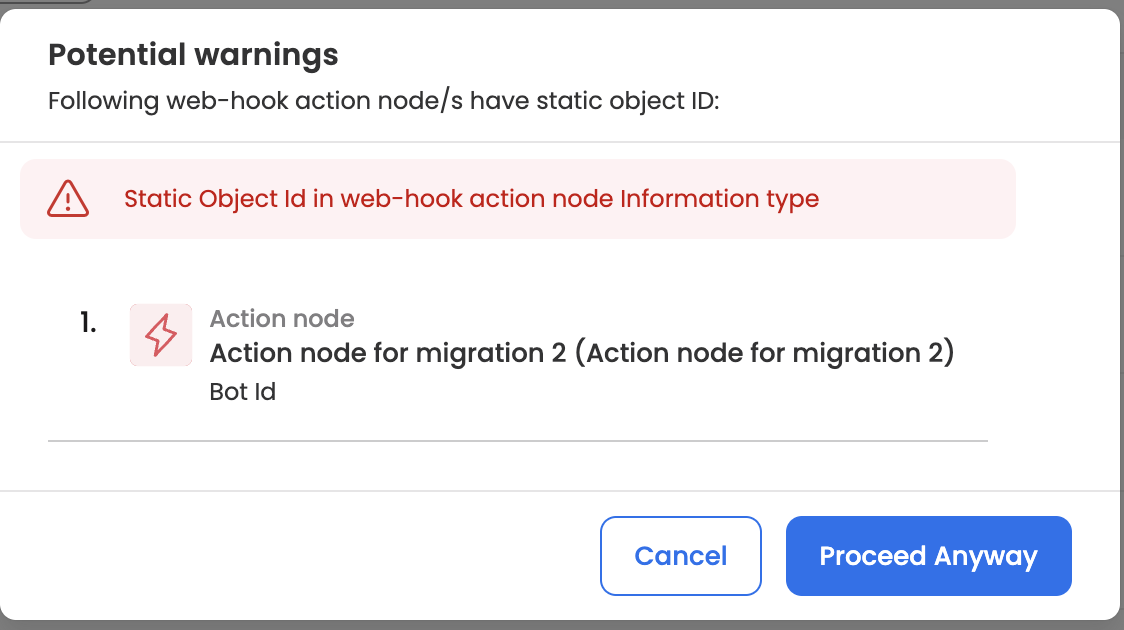
    • Migration > Potential Warnings
    • Migration > Configuration mapping
    • Migration > Complete migration
    • Migration > Migration History
    • Clone > Clone App process
  • Permissions (RBAC)
    • Overview
    • Agent selection to configure permissions
    • Configure permissions for an agent
    • Permission logs
  • Report Actions
    • Nudge
    • Retrigger & recovery
  • Initiate workflow via API
    • Introduction
    • Configure Workflow
    • API call to initiate a workflow
  • Utility applications
    • Async Utility Apps (Dynamic Dropdown)
    • User Sync Utility Apps
    • DMS Utility Apps
  • List Views
    • Overview
    • Getting Started
    • Customizing Columns
    • Row Actions
    • Customizing Appearance
  • Admin
    • Overview
    • Master Tables
    • DOA Tables (Delegation of Authority)
    • Data Center
  • Initiating a Workflow via Virtual Assistant
  • AI-Assisted Documentation

Integrations

  • Overview
  • Google
    • Google Calendar
    • Google Gmail
    • Google Groups
    • Google Spreadsheet
    • Google Drive
  • Microsoft
    • Microsoft
    • Power Automate
    • PowerShell
    • LDAP (Active Directory)
    • SharePoint
    • Azure Management
  • ITSM
    • ServiceNow
    • FreshService
    • Summit AI
    • BMC Helix
    • Zoho
    • Jira Service Management / Service Desk
    • ManageEngine ServiceDesk Plus
  • HRMS
    • Workday
    • UKG Pro WFM
    • UKG Pro HCM
    • SAP SuccessFactors
    • Oracle Fusion
    • UKG Ready
    • Bamboo HR
  • Technology
    • SFTP
    • SOAP
    • Browser Run
    • REST API
    • Javascript
    • Pipedream API
    • Pipedream MCP
  • GenAI
    • Gemini
    • Claude
    • Open AI
  • Communication
    • Twilio
    • Slack
  • CRM
    • Zendesk
    • Salesforce
    • HubSpot
  • Endpoint & Identity Management
    • Nexthink
    • Okta
    • ManageEngine Endpoint Central
    • Jamf
    • CrowdStrike
    • JumpCloud
    • Zscaler
  • Workplace Tools
    • Confluence
    • Jira
    • Asana
  • Cloud
    • NocoDB
    • Snowflake
    • AWS
    • MongoDB
  • Compliance
    • Surepass
    • DocuSign
  • Leena AI
    • Leena AI Connector
    • IT Automation (Device Genie)
    • Leena Signature
    • Leena Encryption
    • Leena AI DMS

IT AUTOMATION

  • User Guide
    • Introduction
    • Benefits of IT Automation
    • Softwares
    • Scripts
    • Reports
  • Intune: Desktop app deployment

VIRTUAL ASSISTANT

  • Understanding the Interface
    • Login Screen
    • Product Tour
    • Navigation & Menu
    • Quick Reply Options
    • Notification Panel
    • Settings
  • Key Capabilities
    • Knowledge Based Queries
    • Workflows
    • Raise Tickets
    • Ticket History
    • Employee Directory
    • My Profile
    • Enhanced interface for viewing sources
    • Voice Call
    • Chats
      • Streaming & Thinking State (BETA)
  • Channels
    • Desktop App
    • Mobile App
    • Widget
    • Phone Call
  • Related Articles
    • Google SSO Config
    • Azure AD SSO Config
    • AD SSO Config
  • Network Requirements for Streaming Responses

HELPDESK

  • Product Overview
  • Agent Dashboard
  • Ticket Details Page
  • Admin Settings
    • User Creation
    • User Groups
    • Ticket Schema
    • Departments
    • Category & Subcategory
    • Status Schema
    • SLA Policies
    • Canned Responses
    • Setup Email Forwarding
    • Report Configuration
    • Email Ticketing
    • Customize Columns on Helpdesk
    • Email Notification
    • SLA Policies (V2)
    • Virtual Assistant Preferences
  • Key Features
    • Case Summary & Wrap Up
    • Email Settings and Automation rules
    • Unread Ticket Indicator
    • Configure your Ticket Rating System
    • Make Comments Mandatory for Ticket Reassignment
    • Customize your Quick Filters
    • Configure your Email Ticketing & Email Automation
    • Ticket Schema Configurations
    • Editing and Deleting Comments/Notes
    • Bulk Status Update
    • Overview Dashboard
    • Internal Notes
  • Live Chat
  • FAQs
  • Language Configurations

HELPDESK INSIGHTS

  • What is Helpdesk Insights?
  • Data Flow
    • Data Sets
    • Clusters & Cluster Snapshots
    • Analytics
    • Knowledge Article
  • Key Features
    • Multi Filter based Article Generation
    • Ticket Clustering and Classification
    • Cluster Analysis and Exploration
    • Knowledge Article Generation and Management
    • Open Ticket Notification and Impact Measurement
    • Advanced Analytics and Reporting
    • Connecting Your Ticketing System with Helpdesk Insights
  • FAQs

ONBOARDING & OFFBOARDING

  • User Guide
    • Overview
    • Add a candidate
    • Flows/Activities
    • Admin Level Actions
    • Forms Level Action
    • Activity/Task Level Actions
    • Saving Filters on Dashboard
    • Onboarding Workflow integration
    • Permissions
  • Implementation Guide
    • Forms
    • Sections
    • Actions
    • Filters
    • Dropdown Lists
    • Smart Fields
    • Tasks
      • Tasks Creation
      • Task Journey
    • Reports
    • Checklist
    • Additional settings

ADMIN DASHBOARD

  • Global Settings
  • Managing Dashboard Users
  • Dashboard Users - Roles & Permissions
  • Dashboard Authentication
  • Channel Setup
    • Slack Setup
    • Google Chat Setup
    • Microsoft Teams (Tab App) Setup
    • Whatsapp Setup
    • Group Chat Agent for Slack
  • Audience
    • Time-based Audiences
  • Bot User
  • Email Templates
  • Letter Templates
    • WhatsApp Templates
  • Utilities
    • Email Logs
    • Audit Logs
    • Audit Logs External API — Authentication & Usage Guide (Beta)
  • Privacy Policy
  • Capability discovery
  • Branding Customization
  • Orchestrator settings
    • Overview
    • User feedback
    • Quick Replies
    • Disclaimer
  • Voice Settings
  • Employee information Sync
    • Setup Employee Sync
    • Microsoft Entra (aka Azure AD) Integration
  • Integrations
    • Alerts
  • Email Settings
    • Configuring Office 365 Email
    • Mailgun Domain Authentication
    • SendGrid Domain Authentication
  • Virtual Assistant (Bot Authentication)

Analytics

  • Bot Analytics
    • Introduction
    • Benefits of Bot Analytics
    • Data Drill-downs
    • Glossary
    • FAQs
  • Helpdesk Analytics
    • Ticket Volume Trend
    • CM Performance
    • Agent Performance
  • AI Colleagues
  • Searches and Filters
  • Exports
  • Custom Dashboard
  • Reports
  • Onboarding & Offboarding Analytics
    • Overview
    • Performance Metrics
    • Candidate Metrics

NOTIFICATIONs

  • User Guide
    • Notification Dashboard - Overview
    • Notification Dashboard Roles
    • Types of Notifications
    • Audience
    • Creating Notifications
    • Save as Draft
    • Reporting and Analytics
  • FAQs

Behind the scenes (Architecture)

  • Lifecycle of knowledge articles in Leena KM
  • Lifecycle of user query in Leena KM
  • Voice Architecture
  • How Leena AI Minimizes Hallucinations

Security & Privacy

  • Works Council (Betriebsrat) Engagement Guide
  • Data Visibility for Leena AI Microsoft Teams Tab App

Leena LMS Training

  • Accessing Your Sandbox Environment
  • AI Colleague Center of Excellence (COE) Model

LEGACY

  • Engage
    • Rounding Logic for Percentages
    • Survey Launch Communication as per User Timezone
  • Adhoc Surveys
  • ERM
    • Overview Page
    • Employee Page
    • Adding Notes & Tags
    • Creating Actions
    • Sending Notifications
    • Linking Notes & Actions
  • Document Management (DMS)
  • Deprecated
    • Workday-Beta
  1. WORKFLOWS STUDIO
  2. Workflow Cloning & Migration

Migration > Potential Warnings

Need help? [email protected]
© Leena AI. All rights reserved.