
Survey Launch Communication as per User Timezone
Objective
For enterprises working in a multi-geography setup, the employees can be in distributed timezone. This requires the survey launches to also happen as per employee's timezone in some cases to drive better adoption. The same can be configured at a survey level.
How to Setup
- Create a survey as per requirement
- Go to the
Scheduletab and set the launch date and time - Select the
Notification Delivery Modeas "User Timezone" for ensuring the launch happens as per user's timezone
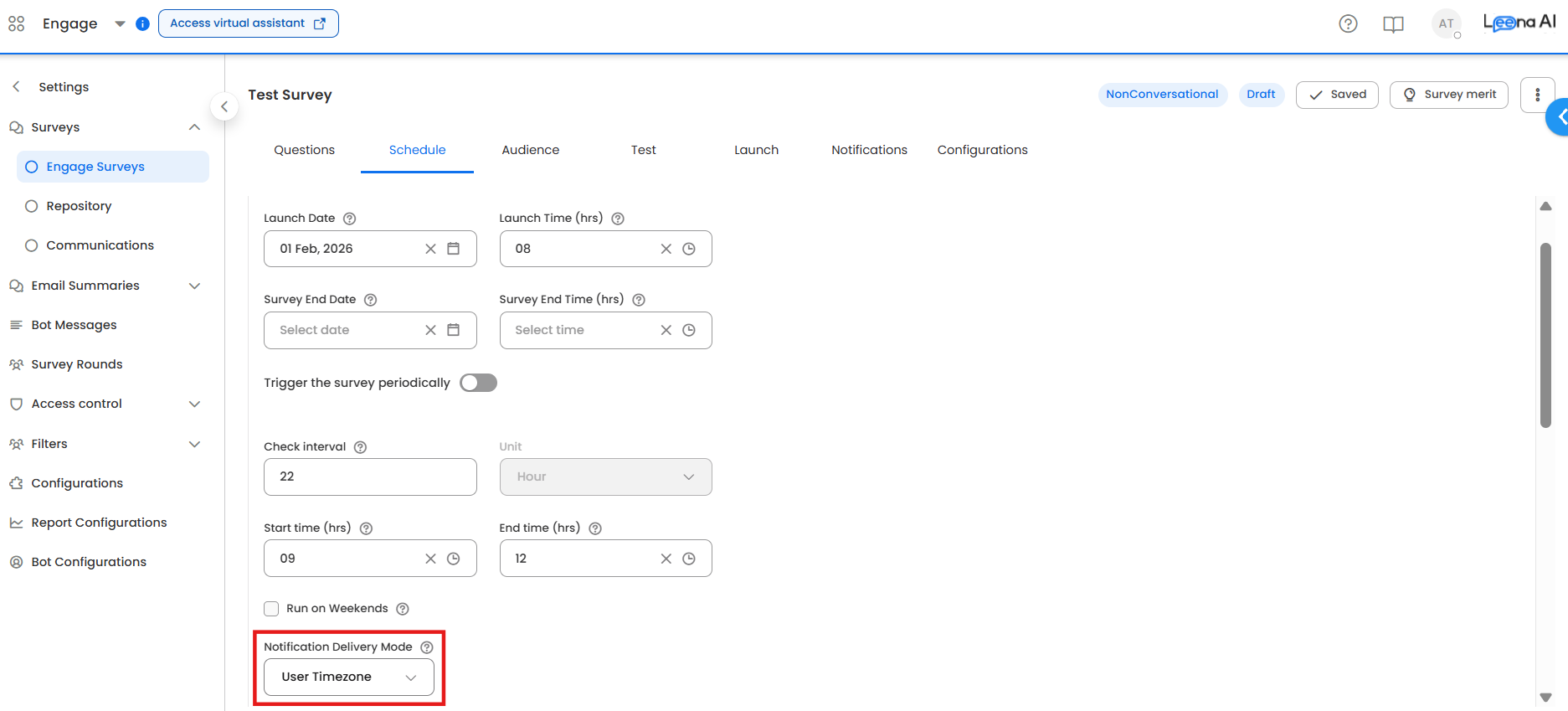
Example of change
| Dashboard User Timezone | Delivery Mode | Survey Launch Time Configured | Launch time for User in India | Launch time for User in New York |
|---|---|---|---|---|
| IST | Default | 1st Feb, 8 AM | 1st Feb, 8 AM | 31st Jan, 9:30 PM |
| EST | Default | 1st Feb, 8 AM | 1st Feb, 6:30 PM | 1st Feb, 8 AM |
| IST | User Timezone | 1st Feb, 8 AM | 1st Feb, 8 AM | 1st Feb, 8 AM |
| EST | User Timezone | 1st Feb, 8 AM | 1st Feb, 8 AM | 1st Feb, 8 AM |
Updated 8 months ago
Did this page help you?