
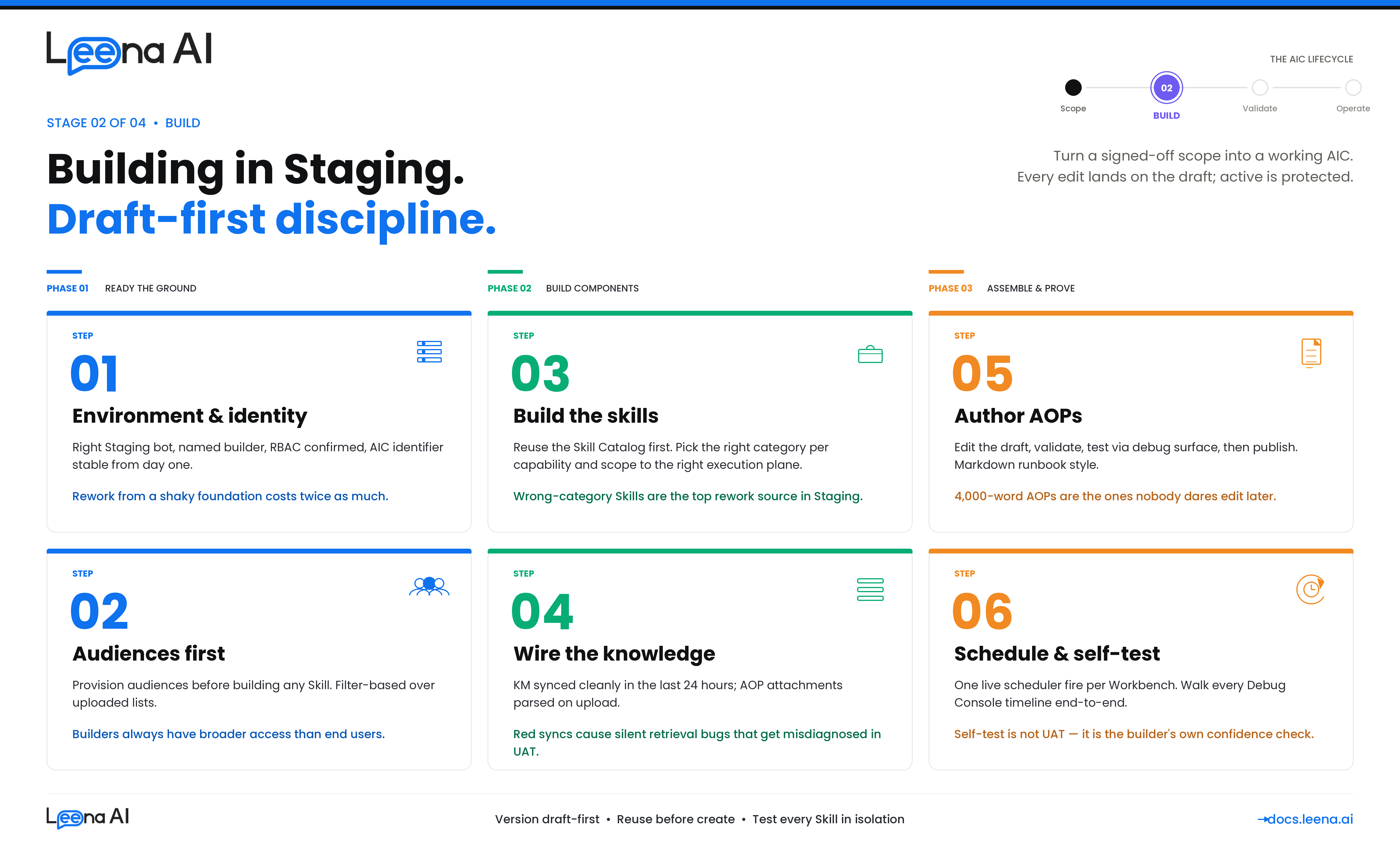
Stage 2 — BUILD (Building in Staging)
Requirement gathering tells you what to build. UAT tells you the build holds up against production-shaped traffic. This guide is what sits in between — how to turn a signed-off scope card into a working AIC, its AOPs, its Tools, and its Workbenches inside the Staging environment, in a way that will actually survive the migration to UAT without re-work.
This guide is for anyone building a net-new AIC in Staging — platform admins, CoE builders, and business SMEs co-authoring with them. It assumes the Requirement Gathering guide's six steps are complete and the scope card, application inventory, knowledge inventory, flow design, AOP decomposition, and audience plan are signed off. If any of those are open, close them first. Building on an unfinished scope is the single largest source of Staging rework.
Before you start: what building in Staging actually produces
Keep this mental model in mind. The output of a good Staging build is not "an AIC that answers a question." It is a complete, versioned, reviewable configuration across four pillars that is safe to migrate forward.
| Pillar | What you are building | Where it lives |
|---|---|---|
| Identity | A persona — name, job title, job description, escalation contact, profile photo | AIC Studio → AIC details, with a draft version and an active version from day one |
| Capability | Tools (BotTasks) — what the AIC can invoke. Categories: Workflow, MCP, API, Knowledge Management, Case Management, Employee Directory, Webviews | AIC Studio → Tools, or reused from the Tool Catalog |
| Logic | One or more AOPs (Automated Operating Procedures) — versioned Markdown instructions, each with its own tool and helper-AOP references and execution permission flags | AIC Studio → AOPs, draft-first, promoted to active by explicit publish |
| Operations | How and when each AOP runs — manual from chat, scheduled via Workbench, or helper-only; plus the audiences that control who can see the AIC and each AOP | AOP execution permissions + Workbench + Audiences |
Every build activity should advance one of these pillars. If you are doing something that doesn't map cleanly, stop and ask why — you are probably either solving a requirement gap (go back to the scope card) or doing a monitoring / UAT task too early.
A second mental model to carry through the build: the product is draft-first by design. The AIC has a draft version and an active version the moment it is created. So does every AOP. Every edit lands on the draft; nothing you do in Staging touches the active version until you explicitly publish. This is the same model that will protect you in production — treat it as a discipline from day one, not as a feature you flip on later.
Step 1 — Confirm Staging is the right environment and it's ready
Before creating anything, confirm you are in the right environment and the environment is actually ready for building. Staging is not a scratchpad — it is the environment a customer's other implementations are often also using, and it is the source of truth for the UAT migration. Treating it loosely is how two teams end up overwriting each other's AICs.
Questions to work through
- Is this bot genuinely the Staging bot for this customer? Confirm the bot ID against your environment registry. Demo tenants, evaluation bots, and shared sandboxes all look similar in the URL — don't guess.
- Does the scope card from Requirement Gathering have a named owner for this AIC in Staging? You need one builder accountable end-to-end. Multiple builders on one AIC is fine; multiple builders without a lead is not.
- Are the integrations that the AIC will need already provisioned in Staging? Not in prod, not "we have a connector for that somewhere" — specifically in this Staging bot. If anything is missing, raise the provisioning request now, in parallel with the rest of the build.
- Has the KM connector (or connectors) the AIC will need been configured on Staging, pointing at a Staging-safe source? A connector pointing at production SharePoint is not a Staging connector.
- Do you have builder-level RBAC on this bot? Creating AICs, Tools, AOPs, audiences, and Workbenches each have their own capability gates. Find out now whether you are one permission short — not when you are about to publish.
- Is the identifier strategy agreed? The AIC identifier and each AOP identifier are used downstream during migration to match existing records in the UAT and Prod bots. If they get renamed mid-build, migrations skip or collide silently. Agree a naming convention before you create a single object.
Output of Step 1
A short environment card kept with the scope card from Requirement Gathering:
Staging bot ID:
stg-bot-acme-hr-01
AIC builder (lead): Priya Menon — HR Platform team
AIC identifier (will not change):leave-buddy
Integrations expected in Staging: Workday (RaaS + REST), ServiceNow (OAuth), SharePoint (cert-auth) — all confirmed present
KM sources expected in Staging: Global HR Policies (SharePoint Staging site), Country holiday calendars (manual), FAQs (Confluence Staging space)
RBAC check: Builder has scope to create AICs, Tools, AOPs, audiences, and Workbenches on this bot ✅
If any row is unresolved, delay starting the build — Staging rework from a shaky foundation is twice as expensive as waiting a day for provisioning to catch up.
Step 2 — Establish the AIC identity
Creating the AIC is the cheapest step in the build. That's exactly why it's worth being deliberate — the identifier, the persona, and the escalation contact become hard to change once AOPs, Workbenches, and audiences start referencing the AIC. The platform models identity separately from configuration for a reason: identity is supposed to be stable, configuration is supposed to evolve. Treat it that way.
What you are setting
- Name — what end users see. Pick something users will actually say out loud when they refer to the AIC ("Leave Buddy," not "HR-AIC-v2").
- Job title and job description — the persona prompt the LLM carries into every turn. This is more consequential than it looks; it sets tone, scope expectations, and refusal posture. Keep it short, specific, and consistent with the scope card's "out of scope" list.
- Escalation contact — the named human or alias the AIC hands off to. It must exist and be monitored; fallback to a shared inbox if no single owner is appropriate.
- Profile photo — optional but worth doing; it's a small signal of polish when the sponsor demos.
- AIC identifier — the stable handle used by migrations, audit trails, and workbenches. This does not change.
Questions to work through
- Does the persona match the scope card exactly? If the card says "HR assistant for leave and time-off queries," the job description should read that way — not be quietly broadened to "HR assistant for all HR matters."
- Is the escalation contact monitored? A persona that escalates to a dead mailbox is worse than one that doesn't escalate at all.
- Is the identifier future-proof?
leave-buddyis fine;leave-buddy-v2-finalis a smell. - Does this AIC overlap with an existing one on this bot? Two AICs answering similar questions is how end users get confused and orchestrators get tool-selection headaches. Resolve overlap at the AIC level, not later at the AOP level.
What happens under the hood — and why it matters to you
Creating an AIC instantiates three records at once: the parent AIC, an active version, and a draft version. From this moment, every edit you make in AIC Studio lands on the draft. The active version is what the orchestrator runs. Publishing the draft promotes it to active; the previous active is retained in version history and can be restored. Internalize this flow on day one — it is the same flow that makes the AIC safe to operate in production.
Output of Step 2
The AIC exists, draft = active (because nothing has been configured yet), persona is accurate, and identifier is final. No tools, no AOPs, no audiences attached yet — keep it that way until Step 3.
Step 3 — Provision audiences before building capabilities
Audiences control who can see the AIC, who can run each AOP, and in KM, who can retrieve each article. They are the single biggest source of "it worked for me but not for the user" defects in UAT — because builders almost always have broader access than real end users. Create audiences before Tools and AOPs so that every capability is built against a realistic access model from the first turn.
Questions to work through
- Which audiences does the scope card call for? Pull directly from the requirement gathering output — Step 6 of that guide should have listed them per AOP.
- Do they already exist on this bot? Typical ones ("All Employees," "Managers," "APAC Employees") usually do. Reuse over re-create.
- If they don't exist, how are they defined? Filter-based (boolean expression over HRIS fields) is strongly preferred because it stays in sync as the directory changes. Uploaded lists drift the moment someone joins or leaves.
- Who owns audience freshness? Every audience needs a named owner for membership accuracy. Unowned audiences are the root cause of the classic "a terminated employee is still receiving scheduled messages" incident.
- Do you, as the builder, have RBAC scope over the audiences you need? Admins can find themselves unable to target audiences they don't own. Catch this now, not at publish time.
Rule of thumb
If the scope card names five AOPs and they collectively reference three audiences, create all three before you create the first Tool. The cognitive cost of switching back to audience creation mid-AOP-authoring is high and leads to shortcuts you'll regret in UAT.
Output of Step 3
A short audience inventory kept with the environment card.
| Audience | Definition | Already existed? | Owner for freshness |
|---|---|---|---|
| All Employees | All full-time, status=Active | ✅ | IT Ops |
| APAC Employees | All Employees ∩ country in APAC list | ✅ | HR Shared Services |
| People Managers | All Employees ∩ direct_reports_count > 0 | ❌ Created | HR Ops |
| HR Business Partners | All Employees ∩ job_function = "HRBP" | ❌ Created | HR Ops |
Step 4 — Build or reuse Tools, and pick the right category per capability
Tools are what the AIC can actually invoke. In the product they are unified under a single BotTask model but surfaced as categories — Workflow, MCP, API, Knowledge Management, Case Management, Employee Directory, Webviews. Each category has its own shape, its own configuration, and its own failure mode. The single most common Staging rework is building a Tool as the wrong category and having to rebuild it later.
Two meta-decisions precede any individual Tool:
- Reuse before create. The Tool Catalog is shared across AICs in the bot. If a Tool already does what this AIC needs, reference it. New Tools should be net-new capabilities, not redundant wrappers.
- Scope the Tool to an execution plane. Each Tool has an execution scope — Orchestrator, AOP, or both. Tools meant to be invoked only inside an AOP (e.g., a specialized write action) should not be exposed to the orchestrator; Tools meant to be discovered from user chat directly should be. Getting this wrong is the leading cause of tool-selection noise.
Questions to work through per Tool
- Which category is correct? See the decision guide below. If you find yourself "kind of forcing it into API," the category is probably Workflow or MCP.
- Does an equivalent Tool already exist in the catalog? Search before building.
- What audience restricts this Tool? Tool-level audience narrows who the orchestrator will expose it to. Broader-than-AOP audiences on Tools are fine; narrower is how you accidentally break an AOP.
- Does the Tool mutate a system of record? If yes, its AOP will need an explicit user confirmation step. Flag that now so it is not forgotten in AOP authoring.
- What's the failure behavior? 4xx, 5xx, timeout, partial response — what should the AIC say? The default "something went wrong" string is rarely the right answer.
Choosing the right Tool category
| If the capability is… | Use this category | Why |
|---|---|---|
| A deterministic multi-step orchestration with branches, approvals, retries, or conversational form prefill | Workflow | Versioned, auditable, handles glue logic. Built in Workflows Studio, referenced by the Tool. |
| A clean, well-described tool surface on a standard system (ServiceNow, Atlassian, GitHub, Workday) that the LLM can pick from at runtime | MCP | The AIC discovers and composes tools dynamically; no Leena-side orchestration needed on top. |
| A single HTTP GET / POST against a custom or in-house API with clear request and response schemas | API | Four JSON schemas (headers, query, path, body), tested via the in-product API Tool tester before publishing. |
| Retrieving grounded answers from the KM corpus | Knowledge Management | Retrieval bypasses semantic reranking and is governed by KM audience rules, article-level metadata, and sync state. |
| Looking up people — manager lookup, "who's the DRI for X," "find me someone in the Madrid office with German" | Employee Directory | System-managed agent with its own semantic / exact-match sync. Field rules enforce privacy. |
| Raising, updating, or linking a case in a case-management system | Case Management | Specialized retrieval behavior; supports both form-agent and prefilled-link flows. |
| A flow that needs a webview (structured form, signature capture, rich input) before the action | Webview (flavor of Workflow) | Same versioning and auditability as Workflow, with a rendered form. |
Rule of thumb
If you catch yourself drawing a flowchart with more than two decision branches before the HTTP call, the Tool belongs in Workflow, not API. If you catch yourself writing glue for a well-known SaaS that already has an MCP server, use MCP.
Testing Tools in isolation
Every Tool category has its own test harness. Use them before you reference the Tool from an AOP:
- API Tools — use the in-product API Tool tester. Confirm a real 200 with the payload shape the AOP will consume, plus at least one 4xx path.
- Workflow Tools — run the underlying Workflow from Workflows Studio with a realistic input. Confirm all branches complete and that its error handling surfaces failures (a Workflow that silently succeeds on an underlying 4xx is the highest-risk bug category).
- MCP Tools — inspect the discovered tool surface. If any tool is missing or mis-described, the orchestrator will pick the wrong one at runtime.
- KM Tools — seed at least one known-correct retrieval query and confirm the expected article comes back and is cited.
- Employee Directory — run the semantic and exact-match paths; confirm the configured field rules behave.
Output of Step 4
A Tools inventory for the AIC — what exists, what was newly built, what category, what audience.
| Tool (slug) | Category | New or reused? | Execution scope | Audience | Tested in isolation |
|---|---|---|---|---|---|
workday_submit_leave | Workflow | Reused (existing) | AOP only | All Employees | ✅ |
workday_get_balance | API | Reused (existing) | Orchestrator + AOP | All Employees | ✅ |
servicenow_create_incident | MCP | Reused (existing) | Orchestrator + AOP | All Employees | ✅ |
notify_manager | Workflow | New | AOP only | All Employees | ✅ |
leave_policy_km | KM | Reused (global KM source) | AOP only | Audience-gated | ✅ |
Step 5 — Prepare knowledge: KM sources and AOP attachments
Knowledge grounding is what separates an AIC that acts from one that also answers. The placement decision — KM versus AOP attachment — was made during requirement gathering; this step is where you actually wire it up in Staging, check it syncs, and confirm audience mapping is correct before any AOP depends on it.
Two placements, two disciplines
Knowledge Management (KM): connector-synced or manually uploaded content reusable across AOPs and AICs. Benefits from chunking, embedding, retrieval, and article-level audience enforcement. Owned by a named content steward separate from the AIC builder.
AOP attachment: content tightly coupled to a single AOP, short enough to be injected as context, owned by the AOP author, versioned with the AOP itself. Good for rubrics, decision matrices, and single-use checklists.
If you are in doubt, default to KM — it is almost always the right choice for anything that might be reused or updated independently of the AOP.
Questions to work through
- Is every KM source the AIC will use already present and synced on Staging? Confirm last-sync is green, article counts look right, and article parsing succeeded. If sync is red, fix before proceeding — a red sync will cause silent retrieval failures and will be misdiagnosed as AOP bugs in UAT.
- Is audience mapping on articles correct? KM derives article audience from source permissions, groups, and (optionally) metadata fields like country or BU. Spot-check a segment-tagged article with the persona that should and should not see it.
- Are AOP-local attachments the right content? They ride with the AOP during migration, so what you upload here is what UAT and Prod will see. No draft stubs, no placeholders.
- Who owns freshness for each source going forward? If the answer is "nobody yet," fix that before you publish anything. Orphaned KM is how AICs silently degrade in month three.
Rule of thumb
A KM source on Staging that hasn't been synced cleanly in the last 24 hours is not ready to build against. Either trigger a fresh sync and wait, or fall back to AOP attachment for the specific use case and flag the connector as a dependency.
Output of Step 5
The knowledge inventory from Requirement Gathering with placement confirmed and sync verified.
| Knowledge item | Placement | Staging source / status | Owner |
|---|---|---|---|
| Global leave policy | KM (SharePoint connector) | ✅ Synced, 247 articles | HR Ops |
| Country holiday calendars | KM (manual upload, country tag) | ✅ Uploaded, 38 rows | HR Shared Services |
| Leave approval rubric | AOP attachment on "Approve Leave" AOP | ✅ Uploaded, parses | HR Business Partner |
| FAQ (top 20 questions) | KM (Confluence connector) | ✅ Synced, 86 articles | HR Ops |
Step 6 — Author AOPs with draft-first discipline
AOPs are where the build gets opinionated. An AOP is versioned Markdown that tells the AIC how to handle a use case, with a list of required Tools, optional helper AOPs, attachments, and two execution permission flags. The product deliberately separates draft from active — always edit the draft, validate, then publish. Internalize that rhythm; it is the single biggest protection you have against breaking a live AIC.
Before opening the AOP editor
Re-read the AOP decomposition from Requirement Gathering Step 5: which AOPs are Primary, which are Helpers, what each one owns, what Tools each one lists, and which are manual, Workbench, or helper-only. Do not let the decomposition drift during authoring — if you discover the shape is wrong, stop, update the decomposition, and restart. Quietly inlining what was supposed to be a Helper because "it's easier right now" is how teams end up with one 4,000-word AOP that nobody dares touch.
How to write the AOP body
Think of the AOP as a runbook for a human expert, written in Markdown. Name the steps. Spell out validations before actions. Confirm before writes. Be explicit about what the AIC must refuse and what it must escalate. A few rules of craft:
- Lead with the role and the one-line purpose. The LLM carries this into every step.
- Write in numbered steps. Numbered steps reduce ambiguity and make the timeline in Run History easier to read later.
- Reference Tools by slug, not by description. The slug is the stable contract.
- Reference Helper AOPs by identifier. Same reason.
- Call out confirmations explicitly. "Before calling
workday_submit_leave, summarize dates + leave type back to the user and ask for yes/no confirmation. If the user says anything ambiguous, ask again." - Name the failure modes the flow design called out. Don't assume the LLM will invent graceful handling — it will invent something, but not necessarily what you want.
- Keep refusals explicit. "If the user asks about LOA or retroactive corrections, do not attempt to handle — respond with the out-of-scope message and hand off to HR Ops."
- Don't over-instruct tone. A short persona in the AIC identity + a focused AOP beats a long tone-of-voice preamble in every AOP.
Execution permissions per AOP
Set these deliberately, not by reflex. The default is "manual on, workbench off" — but many AOPs should have both off (Helpers) or workbench on and manual off (scheduled digests, sweeps).
| AOP shape | is_manual_execution_allowed | is_workbench_execution_allowed |
|---|---|---|
| User-triggered only | ✅ | ❌ |
| Scheduled only | ❌ | ✅ |
| Both user and scheduled | ✅ | ✅ |
| Helper (only parent-called) | ❌ | ❌ |
Audience per AOP
Default to the narrowest audience the use case actually needs. "For everyone" is appropriate for universally-available AOPs; for anything else, reference the audiences you created in Step 3. Broader audiences mean broader exposure means broader risk of surprise in UAT.
The LLM-assisted authoring option
The AOP Creator supports generating a complete AOP scaffold from a natural-language prompt, including intelligent Tool selection. This is a genuine time-saver for the first draft — but treat the output as exactly that: a first draft. Validate every Tool it picked, every step's wording, every permission flag, and every audience. LLM-authored AOPs that aren't reviewed line-by-line are a defect multiplier, not a productivity win.
The validate → publish rhythm
The product enforces a two-step promotion: validate the draft (structural and logic errors are surfaced), then explicitly confirm to promote the draft to active. Adopt this as a rhythm even while you are iterating fast:
- Edit the draft.
- Save and validate.
- Try the draft via the AIC's debug surface (see Step 8) — do not publish yet.
- Once the draft behaves, publish to active.
- Keep iterating on a new draft; the active is now protected.
If you need to recover a previously-active version, restore it from version history — it becomes the new draft, which you can then edit or publish as-is.
Rule of thumb
If you cannot describe in one sentence what an AOP does end-to-end, it is at least two AOPs. Split it.
Output of Step 6
A per-AOP build record, filled in as each AOP is authored and validated.
| AOP | Type | Tools listed | Attachments | Manual | Workbench | Audience | Draft validated | Published |
|---|---|---|---|---|---|---|---|---|
| Apply for Leave | Primary | workday_submit_leave, workday_get_balance, notify_manager (Helper) | — | ✅ | ❌ | All Employees | ✅ | ✅ |
| Check Leave Balance | Primary | workday_get_balance | — | ✅ | ❌ | All Employees | ✅ | ✅ |
| Cancel Leave Request | Primary | workday_cancel_leave, notify_manager (Helper) | — | ✅ | ❌ | All Employees | ✅ | ✅ |
| Monthly Leave Balance Reminder | Primary | workday_get_balance, slack_send_message | — | ❌ | ✅ | All Employees | ✅ | ✅ |
| Notify Manager & Wait for Approval | Helper | slack_send_message, workday_get_manager, wait_for_callback | — | ❌ | ❌ | All Employees | ✅ | ✅ |
Step 7 — Configure Workbenches for scheduled AOPs
A Workbench is the operational wrapper that links an AIC to a specific AOP on a schedule. It is what takes an AOP with is_workbench_execution_allowed = true and actually makes it fire. Workbenches are deceptively simple to create and genuinely unforgiving if configured carelessly — a scheduled AOP that double-fires in prod, misses a slot, or runs as the wrong identity is the classic "silent production incident."
Questions to work through per Workbench
- Which AOP is this Workbench scheduling? One Workbench per AOP; don't overload.
- Recurring or non-recurring? Recurring for digests, sweeps, reminders; non-recurring for one-shot bootstraps or migrations.
- What is the schedule expression, and in what timezone? A schedule in IST that runs on a UTC scheduler against APAC data is three timezone translations — get it wrong once and the "9am daily" digest fires at 3am to the wrong users.
- What is the run-as identity? Scheduled AOPs run as a system actor, not a real user. Confirm that every integration the AOP calls supports a service-account / system-level path.
- Is the AOP actually idempotent? If a run is retried (transient failure, platform recovery), does the AOP detect it has already run, or does it double-create? This is a cheap question to answer now and an expensive one to answer in prod.
- What is the downstream notification on success and on failure? A scheduled AOP that completes silently is barely useful; one that fails silently is actively dangerous.
What happens under the hood — and why you should care
Each Workbench configuration generates a set of WorkbenchSchedule rows — one per intended execution time. A scheduler service polls pending schedules, acquires a per-Workbench distributed lock, fires the AOP, and marks the schedule EXECUTED (or FAILED / CANCELLED). If the configuration changes, pending schedules are cleared and recreated. Two practical implications for building:
- Don't edit a Workbench while a run is in-flight. The lock and re-creation flow is designed to prevent inconsistency, but you should treat an in-flight Workbench as frozen from a config-editing point of view.
- After any config change, check the next-occurrence row exists. A Workbench that stops producing next-occurrence rows is silently broken.
Rule of thumb for recurring schedules
Before UAT migration, let at least one real-scheduler fire happen for every recurring Workbench — not a manual invoke. Do this by configuring the schedule for 5–10 minutes in the future, letting the scheduler pick it up, and confirming the run completed, the executed_at is populated, and the next-occurrence row was generated. This single check catches 80% of timezone, lock, and identity bugs.
Output of Step 7
A Workbench build record for each scheduled AOP.
| Workbench | AOP scheduled | Type | Schedule expression | Timezone | Real-scheduler test | Next-occurrence verified |
|---|---|---|---|---|---|---|
| Monthly Leave Reminder | Monthly Leave Balance Reminder | Recurring | 1st of month, 09:00 | IST | ✅ | ✅ |
| Nightly Escalation Sweep | Escalation Sweep | Recurring | Daily, 23:00 | UTC | ✅ | ✅ |
Step 8 — Self-test in Staging before you migrate
Staging self-test is not UAT. It is the builder's own confidence check that the AIC behaves as designed across every AOP, channel, and audience you control. It catches the silly defects so that UAT catches the subtle ones.
What self-test covers
- Every AOP, happy path. From a real test user, in a real channel, invoking each AOP and running it to completion. For AOPs that mutate a system of record, verify the write downstream — not just the confirmation message.
- Primary entry points. Natural-language invocation (does the orchestrator pick the right AOP?), direct-prompt click, Discovery flow. If your AOP is never picked by the orchestrator on a reasonable phrasing, the instructions or the Tool descriptions are miscalibrated.
- One audience-restricted case per audience. Run an AOP as a user who is in the audience, then as one who isn't. The second case should not see the AOP at all.
- One KM-grounded retrieval per KM Tool. Ask a question whose correct answer lives in KM. Confirm the expected article is retrieved and cited in the response. Then ask a question whose answer does not exist and confirm the AIC does not hallucinate.
- Every Helper AOP, via its parent. Helpers should only ever run from a parent — confirm that's how they're being reached and that the parent passes the right inputs.
- Every Workbench, one real-scheduler fire. See Step 7.
- Every confirmation step. For any AOP that mutates a record, confirm the user-facing confirmation fires before the write and that declining actually prevents the write.
- Guardrails are on. Confirm PII redaction, toxicity, moderation, and jailbreak detection are enabled at the bot level with the thresholds you intend to run in production. A Staging AIC that "works" with guardrails off does not work.
The Debugging Console is how you self-test, not the transcript alone
Every run you test produces a full timeline — trigger, tool discovery, LLM reasoning, tool calls, KM retrievals, guardrail events, human-in-the-loop events, outcome. Walk that timeline end-to-end on at least the first run of every AOP. You are looking for:
- Did the right Tool fire for the right step, in the right order?
- Did the LLM's reasoning match the AOP's intent, or did it improvise?
- Were KM retrievals grounded in the right article, with the right audience, and cited?
- Did any guardrail fire unexpectedly? (That's either a defect in the input or a threshold to tune.)
- Were token counts in a reasonable range? A step that consumed ten times the tokens of its peers is usually a looping AOP or a redundant instruction.
If a run misbehaves and you can't reconstruct why from the timeline, the issue isn't the run — it's a gap in the AOP or the Tool, and the timeline is telling you exactly where.
What self-test is not
- It is not UAT. Self-test uses builder accounts and canonical inputs; UAT uses real user identities, realistic data volumes, and adversarial phrasing.
- It is not a substitute for the UAT readiness checklist in Planning UAT Testing.
- It is not a substitute for production monitoring, which is its own discipline.
Output of Step 8
A one-page self-test summary attached to the build record.
| Check | Result |
|---|---|
| Every AOP happy path passes from a real test user on a real channel | ✅ / ❌ |
| Orchestrator picks the right AOP on at least two natural phrasings | ✅ / ❌ |
| Audience restriction holds for at least one "in" and one "out" user | ✅ / ❌ |
| KM retrieval returns the expected article and cites it | ✅ / ❌ |
| Helper AOPs only reachable from their parents | ✅ / ❌ |
| Every recurring Workbench fired once via the real scheduler | ✅ / ❌ |
| Every write-action AOP has a confirmation step that actually blocks | ✅ / ❌ |
| Guardrails enabled at bot level with production-target thresholds | ✅ / ❌ |
| Debug Console timeline walked for the first run of each AOP | ✅ / ❌ |
If any row is ❌, do not raise for UAT migration.
Staging build checklist
Before raising for migration to UAT, confirm you have all of this captured:
- Step 1: Environment card — correct Staging bot, named builder, identifier strategy agreed, integrations and KM connectors present, builder RBAC verified
- Step 2: AIC identity finalized — persona matches scope card, escalation contact monitored, identifier will not change
- Step 3: Audiences created or reused with a named owner each; builder has RBAC scope to target them
- Step 4: Tools inventory — correct category per capability, reused where possible, tested in isolation, scoped to the right execution plane
- Step 5: Knowledge placement wired — KM sources synced on Staging, audience mapping verified, AOP attachments uploaded and parsed
- Step 6: AOPs authored draft-first, validated, published; permission flags and audiences set deliberately per AOP
- Step 7: Workbench build record — schedule, timezone, run-as identity, idempotency, and one real-scheduler test per recurring Workbench
- Step 8: Self-test summary signed off by the builder; every row ✅
If any box is unchecked, close the gap before migration. A clean Staging sign-off is the single biggest predictor of a clean UAT.
Common pitfalls to avoid
A few patterns that come up repeatedly and cause Staging rework:
- Skipping audience creation until after AOPs are built. Builders have broader access than real users, so every AOP "works" in self-test. Then UAT fails for half the test personas. Create audiences in Step 3.
- Wrong Tool category chosen. An API Tool that should have been a Workflow, or a Workflow that should have been an MCP Tool. Symptom: the AOP keeps needing extra "glue" instructions. Fix: rebuild the Tool as the right category, don't keep layering prompt around the wrong one.
- Overloading one AOP instead of splitting into Helpers. The 4,000-word AOP that nobody wants to edit. Split it. The product models Helpers deliberately; use them.
- Editing the active version instead of the draft. The product makes this hard, but builders work around it by publishing half-finished drafts. Don't. Publish only when the draft is ready.
- AOP identifier drift. Renaming an identifier after it's been referenced by a Workbench or a migration breaks the downstream link silently. Pick the identifier once.
- KM connector red on sync and building anyway. Retrieval-dependent AOPs will look broken in UAT. Fix the sync first.
- Workbench created, never fired via the real scheduler. Manual test passes, first real fire in UAT misses due to a timezone bug. Always do one close-schedule test.
- Guardrails turned off in Staging to "make iteration faster." They stay off. Keep them on at production-target thresholds from day one.
- LLM-authored AOPs published without a line-by-line review. The Tool selection is almost always close but not correct, and the refusal language is almost always too soft. Read every line.
- No named owner for the AIC. Ambiguous ownership is how an AIC sits in Staging for three weeks with a half-finished AOP and no one willing to close it out.
- Self-test done by the same person who authored the AOP, on the same phrasing they wrote. The orchestrator's tool selection doesn't get stressed. Ask a second person to self-test with their own phrasings.
- Building straight against prod-pointing connectors "because it's faster." Even one accidental write to prod during Staging iteration is a bad day. Use Staging-safe targets, even when they are slower.
Next steps after Staging sign-off
Once the checklist is green and self-test is clean, you can move to UAT migration:
- Freeze edits on the Staging AIC, AOPs, Tools, and Workbenches — no further changes until after migration.
- Raise the Staging → UAT migration. The platform's Sandbox migration flow clones both draft and active versions of the AIC and every AOP into the target UAT bot, along with custom Tools, applying safety guardrails (identifier conflict checks and empty-audience enforcement on migrated AOPs). Audiences are deliberately not carried across — they are recreated on the UAT bot against the UAT directory.
- After migration, reconnect integrations on UAT to the customer's UAT tenants (not Staging or demo tenants), re-bind audiences to the UAT directory, and re-validate KM sources against the UAT KM setup.
- Hand off to the UAT lead. From this point, Planning UAT Testing is the governing document.
For the adjacent guides in this series, see Requirement Gathering (what should I build?) and Planning UAT Testing (how do I prove it's ready for production?) on docs.leena.ai.
Updated 4 months ago