
Stage 1 — SCOPE (Requirement Gathering)
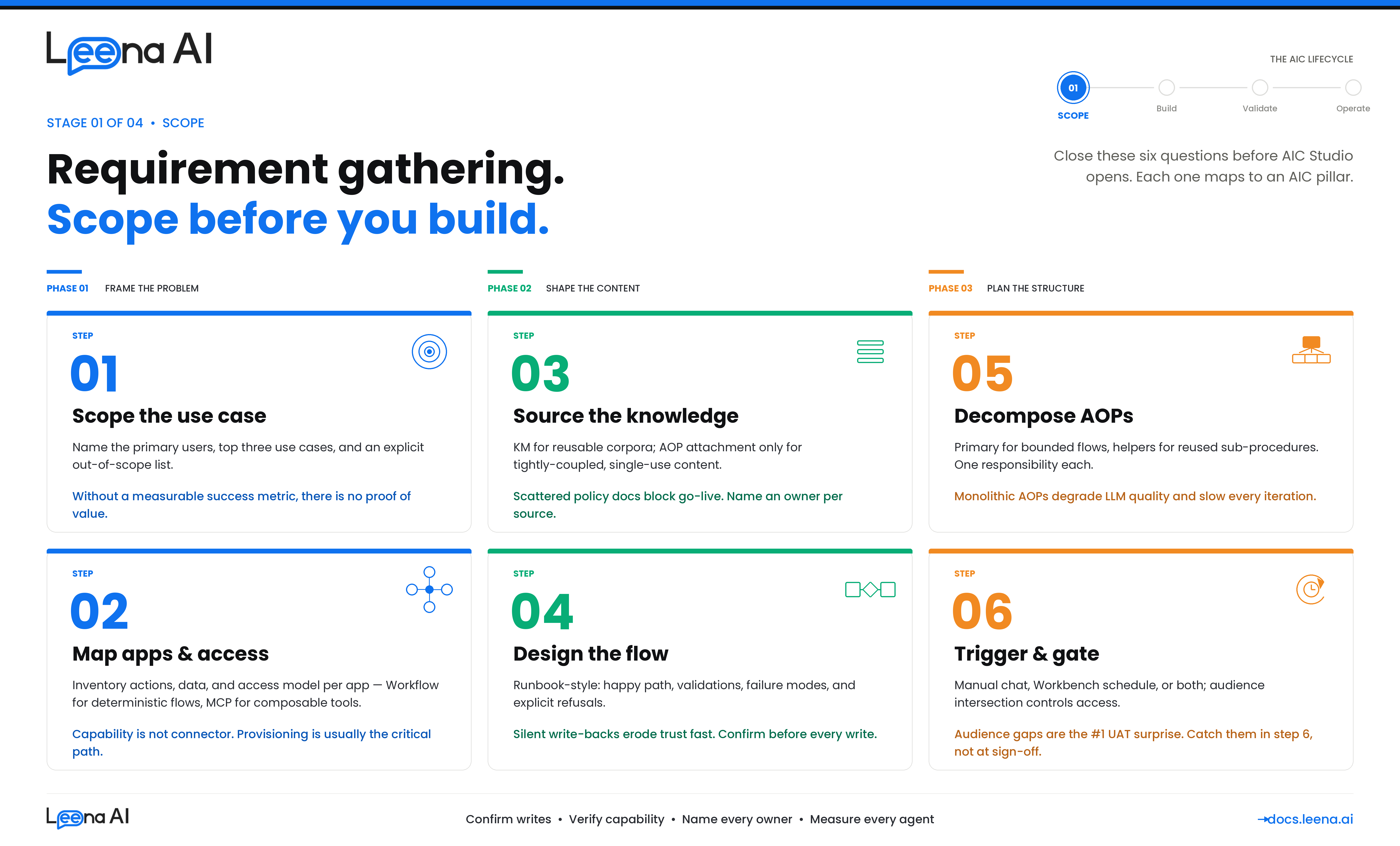
A well-built AIC starts with a well-scoped problem. This guide walks you through the six things you need to nail down before you open AIC Studio and start wiring up AOPs, Tools, and Workbenches. If you skip these, you will end up with an AIC that either does too much, does the wrong thing, or can't do anything because it doesn't have the right integrations, knowledge, or access.
This guide is for anyone building a new AIC — whether you are scoping it for your own team or gathering requirements from a business owner in HR, IT, Finance, or another function. Work through these six steps before opening AIC Studio.
Before you start: what an AIC actually is
Keep this mental model in mind as you gather requirements. An AIC is made up of four things:
| Pillar | What it is | Where it's configured |
|---|---|---|
| Identity | The persona — name, job title, job description, escalation contact | AIC Studio → AIC details |
| Logic | One or more AOPs (Automated Operating Procedures) written in Markdown that tell the AIC how to handle a use case | AIC Studio → AOPs |
| Capability | Tools (BotTasks) — the actual tools the AIC can invoke. Tool categories include Workflows, MCP, API, Knowledge Management, Employee Directory, Case Management | AIC Studio → Tools, or reused from the Tool Catalog |
| Operations | How and when the AIC runs — manual user chat, or scheduled via Workbench, and who is allowed to use it | AOP execution permissions + Workbench + Audiences |
Every requirement you gather should end up mapped to one of these pillars. If a request does not map cleanly, it is almost always because the use case itself is not yet scoped — go back to Step 1.
Step 1 — Identify the use case and define what it actually solves
The goal of this step is a one-paragraph problem statement that is specific enough to build against. Vague requests like "automate HR" or "an IT helpdesk agent" are not AICs — they are categories of AICs. Each AIC should own a bounded set of related use cases.
Questions to answer
- Who is the end user of this AIC? An employee, a manager, an IT admin, a finance controller, or the system itself (scheduled job)?
- What triggers them to need this today? Describe the current journey — the ticket they raise, the portal they open, the colleague they ping, the spreadsheet they update.
- What is the measurable outcome? Ticket deflection, cycle-time reduction, compliance coverage, cost per AOP/Tool execution, NPS? Without a metric, you cannot prove the AIC is working.
- What is in scope and what is explicitly out of scope? This is the single most important question. Write down the "no" cases — the AIC should decline or escalate them rather than hallucinate.
- What is the fallback? Who is the escalation contact when the AIC cannot handle the request?
Output of Step 1
Document a short scope card for the AIC:
AIC name: Leave Buddy
Persona / job role: HR assistant for leave and time-off queries
Primary users: All full-time employees in APAC and NA
Top 3 use cases: (1) Apply for leave, (2) Check leave balance, (3) Cancel a pending leave request
Out of scope: Payroll queries, LOA (long-term medical leave), retroactive leave corrections — these escalate to HR Ops
Success metric: 70% deflection on leave-related tickets within 90 days
Escalation contact: [email protected]
If you cannot fill this card in 15 minutes, the use case is not ready.
Step 2 — Identify applications, access, actions, and data
For each use case in the scope card, walk through the end-to-end steps and list every application the AIC will need to touch. Per application, capture three things:
- What actions will the AIC perform? (e.g., create a leave request, update a ticket, close a case)
- What data will the AIC read? (e.g., current balance, employee profile, pending approvals)
- What access does it need? (service account, OAuth on behalf of the user, read vs write scopes)
Application inventory template
| Application | Actions needed | Data needed | Access model | Already integrated? | Integration path |
|---|---|---|---|---|---|
| Workday | Submit time-off request | Employee ID, leave types, balance | Service account (RaaS + REST) | ✅ (tenant-level) | Workflow |
| ServiceNow | Create incident on escalation | User email, short description | OAuth | ✅ | MCP |
| SharePoint | Fetch leave policy PDF | Site + document library | Cert-based auth | ❌ Needs provisioning | KM source |
| Internal HRIS (custom) | Check manager hierarchy | Reporting line | API key | ❌ Not built | API Tool |
How to decide between MCP and Workflow
Both MCP tools and Workflow tools end up as BotTasks the AIC can invoke, but they are chosen for different reasons.
Use a Workflow (built in Workflows Studio) when:
- The use case needs a deterministic, multi-step orchestration — branching, conditional logic, human approvals, retries, form prefill.
- The action is high-stakes or compliance-relevant and you want a versioned, auditable flow.
- The integration requires a conversational form or webview before execution (e.g., collect structured input from the user).
- The downstream system has a quirky API that needs glue logic (pagination, field mapping, retry on specific errors).
Use an MCP server (surfaced via Integrations) when:
- The application exposes a clean, well-described tool surface and the LLM can pick the right tool and parameters at runtime.
- The use case is read-heavy or low-blast-radius (fetch a record, search a KB, list tickets).
- You want the AIC to discover and compose tools dynamically rather than follow a fixed flow.
- The tool is already available via a standard MCP server (ServiceNow, Atlassian, GitHub, etc.) and you don't need Leena-specific orchestration on top.
Rule of thumb: If you catch yourself drawing a flowchart with more than two decision branches, it belongs in a Workflow. If the "flow" is really just "pick the right API, call it, return the result" — MCP is usually cleaner.
Check integration readiness
For every application in your inventory, confirm with your IT / security team:
- Is the connector or MCP server already installed in your tenant? If yes, note the connection name. If no, raise an Integrations request in parallel — do not block requirement gathering on it, but flag it as a dependency.
- Are service account credentials, cert-based auth, or OAuth app registrations already provisioned? Connector provisioning is frequently the critical path for go-live.
- What audiences (user groups) does each integration support, and does that match the AIC's intended user base?
Output of Step 2
A completed application inventory table plus a dependency list of integrations to be added, with owners and target dates.
Step 3 — Identify knowledge requirements
Many AICs fail not because they can't do things but because they don't know things — policies, eligibility rules, SOPs, FAQs. Before designing the flow, list every piece of knowledge the AIC will rely on.
Questions to ask
- What policy documents, SOPs, FAQs, or reference tables does the human doing this job use today? Ask for the actual files or links — do not paraphrase.
- Is this knowledge static (updated quarterly) or dynamic (changes per AOP/Tool execution)? Dynamic knowledge usually belongs in an integration, not in a document.
- Is the knowledge tenant-global or segment-specific (country, business unit, role)? Segment-specific knowledge needs either separate KM sources or metadata tagging.
- Who owns each document and who approves updates? You need a named owner per source.
Knowledge placement — KM vs AOP attachment
There are two places AIC knowledge can live, and you pick based on reusability and scope.
Knowledge Management (KM) — use when:
- The content is reused across multiple AOPs or multiple AICs.
- It's a large corpus (policies, handbooks, KB articles) and benefits from chunking, embedding, and retrieval.
- It's updated independently of the AIC and needs to stay in sync (via connector sync — SharePoint, Confluence, ServiceNow KB, Google Drive, etc.).
- Access needs to be gated by audience at the document or source level.
AOP Attachment — use when:
- The content is tightly coupled to a single AOP and is unlikely to be reused elsewhere (e.g., a decision matrix specific to one approval workflow).
- It's short enough to be injected as context (a one-pager, a checklist, a rubric).
- It rarely changes — attachments are versioned with the AOP itself.
- You need the AOP author to own the content, not a separate KM admin.
Knowledge inventory template
| Knowledge item | Source | Placement | Already in KM? | Owner |
|---|---|---|---|---|
| Global leave policy | SharePoint: /HR/Policies/Leave | KM (SharePoint connector) | ✅ | HR Ops |
| Country-specific holiday calendars | Excel file, updated annually | KM (manual upload with country tag) | ❌ | HR Shared Services |
| Leave approval rubric (manager guidance) | Internal wiki excerpt | AOP attachment — "Approve Leave" AOP | N/A | HR Business Partner |
| FAQ (top 20 questions) | Confluence space | KM (Confluence connector) | ✅ | HR Ops |
If a source isn't in KM yet, the decision is: add it to KM (preferred for anything reusable) or attach it to the AOP (only if it's single-use). Flag any new KM source as a provisioning task — the same access, audience, and sync considerations from Step 2 apply.
Step 4 — Design the flow covering all cases
Now you have use cases, applications, and knowledge. Design the flow before writing AOP instructions. A good flow design is written like a runbook the human expert would follow — clear steps, explicit branches, named fallbacks.
What to capture in the flow design
- Happy path — the common case, end to end. This is usually 60–80% of traffic.
- Validation steps — what does the AIC check before acting? (eligibility, entitlement, date ranges, approvals already in place)
- Branches and edge cases — what changes based on input? (leave type, country, tenure, manager availability)
- Confirmation and write-back — where does the AIC confirm with the user before executing a write action? For anything that mutates a system of record, confirmation is the default.
- Failure modes — what does the AIC do when: the integration is down, the user is not entitled, the knowledge is missing, the LLM is uncertain?
- Handoff / escalation — when does the AIC stop and transfer to a human, and what context does it carry over?
Sketch, don't write Markdown yet
Use a whiteboard, Miro, or even a nested bullet list. The point is to see the decision tree so you know how many AOPs you need (Step 5). A typical flow has:
- An entry point (intent recognition or scheduled trigger)
- Data gathering (ask the user, fetch from integration, look up in KM)
- A decision or validation block
- One or more action blocks (tools)
- A confirmation step
- A conclusion (success, escalation, or cancellation)
Cover the "nos"
Explicitly list what the AIC must refuse and what it must escalate. This feeds directly into AOP instructions and guardrails later. Examples: "Never approve leave on behalf of a user — always handoff to the manager's AIC or a named approver." "If the user asks about LOA, acknowledge and hand off to HR Ops."
Step 5 — Single AOP or Primary + Helper AOPs?
Once the flow is sketched, decide how to decompose it into AOPs. An AOP is versioned Markdown instructions with a list of required tools and optional helper AOPs. You can keep a flow in a single AOP, or split it across a Primary AOP that calls Helper AOPs.
Keep it as a single AOP when
- The flow is linear or has at most one or two branches.
- It uses a small, focused set of tools (roughly six or fewer).
- There's no meaningful reuse of sub-procedures across other AOPs.
- The whole procedure fits comfortably in one Markdown doc without being hard to read.
Split into Primary + Helper AOPs when
- The same sub-procedure is reused across multiple parent AOPs — e.g., "Verify employee eligibility" or "Notify manager and wait for approval." Build it once as a Helper and reference it from each Primary AOP.
- A sub-procedure has its own distinct ownership, lifecycle, or audience. (Helpers can carry their own tools and attachments.)
- The parent AOP is getting long enough that the LLM context is crowded — splitting improves execution quality.
- A sub-procedure should only ever run as part of a larger flow and never directly from user chat — set it as a Helper with
is_manual_execution_allowed = falseso it's not exposed to users.
Helper AOP design questions
For each Helper you're considering:
- What's the single responsibility of this Helper? If you can't say it in one sentence, it's probably two Helpers.
- What inputs does it expect from the parent? What does it return?
- What tools does only this Helper need? (Helpers carry their own tool list; keep it scoped.)
- Should it be callable only by specific parent AOPs, or by any AOP in the AIC?
Output of Step 5
A list of AOPs for the AIC with their type (Primary / Helper), purpose, and the tools each one needs.
| AOP | Type | Purpose | Tools required |
|---|---|---|---|
| Apply for Leave | Primary | End-to-end leave application | workday_submit_leave, workday_get_balance, notify_manager (Helper), KM: Leave Policy |
| Check Leave Balance | Primary | Read-only balance query | workday_get_balance |
| Cancel Leave Request | Primary | Cancel a pending request | workday_cancel_leave, notify_manager (Helper) |
| Notify Manager & Wait for Approval | Helper | Reusable approval sub-procedure | slack_send_message, workday_get_manager, wait_for_callback |
Step 6 — Flow initiation: user vs Workbench, and audience
Finally, decide how each AOP gets triggered and who can trigger it.
How will the AOP be initiated?
Each AOP has two independent execution permission flags:
is_manual_execution_allowed— the AIC can be invoked by a user from chat (Slack, Teams, web). The orchestrator will expose this AOP as a tool if the user's audience matches.is_workbench_execution_allowed— the AOP can be scheduled via a Workbench. A Workbench links an AIC to a specific AOP and defines a schedule (recurring or one-time). When the schedule fires, the system creates a synthetic request that bootstraps the AOP execution.
You can enable both, one, or neither (e.g., Helper AOPs are typically neither — they only run when called from a parent AOP).
Decide per AOP
| AOP | Manual (user chat)? | Workbench (scheduled)? | Why |
|---|---|---|---|
| Apply for Leave | ✅ | ❌ | User-initiated only |
| Monthly Leave Balance Reminder | ❌ | ✅ | Scheduled nudge, not user-initiated |
| Escalation Sweep (find stale requests) | ❌ | ✅ | Runs nightly, never from chat |
| Notify Manager & Wait for Approval | ❌ | ❌ | Helper, only called from parent |
If user-triggered: which users, and is the audience ready?
If an AOP allows manual execution, you must decide who can use it. Access is controlled by audience intersection — the AOP is either marked for_everyone = true, or it carries a list of audience IDs. A user sees the AOP as an available capability only if they are in for_everyone or if their audience memberships intersect with the AOP's audience list.
Questions to work through:
- Who should be able to use this? All employees? Only a specific country, business unit, role, or band? Managers only?
- Does the audience already exist in the product? Check the Audiences module. Typical ones (All Employees, by Country, by Department) are usually already built.
- If not, how should it be defined? Filter-based (boolean expression over profile fields), uploaded list, or built-in category? Filter-based is preferred because it stays in sync as the directory changes.
- Who owns keeping it accurate? Audience membership changes as people join, move, or leave. Assign an owner for refresh cadence and RBAC scope.
- Any RBAC implications? Admins building the AIC might not have targeting scope over the audience they want to use. Confirm with your platform admin.
If scheduled (Workbench): who's the run-as identity and what's the cadence?
- Schedule: one-time or recurring? What frequency and timezone?
- Run-as identity: scheduled AOPs run as a system actor, not as a specific end user. Confirm that any integration the AOP uses supports a service-account mode.
- Downstream notifications: does the scheduled AOP send results to a Slack channel, email, or ticket system? Capture the target and format.
- Failure handling: what happens if a run fails — alert, retry, skip?
Output of Step 6
For each AOP, document: manual on/off, workbench on/off, audience (existing ID or "to be created" with filter definition), schedule config (if workbench), and escalation/notification targets.
Requirement gathering checklist
Before you start building, confirm you have all of this captured:
- Step 1: Scope card — AIC name, persona, primary users, top use cases in scope, out-of-scope list, success metric, escalation contact
- Step 2: Application inventory — actions, data, access model, integration status (present / to-be-provisioned), MCP vs Workflow decision per application
- Step 3: Knowledge inventory — each source with placement (KM vs AOP attachment), connector status, owner
- Step 4: Flow design — happy path, validations, branches, confirmations, failure modes, explicit handoff and refusal cases
- Step 5: AOP decomposition — Primary vs Helper, purpose, tool list per AOP
- Step 6: Trigger & audience — manual and/or workbench per AOP; audience identified or to-be-created; schedule defined if applicable
If any box is unchecked, do not start building. Close the gap first — it is always cheaper than refactoring an AIC after UAT.
Common pitfalls to avoid
A few patterns that come up repeatedly and cause rework:
- Scope creep during build — new use cases keep getting added after the scope card is signed off. Hold the line; additional use cases are a new AOP (or a new AIC), not an extension of the current one.
- Integration assumed, not confirmed — someone says "we already have Workday" and it turns out they have a Workday connector for HR sync but not the RaaS reports the AIC needs. Always confirm the specific capability, not just the connector.
- Policy knowledge scattered across emails — policies living in a dozen versions across email threads and shared drives. Refuse to proceed until there is a single, versioned source in SharePoint / Confluence / KM with a named owner.
- Audience treated as an afterthought — teams build the AOP, then realize the audience they want does not exist or the admin does not have RBAC scope to create it. Catch this in Step 6, not at UAT.
- Everything goes into the Primary AOP — resist the urge to put every step in one giant AOP. Split sub-procedures that are reusable or have independent ownership into Helpers.
- Confirming nothing before write actions — AICs that silently mutate systems of record erode trust fast, with both leadership and end users. Default to explicit user confirmation on every write, unless there is a documented reason to skip it.
Next steps after requirement gathering
Once this guide's six steps are complete and the checklist is green, you can move to build:
- Create the AIC in AIC Studio (Identity).
- Create the audiences that don't yet exist.
- Add tools — Workflow tools reference flows from Workflows Studio; MCP tools reference tools from the configured Integrations MCP servers; API tools are configured inline; KM tools reference the knowledge sources.
- Attach any AOP-local knowledge as attachments.
- Draft each AOP in Markdown, referencing tools and helper AOPs by slug.
- Configure execution permissions and audiences per AOP.
- Create Workbenches for scheduled AOPs.
- Publish the draft version to active, and hand off to QA / UAT.
For each of the steps above, see the relevant build guide on docs.leena.ai.
Updated 29 days ago