
Streaming & Thinking State (BETA)
The Streaming & Thinking State feature delivers the virtual assistant's reasoning and final response to the user in real time, as it is being generated. Instead of waiting for a complete reply, users see the assistant's intermediate "thinking" steps, tool invocations, and the response text appear progressively, token by token.
This feature is in BETA. It is rolled out on a per-tenant basis via a bot-level configuration flag, and is currently scoped to the new Chats interface for tenants with multi-chat enabled. Reach out to your Leena AI representative to enable it on your environment.
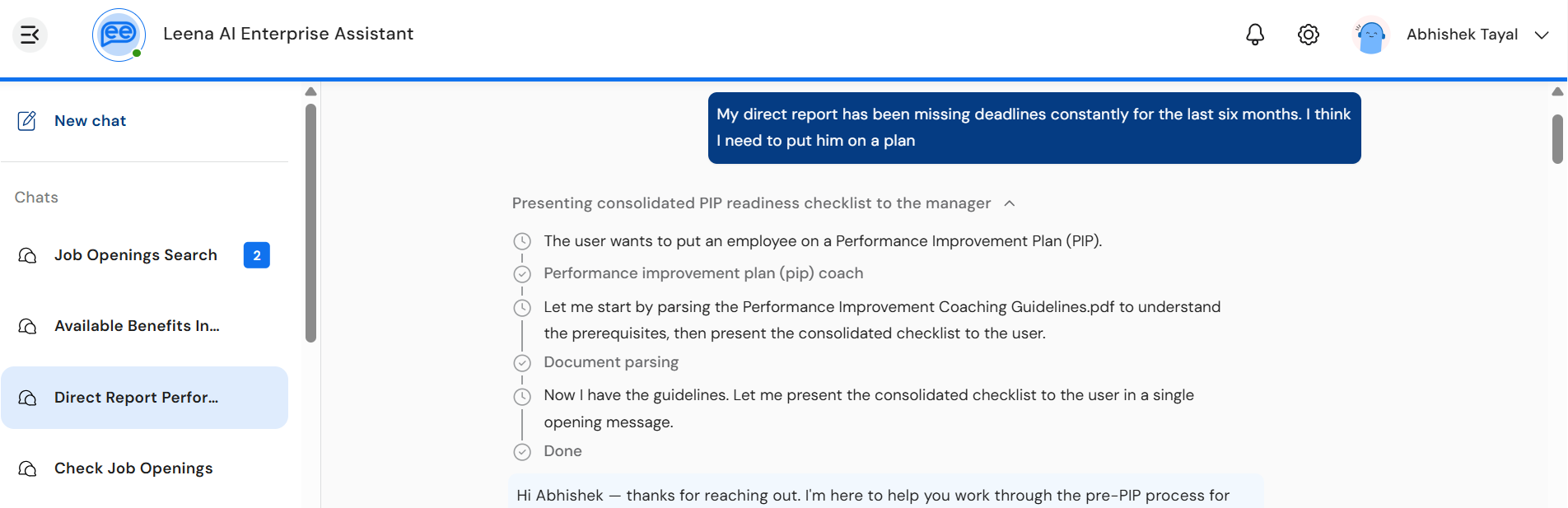
Overview
- See the assistant think in real time — reasoning steps, tool calls, and source lookups are surfaced as they happen
- Faster perceived response time — the user sees activity immediately rather than staring at a static loader
- Transparent execution — users can expand the thinking timeline to inspect how the assistant arrived at the final answer
- Stop mid-generation — users can abort a long-running response without waiting for it to finish
- Automatic recovery — transient network drops are recovered silently in the background; user-visible errors offer a Retry option
What the user sees
When streaming is enabled, every assistant response is delivered in two visual sections, rendered without a chat bubble around them so the agent's reasoning and response stream cleanly into the chat surface.
1. Thinking section
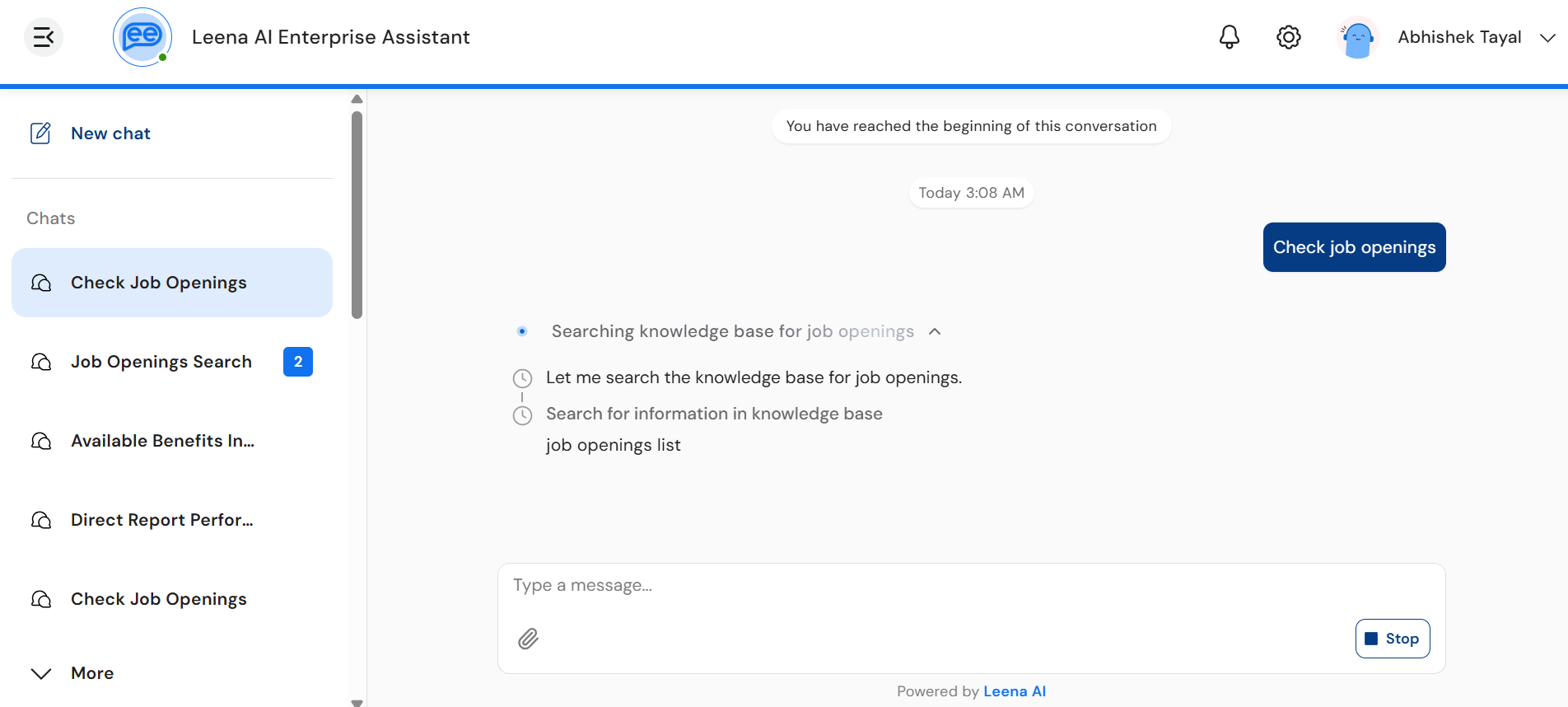
A collapsible timeline shown above the response. While the assistant is reasoning, the section header displays a label such as "Thinking…" with a shimmer effect and a small inline animation. Users can expand the section to view:
- Reasoning text — the assistant's intermediate thoughts, dripped in character-by-character as Markdown.
- Tool steps — each tool invocation appears as a row in the timeline with a status icon:
- ⏱ Clock — tool is in progress
- ✅ Check — tool completed successfully
- ⚠️ Error — tool failed
- Done indicator — once reasoning concludes, a "Done" row marks the transition into the final response.
The thinking section is collapsed by default to keep the chat clean. Users tap the header (or the caret icon) to expand or collapse it. Long thinking segments are clamped (around 8 lines) with a fade effect and a "Show more / Show less" toggle.
2. Response section
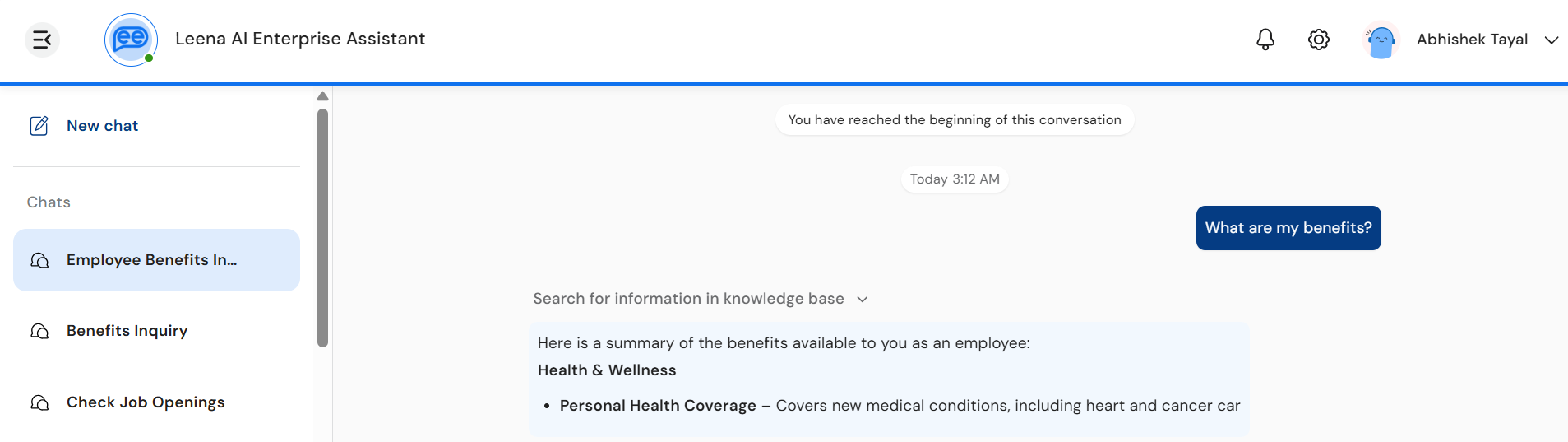
Once reasoning completes, the final answer streams in below the thinking section, character by character, with full Markdown rendering. Sources, disclaimers, "Did you know" tips, and quick replies appear under the response as they arrive.
3. PII masking during reasoning
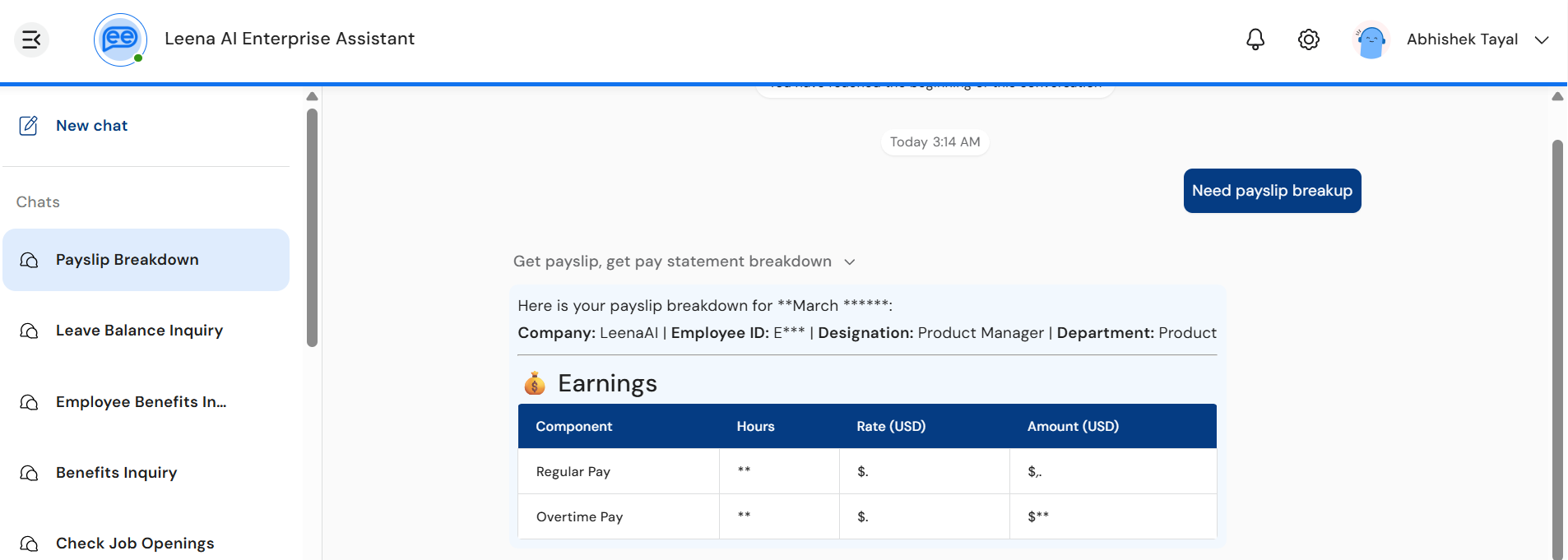
When PII guardrails are configured for the bot with the mask_and_continue action, the streaming pipeline protects sensitive values in real time as they flow through the thinking block.
- While the assistant is reasoning, any digits and detected PII appearing in the thinking timeline or in tool-call arguments are displayed in masked form:
- Numeric values (account numbers, employee IDs, OTPs, dates of birth, SSNs, phone numbers, etc.) are rendered with asterisks — for example,
Employee ID: *******orSSN: ***-**-****. - Named entities are shown as standardised placeholders such as
<PERSON>,<EMAIL_ADDRESS>,<US_SSN>.
- Numeric values (account numbers, employee IDs, OTPs, dates of birth, SSNs, phone numbers, etc.) are rendered with asterisks — for example,
- This guarantees that no raw PII is ever streamed to the chat surface before the input/output guardrails have evaluated and approved it.
- Once the thinking block closes and PII guardrails complete, the platform emits a thinking snapshot that replaces the masked content in-place with the authoritative, reverse-masked values. The user sees the masked text quietly resolve to the original values (e.g.,
Employee ID: *******→Employee ID: 4421789) without any flicker or layout shift. - Tool arguments are reverse-masked before being dispatched to downstream systems, so external APIs always receive the original, unredacted values — only the user-facing reasoning is masked during the streaming window.
Why the asterisks appear brieflyThe masking is intentional: it preserves the privacy guarantee that streamed reasoning never exposes sensitive data ahead of guardrail evaluation. The unmasked values appear only after the guardrail check passes and the thinking block is finalised.
4. Composer behaviour during streaming
While a response is actively streaming:
- The Send button transforms into a Stop button — tapping it cancels the current response.
- The input field is disabled to prevent overlapping requests in the same chat.
- Quick replies are hidden until the stream completes, except when the assistant is explicitly waiting for user input as part of the same turn.
States the user may see
| State | What it looks like | Meaning |
|---|---|---|
| Initial | Lottie animation, no text yet | Stream has been initiated; the assistant is preparing to respond |
| Thinking… | Shimmer label + reasoning timeline | The assistant is reasoning, calling tools, or fetching context |
| Responding | Final text dripping into the response area | The assistant has begun delivering the final answer |
| PII-masked (transient) | Digits and entities appear as *** or <PERSON> placeholders in the thinking timeline | A PII guardrail with mask_and_continue is active; values resolve to the originals once the thinking block closes |
| Stopping… | Lottie animation with "Stopping" label | The user has tapped Stop; cancellation is being processed |
| Done | "Done" row in the timeline + complete response | The response is finalised and persisted to chat history |
| Waiting for input | Stream stays open; composer re-enabled | The assistant is waiting for the user to provide additional input to continue |
Errors and retry
If a stream fails or is interrupted, the user sees an inline error banner instead of (or alongside) any partial output. The banner is colour-coded by error variant:
| Variant | Colour | When it appears |
|---|---|---|
| Guardrail | Orange | The request or response violated an input/output guardrail |
| User-stopped | Grey | The user tapped Stop before the response completed |
| System | Red | A network drop, timeout, or unexpected backend error |
For retryable errors, a Retry button is shown on the banner. Tapping it re-initiates the same request — the previous partial output is cleared and fresh content streams in.
Automatic recovery (silent)Short network drops and missed heartbeats do not surface an error to the user. The client transparently reconnects with jittered exponential backoff (500 ms → 1 s → 2 s → 4 s) and resumes the stream from where it left off using a server-side cursor, so no content is lost. The user only sees the banner if all automatic retries are exhausted.
Behaviour on navigation, refresh, and logout
- Switching chats — the outgoing chat's stream is paused; the incoming chat's stream (if any) is resumed automatically.
- Page refresh — if a stream was active in the chat, the client reconnects on load and rebuilds the timeline + response from the last known position. No content is lost.
- Logout — all active streams are aborted cleanly.
- Empty chats — chats that contain only an interrupted stream and no completed messages are auto-deleted on navigation away (consistent with standard chat behaviour).
Differences vs. the non-streaming experience
| Aspect | Streaming enabled (BETA) | Non-streaming (default) |
|---|---|---|
| Response delivery | Token-by-token, in real time | Full response delivered at once |
| Reasoning visibility | Visible in an expandable thinking timeline | Hidden; only "Thinking…" loader is shown |
| Tool execution | Each step surfaced with live status | Single generic loader until reply arrives |
| Cancellation | Stop button mid-generation | Not available |
| Recovery from network drops | Automatic, with replay from last event | Request must be re-sent |
| Chat bubble | None — content flows directly into the chat surface | Standard chat bubble |
Supported channels
| Channel | Status |
|---|---|
| Web (browser) | ✅ Supported |
| Desktop App | ✅ Supported |
| Mobile App | ✅ Supported |
| MS Teams (Tab App) | ✅ Supported |
| Slack | ✅ Supported |
| SMS / Google Chat / WhatsApp | ❌ Not supported (these channels use their native message delivery) |
Enablement
Streaming & Thinking State is controlled by a bot-level configuration flag and rolled out per tenant during the BETA. Reach out to your Leena AI representative to request enablement on your environment.
Once enabled:
- All new assistant responses in the Chats interface stream automatically.
- Past (already-persisted) messages continue to render with their original thinking blocks if any were captured at the time.
- No action is required from end users — the experience is seamless.
FAQs
Will I see the thinking timeline for every response?
Yes, whenever streaming is enabled and the assistant performs reasoning or tool calls. For very simple replies (e.g., a one-line acknowledgment), the thinking section may be minimal or skipped entirely.
Can I copy the assistant's reasoning text?
Yes — once a thinking segment is fully rendered, you can select and copy it like any other Markdown content.
What happens if I tap Stop?
The stream halts immediately. Any text already streamed is preserved in the chat as a partial message, marked as user-stopped. You can ask a fresh question right away.
Does streaming work for very long responses?
Yes. The streaming protocol uses Server-Sent Events (SSE) with heartbeats every ~15 seconds, so even multi-minute generations stay connected reliably.
Is the thinking content saved in chat history?
Yes. The thinking timeline is persisted alongside the response, so when you scroll back or reopen the chat, you can re-expand the timeline and review the reasoning that produced each answer.
Why don't I see streaming in Home?
Streaming is currently scoped to the Chats interface only as part of the BETA. If your organisation has multi-chat enabled, Home is read-only and all new conversations happen in Chats — so you will see streaming on every new query.
Will streaming be enabled for all channels?
The current BETA covers Web, Desktop, Mobile, and MS Teams Tab App. Native chat channels (Slack, Google Chat, WhatsApp) deliver messages through the channel's own protocol and are not part of this BETA.
Why do I sometimes see numbers or names as *** or <PERSON> in the thinking timeline?
This happens when your bot has a PII guardrail configured with mask_and_continue. Sensitive values are masked while the reasoning streams — protecting them from being exposed before guardrails finish evaluating. Once the thinking block closes, the masked values are automatically replaced with the original, unredacted text. You don't need to do anything; the resolution is automatic.
What if the connection drops mid-stream?
The client automatically reconnects and resumes from the last received event. You will only see an error banner if recovery fails after multiple attempts.
Updated 28 days ago