
Stage 3 — VALIDATE (Planning UAT)
Staging tells you the AIC works. UAT tells you the AIC works the way production will work. That difference is what this guide helps you plan for. It walks you through the eight things you need to nail down before you start writing test cases — so that when testing begins, you're catching real defects and not chasing noise from a half-ready environment.
This guide is for anyone taking a net-new AIC through UAT before go-live — whether you're a QA lead, a platform admin, or the AIC builder running the implementation end to end. It assumes the Staging → UAT migration of the AIC, its AOPs, Tools, and Workbenches is already done, and that the UAT bot is reachable on at least one channel.
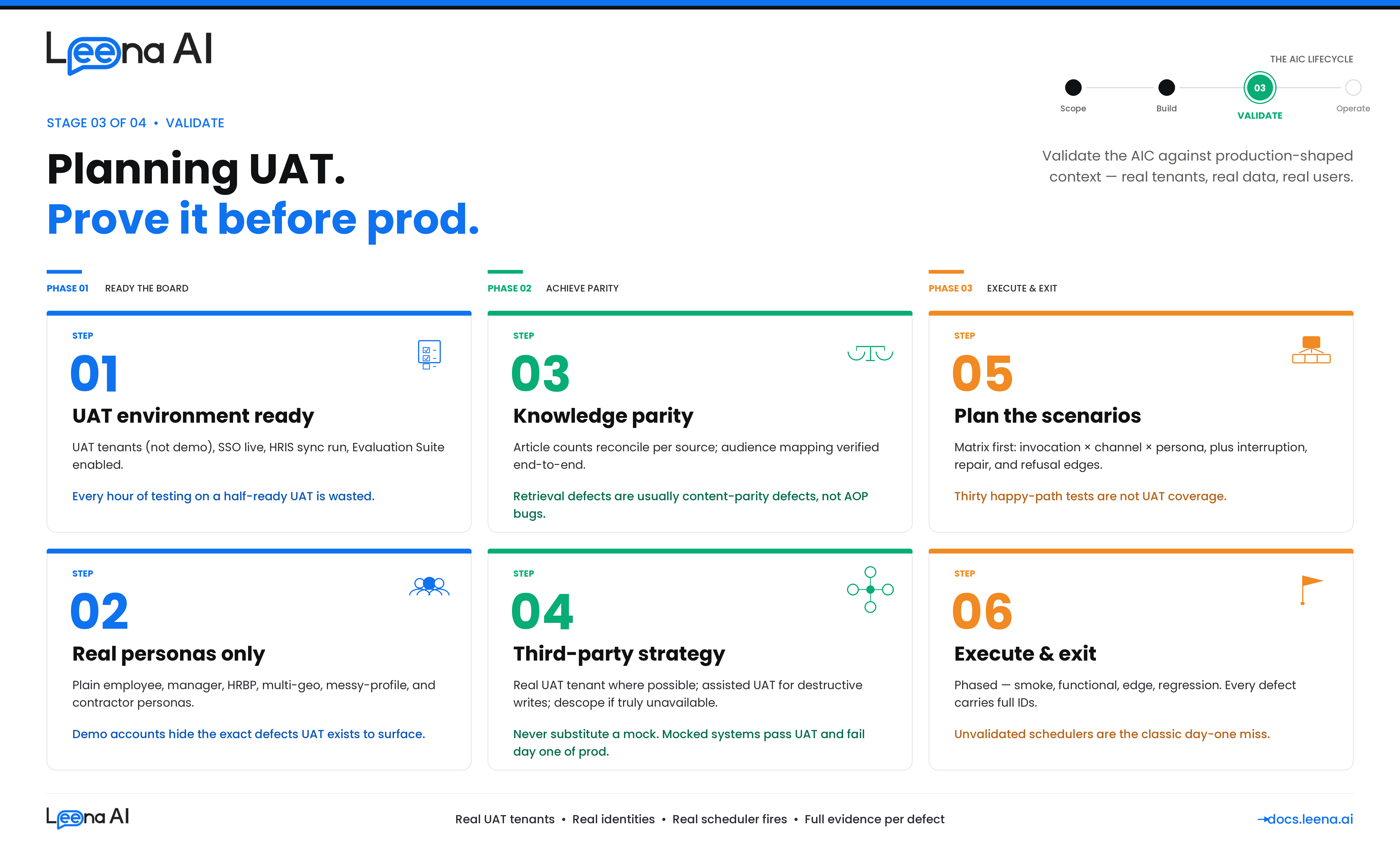
Before you start: what UAT actually tests
Keep this mental model in mind. UAT validates six things about an AIC — every test case you write should map to one of them, and a plan that only covers the first one is not a UAT plan.
| Dimension | What you're proving |
|---|---|
| Functional correctness | The AOP runs the right steps, calls the right Tools, returns the right outcome |
| Integration fidelity | Every Tool that hits a third-party system (Workday, ServiceNow, SAP SuccessFactors, SharePoint, Oracle HCM, ManageEngine, custom APIs) behaves against the UAT tenant like it will in production |
| Knowledge grounding | The AIC retrieves the right KM articles, cites them correctly, respects article-level audience, and behaves sensibly when no article exists for a query |
| Identity & authorization | The right users can trigger an AOP, the wrong users cannot, approvals route to the real manager chain, audience restrictions hold |
| Schedule & autonomy | Workbench-triggered AOPs fire on time, don't double-execute, don't silently miss, handle downstream failures cleanly |
| Governance | Guardrails fire when they should (PII, toxicity, jailbreak), audit trails are captured, failure paths are observable |
UAT exists to surface gaps that only appear under production-shaped context — real HRIS data, real KM content, real approval chains, real third-party tenants, real end users on real channels. The rest of this guide is oriented around closing that gap.
Step 1 — Confirm UAT is ready for testing
The goal of this step is a signed-off readiness checklist. If any item is No, resolve it before writing a single test case — testing on a half-ready environment produces false positives that waste everyone's time.
Questions to work through before starting
- Is everything from Staging actually on UAT? The AIC, every AOP (active + draft), every Tool, every Workbench schedule.
- Are integration connections configured against your UAT tenants — not demo or evaluation tenants? This is the single most common source of "it passed UAT but failed day 1 of prod."
- Are the KM sources the AIC uses present and synced on UAT? See Step 3 for the deeper content-parity check.
- Is SSO wired to your UAT IdP? Can a real UAT user log into the channel without any test account workaround?
- Has the HRIS sync run at least once against UAT? User profile lookup must return manager, department, location, cost center.
- Are the channels in scope provisioned on UAT? Web, Teams, Slack, WhatsApp, Voice — whichever are in scope.
- Are audiences and RBAC groups populated? Audience-restricted AOPs and audience-gated KM articles should be visible only to their intended users.
- Are guardrails ON with production-target thresholds? Profanity, Toxicity, PII Detection, Moderation, Jailbreak Detection. Do not relax them in UAT to "pass tests."
- Is the Evaluation Suite enabled on the UAT bot? Can a suite be created, imported from Excel, and run?
Output of Step 1
A readiness checklist with every item ✅ before execution begins.
| # | Readiness item | Status |
|---|---|---|
| 1 | AIC, AOPs (active + draft), Tools present on UAT; counts reconcile against Staging | ✅ / ❌ |
| 2 | Workbench schedules present and in intended active/paused state | ✅ / ❌ |
| 3 | Integration connections configured against your UAT tenants — not demo tenants | ✅ / ❌ |
| 4 | KM sources (SharePoint, Confluence, ServiceNow KB, Box, Google Drive, Zendesk, manual uploads) present on UAT and last sync is green | ✅ / ❌ |
| 5 | KM article counts on UAT reconcile against prod within an agreed tolerance | ✅ / ❌ |
| 6 | AOP-local attachments (files attached to individual AOPs) migrated and openable | ✅ / ❌ |
| 7 | SSO / SAML wired to the UAT IdP | ✅ / ❌ |
| 8 | HRIS sync has run at least once; user profiles hydrated | ✅ / ❌ |
| 9 | Channels in scope (Web / Teams / Slack / WhatsApp / Voice) provisioned on UAT | ✅ / ❌ |
| 10 | Audience / RBAC groups populated | ✅ / ❌ |
| 11 | Guardrails (Profanity, Toxicity, PII, Moderation, Jailbreak) ON with prod thresholds | ✅ / ❌ |
| 12 | Evaluation Suite enabled on UAT bot | ✅ / ❌ |
| 13 | UAT test user list signed off (real identities from your org, not shared test accounts) | ✅ / ❌ |
If you cannot get all items to ✅ in the first week, escalate — do not start execution on a yellow board.
Step 2 — Select test users and personas
Most UAT defects come from running the AIC against "messy" real-world users — the ones with missing managers, incomplete profiles, or unusual org paths. You will miss those defects if you only test with clean demo accounts.
Questions to ask
- Who is the primary end user of each AOP? Employee, manager, HRBP, admin, external contractor?
- What does a "messy-profile" user look like in your HRIS? On leave, pending termination, multi-level reporting chain, missing manager, multi-geo?
- Are there audience-restricted AOPs that need specific personas to test? E.g., a manager-only AOP needs at least one real manager account.
- Do any personas need segment-specific KM access — e.g., a US employee should see US-tagged policy articles, an APAC employee should see APAC-tagged ones?
- Who owns the UAT test user list? Someone must be accountable for creating and refreshing the accounts.
Personas every UAT plan should cover
- Plain employee with a complete HRIS record — for the happy path.
- Manager with direct reports — for approval flows.
- HRBP / Admin — if any AOP is audience-restricted to these roles.
- Multi-geo user — different timezone, locale, language, and KM segment tag (country / BU).
- Messy-profile user — missing manager, on leave, pending termination, multi-level reporting chain.
- External contractor — if in scope.
Use real identities only
Do not test with shared demo or developer accounts. Permissions, audiences, manager chains, and HRIS attributes on those accounts don't reflect production, and defects that only surface with real identities will be missed. Use real UAT identities from your directory.
Output of Step 2
A persona table with named UAT accounts.
| Persona | UAT account | Why it matters |
|---|---|---|
| Plain employee | [email protected] | Happy-path baseline |
| Manager with reports | [email protected] | Approval-flow AOPs |
| HRBP / Admin | [email protected] | Audience-restricted AOPs (HR-only) |
| APAC-based employee | [email protected] | Timezone, locale, language, APAC-segmented KM articles |
| US-based employee | [email protected] | US-segmented KM articles, different holiday calendar |
| Messy-profile user | [email protected] | Missing manager — exposes branching defects |
| External contractor | [email protected] | Audience-boundary enforcement on both AOPs and KM articles |
Step 3 — Verify the knowledge base is production-equivalent
Many AICs don't just do things — they also answer things. Any AOP that retrieves policy text, eligibility rules, FAQs, or SOPs relies on KM for grounding. If the UAT KM isn't equivalent to prod, the AIC will confidently return stale, partial, or missing answers, and your UAT will be full of false-positive retrieval defects that are actually content-parity defects.
KM content in UAT can come from two places: connector-synced KM sources (the KM connector pulls from your systems — SharePoint, Confluence, ServiceNow KB, Box, Google Drive, Zendesk, and similar) and AOP-local attachments (files attached to a specific AOP that travel with the AOP during Staging → UAT migration). Both need to be verified.
Questions to ask
- Which KM sources does the AIC actually use? List every KM source (connector-backed or manual upload) that any in-scope AOP relies on.
- For each source, what is the UAT topology? Is UAT pointing at a UAT copy of the source (e.g., a
UAT-HR-PoliciesSharePoint site), or at the same source as prod in read-only mode, or a separate manually-maintained copy? - Is the UAT source populated with the same content as prod? Not an empty UAT site, not a partial copy from six months ago.
- Are audience mappings on articles correct? KM derives article-level audience from source permissions, groups, and optional metadata fields (country, BU, department). Those mappings must be identical in UAT, or segment-restricted retrieval won't behave the same.
- Are AOP-local attachments intact? AOPs migrated from Staging carry their attached files; confirm they opened and parsed successfully on UAT.
- Who owns the UAT KM source going forward? Someone must keep it in sync with prod for the duration of UAT, otherwise it drifts mid-testing.
KM parity checks to run
| Check | How to verify |
|---|---|
| Every KM source used by the AIC is present on UAT | Reconcile the KM source list against prod; flag any missing |
| Last sync on each UAT source is green and recent | KM → Connectors → Sync history. A failed or very old sync invalidates retrieval tests |
| Article counts are within agreed tolerance (small deltas OK, large deltas indicate incomplete sync) | Compare total article count per source between UAT and prod |
| Spot-check 10 high-traffic articles — title, body, attachments, metadata all match prod | Open side-by-side in the KM UI |
| Article-level audience matches prod for at least three segment-restricted samples | KM article → Audience field. Confirm UAT article has the equivalent audience object |
| AOP-local attachments are present and parseable on every AOP that has one | Open the attachment from the AOP editor; confirm the text extracted correctly |
| Segment-specific retrieval works for each geo persona | Ask the AIC a question whose correct answer is segment-tagged; verify a US persona gets the US article and an APAC persona gets the APAC article |
Retrieval quality testing
This is the KM-specific layer of UAT. For each AOP that does knowledge retrieval, build a small grounding test set:
- Queries with a known correct KM source — "What is our bereavement leave policy?" → should retrieve and cite the bereavement policy article. Verify both the retrieval and the cited article ID.
- Queries that should NOT retrieve anything from KM — out-of-scope, off-topic, or handoff cases. The AIC should acknowledge it doesn't have an answer and either refuse or escalate; it should not hallucinate.
- Queries that cross segments — verify the APAC persona does not see the US-only article and vice versa.
- Queries where prod and UAT should return the same article — a direct parity check. If the top-cited article differs between environments for the same query, the KM content is not equivalent.
- Queries against recently-updated articles — update a test article in the UAT source, trigger a sync, and confirm the AIC reflects the update within the expected sync cadence.
Rule of thumb
If a retrieval-based test case fails in UAT, check KM parity before blaming the AOP. Nine times out of ten the article is missing, out of date, or audience-gated incorrectly on UAT — it's not an AOP bug.
Output of Step 3
A KM parity table signed off by the KM / content owner.
| KM source | UAT topology | Sync status | Article count (UAT / prod) | Audience mapping verified | Owner for UAT freshness |
|---|---|---|---|---|---|
| Global HR Policies | SharePoint /sites/HR-Policies-UAT | ✅ Green | 247 / 251 | ✅ | HR Ops |
| IT Knowledge Base | ServiceNow UAT KB | ✅ Green | 1,412 / 1,418 | ✅ | IT Ops |
| Country holiday calendars | Manual upload (with country tag) | N/A | 38 / 38 | ✅ | HR Shared Services |
| FAQs | Confluence UAT space HR-FAQ-UAT | ✅ Green | 86 / 88 | ✅ | HR Ops |
| Leave approval rubric | AOP-local attachment on "Approve Leave" AOP | N/A | 1 / 1 | N/A (AOP-scoped) | HR Business Partner |
Step 4 — Decide your third-party system testing strategy
This is the step most UAT plans get wrong. Not every AOP needs a fully wired third-party UAT instance. But faking a third-party with a mock and claiming UAT passed is worse than descoping it. Decide the approach per integration before you plan any AOP test cases.
The decision matrix
| Scenario | Approach |
|---|---|
| A dedicated sandbox / UAT tenant exists (Workday Implementation tenant, ServiceNow sub-prod, SuccessFactors test tenant) | Use the real UAT tenant. Configure the connection against it. This is the gold standard. |
| Only a production tenant exists (common with smaller SaaS, on-prem ManageEngine, custom in-house APIs) | Create a tightly-scoped test account + test data in prod. The AOP operates on a flagged test user or test record. Requires written sign-off from your security team. |
| Third-party write is destructive and no sandbox exists (payroll deductions, terminations, payment runs, notifications to employees) | Assisted UAT. Run the AOP, let it build the payload, stop before the write, have the tester manually confirm the payload would have produced the correct result. Document each case. |
| System is genuinely unavailable in UAT | Descope and monitor post-go-live. Do not substitute a mock. |
On manually replicating user behavior in third-party systems
Many AOPs pause waiting for a human action outside the AIC — approve a ticket in ServiceNow, sign a document in DocuSign, complete a task in Workday Inbox, click an approval link in email. In UAT, the tester is that human. Script the tester's actions the same way you script the AIC's.
Example script:
At step 4, the AOP pauses. Tester logs into ServiceNow UAT as
[email protected], approves INC0012345. AIC should resume the AOP within 60 seconds of approval and post the confirmation message to the employee on the Slack UAT workspace.
Every such scenario needs the UAT account to be used on the third-party system, the exact action (approve / reject / edit / sign / reply), the expected AIC behavior after the action, and an acceptable latency window.
Output of Step 4
An integration strategy table signed off by your security / DPO team where scoped prod test accounts are involved.
| Integration | Strategy | UAT tenant / account | Security sign-off |
|---|---|---|---|
| Workday | Real UAT tenant | wd-uat.example.com / svc-uat-account | N/A |
| ServiceNow | Real UAT tenant | example.service-now.com/uat | N/A |
| SharePoint | Real UAT site | /sites/HR-Policies-UAT | N/A |
| Custom payroll API | Assisted UAT (destructive) | AOP stops before write; tester validates payload | ✅ On file |
| Legacy attendance | Scoped test accounts in prod | test-emp-001..005 | ✅ On file |
| Expense system | Descoped — monitor post-GL | N/A | N/A |
Step 5 — Plan tests for user-initiated AOPs and Tools
User-initiated means the end user starts the AOP by typing, speaking, or clicking a prompt. The entry point is a turn from a channel (Web, Slack, Teams, WhatsApp, Voice). The main assistant either picks the AOP via tool selection, or the AIC takes a direct-AOP fast-path (the user clicked a prompt that explicitly names the AOP).
The goal of this step is a scenario matrix per AOP. Do not start writing individual test cases until the matrix exists — it prevents the classic UAT failure of testing the happy path thirty times and missing three edge cases.
Build the scenario matrix per AOP
| Axis | Values to cover |
|---|---|
| Invocation style | Natural language; Discovery flow ("What can you do?"); direct button/prompt click; deep link from email or ticket |
| Channel | Every in-scope channel |
| User persona | At minimum one happy-path and one edge persona per AOP (from Step 2) |
| Language | Every configured language, including Hinglish / mixed-script |
| Happy path | Canonical inputs, full completion |
| Slot-filling variants | Info up-front vs. one-by-one vs. out of order vs. ambiguous |
| Interruption / repair | User changes mind mid-flow; asks an off-topic question; goes silent on a paused request |
| Knowledge retrieval | Query with a known correct KM answer; query that should not retrieve (out-of-scope); segment-restricted query; recently-updated article |
| Guardrail triggers | PII in input; toxic / abusive input; jailbreak attempt; out-of-scope request |
| Authorization failures | User outside the audience; missing HRIS data; unset manager; user outside the KM article's audience |
| Third-party failure modes | Target returns 4xx / 5xx / timeout / empty / partial |
| Concurrent execution | Same user triggers the same AOP twice; user triggers AOP A while AOP B is paused waiting for input |
Flows that deserve their own attention
- Tools that call integrations — verify the actual outbound request via the integration audit log. Deliberately test more than an hour after any OAuth token was minted to exercise token refresh.
- AOPs that ground answers in KM — verify both that the right article was retrieved and that the cited article ID appears in the response. An AIC that answers correctly but doesn't cite isn't passing; an AIC that cites but answers from memory isn't either.
- AOPs that escalate to humans — approval routing, case-management handoff. Confirm the escalation reaches the real approver in the UAT system and the AIC resumes cleanly when the external step completes.
- Voice / real-time channel AOPs — test interruption, barge-in, long silences, poor audio input. Voice has its own orchestrator; don't assume parity with text.
- AOPs with profile-based branching — always include a messy-profile persona.
Test case template
Each case in the tracker should capture:
ID:
UAT-AOP-LeaveRequest-007
AOP: Apply for Leave (v3, active)
Persona: APAC-based employee —[email protected]
Channel: Slack UAT workspace
Preconditions: No open leave requests; manager account active in HRIS; APAC leave policy article present in KM
Trigger: User typesapply for 2 days leave next Monday and Tuesday
Expected flow: AIC validates balance → cites APAC leave policy article → confirms dates → submits to Workday UAT → posts confirmation
Expected KM citation: APAC leave policy article (ID:kb-apac-leave-001)
Expected third-party state: New leave row in Workday UAT for employee-apac, statusSubmitted, dates match
Expected guardrails: None triggered
Evidence on pass: Thread URL, request ID, integration audit log entry for Workday submit call, Workday record ID, cited KM article ID
Severity on fail: P1 (user-facing functional bug)
Step 6 — Plan tests for Workbench-scheduled AOPs
Workbench-triggered AOPs run without a user on the other end. The scheduler polls pending schedules, acquires a per-Workbench distributed lock, and fires the AOP with a synthetic System user profile. That changes the testing model in three important ways:
- There is no end user to observe success. Evidence lives in the integration audit log, the downstream system, and the AOP execution record — not in a chat transcript.
- Timing matters. Tests must verify the AOP fires at the scheduled time, doesn't double-fire, and doesn't silently miss.
- Failure is silent by default. A user-initiated AOP that breaks produces a confused user. A scheduled AOP that breaks produces nobody — unless alerting is wired.
Build the schedule test matrix
| Axis | Values to cover |
|---|---|
| Schedule type | Non-recurring one-shot; recurring daily / weekly / monthly; business-days only; cron-style custom |
| Timezone | Schedule in one TZ, server UTC, data in a third TZ — common in multi-geo deployments |
| Trigger fidelity | AOP fires within expected window; document acceptable tolerance |
| Lock contention | Two scheduled runs racing the same Workbench lock — confirm only one executes and the other is cancelled / skipped cleanly |
| Downstream idempotency | Re-run after failure — does the AOP double-create records or detect it has already run? |
| External system outage | Third-party is down at schedule time — AOP fails cleanly, logs, retries per its policy |
| Data-volume stress | AOP that iterates over employees / tickets / shifts — test with realistic dataset size, not three rows |
| Long-running AOPs | AOPs that take more than five minutes — complete without being treated as hung |
| Schedule edit during execution | Attempt to modify a Workbench while a run is in-flight — system should prevent config change |
| KM-dependent scheduled AOPs | If the scheduled AOP reads from KM (e.g., a nightly digest built from policy articles), confirm the KM source is synced before the run |
How to trigger and observe a scheduled run
Don't wait for the real schedule to fire during development of your test cases — it costs days of UAT time. Use a combination:
- Schedule close. Set the Workbench for 5–10 minutes in the future and let the scheduler pick it up. This tests the real path end-to-end, including lock acquisition. Do at least one of these per Workbench before sign-off.
- Manually invoke the system AOP execution via a platform admin with the appropriate permissions, to fire immediately for rapid iteration on AOP logic. Never rely on this alone — the scheduling path itself has to be proven.
Evidence to capture per scheduled run
- Scheduled at (wall clock) vs. executed at — within tolerance.
- Schedule status —
EXECUTED(notFAILED, not an unexpectedCANCELLED). - Next occurrence — for recurring schedules, verify the next row exists with the correct next-run timestamp.
- Downstream artifacts — records in the target system, created with the correct System-user attribution (not a real employee).
- Audit trail — integration audit log entries for every outbound call the AOP made.
Rule of thumb for recurring schedules
Run the schedule three consecutive times and confirm behavior is consistent across runs. First-run success often masks idempotency bugs that only show up on run two.
- Skip a run deliberately — pause the Workbench, let the intended slot pass, resume. Confirm the system does not retroactively fire the missed run beyond the documented lookback window.
- Test a DST boundary if you operate in a DST-observing geography.
- Test idempotency explicitly — trigger the same run twice (close-schedule trick) and confirm no duplicate records downstream.
Step 7 — Choose between manual testing and the Evaluation Suite
Leena AI has a built-in Evaluation Suite that runs multi-turn conversation scripts against the AIC and grades responses with an LLM-as-judge. Use it strategically — it does not replace manual UAT.
Use the Evaluation Suite when
- The scenario is deterministic and multi-turn, and you want to replay it on every build.
- You need regression coverage after an AOP or prompt change.
- You want variant testing at scale (multiple phrasings of the same intent).
- The scenario is a KM retrieval test — grounding quality degrades slowly over time with content drift; scripted suites catch it early.
- The scenario is expensive to run manually.
Use manual testing when
- The scenario requires a real human action in a third-party system (approvals, document signing, form submission).
- It's a voice or audio flow.
- Evidence lives outside the chat transcript.
- It's exploratory — you don't know yet what you're looking for.
Authoring pattern
Suites are authored using the Excel template (Scenarios + Notes sheets), imported into UAT, and run against the UAT bot. Metrics — pass rate, reward score, criterion-level breakdown — are exportable via the Evaluation API for the UAT sign-off pack.
Rule of thumb
Everything that can be a scripted Evaluation Suite scenario should be one — so it becomes a regression asset you keep using after go-live. Reserve manual testing for what truly needs a human.
Step 8 — Execute, log defects, and exit UAT
The final step is how you run the thing and how you know you're done.
Phase your execution
Don't run all tests in parallel. Each phase gates the next.
| Phase | Timing | Goal |
|---|---|---|
| Smoke | Day 1–2 | Users can log in, AIC greets, Discovery shows expected tools, hello-world AOP completes |
| Functional | Week 1–2 | AOP-by-AOP, happy path + primary variants, against real UAT third-party tenants and UAT KM |
| Integration & edge | Week 2–3 | Realistic data volumes, edge personas, cross-AOP interactions, Workbench schedules, KM drift |
| Non-functional | Week 3 | Guardrails, latency, concurrent users, load if applicable |
| Regression | Final week | Full scripted re-run against the frozen UAT build |
What every defect must include
Every defect logged during UAT should carry the information needed to reproduce. Reject defects that don't.
- The AIC request ID (generated per turn; visible in the debug view).
- The AOP execution reference ID.
- Integration audit log entry IDs for any outbound calls in the failing flow.
- Cited KM article IDs for retrieval-related defects.
- The channel and UAT user account used.
- For Workbench-triggered defects: the Workbench ID and Schedule ID.
Severity triage
| Severity | Meaning | Examples |
|---|---|---|
| P0 | Blocker — halt UAT | AIC unreachable, AOP completely broken, data corruption risk, auth broken, guardrail failing open on PII |
| P1 | Must-fix before go-live | Functional bug in scoped AOP, wrong third-party payload, wrong KM citation / hallucination, audience leak, incorrect approval routing, schedule miss |
| P2 | Fix in first post-go-live sprint | Cosmetic, edge case, low-frequency error path, minor KM ranking imperfection |
| P3 | Backlog / log-only | Nice-to-have |
Exit criteria — agree these before execution starts
Sign-off is not "all tests passed." It is an explicit set of criteria the sponsor agrees to up front.
- 100% of P0 and P1 defects closed or formally accepted with a documented mitigation.
- ≥ 95% pass rate on the functional suite for each in-scope AOP.
- Every in-scope integration connection has a passing live-connectivity check at sign-off time.
- Every in-scope KM source has a green sync at sign-off time, with content parity checks signed off.
- Every Workbench schedule has fired successfully at least twice from the real scheduler — not via manual invocation alone.
- Evaluation Suite regression pack passes at or above the agreed thresholds, including grounding scenarios.
- Audit trail and observability demonstrated live — the ops team has opened the integration audit log, the AOP execution history, and the debug view in a walkthrough.
- Guardrail behavior demonstrated live on a scripted PII, toxicity, and jailbreak input.
- Rollback / kill-switch procedure documented and tested (pausing a Workbench, disabling an AOP, reverting to a previous AOP version).
- On-call runbook handed over to the IT Ops team that will support the AIC in production.
UAT planning checklist
Before UAT execution begins, confirm you have all of this captured:
- Step 1: Readiness checklist — all items ✅
- Step 2: Persona list — named UAT accounts for every persona class the AOPs touch, including multi-geo personas for KM segmentation
- Step 3: KM parity table signed off — sources present, sync green, article counts reconcile, segment audiences verified, AOP attachments intact
- Step 4: Third-party strategy — approach (real UAT / scoped prod / assisted UAT / descoped) decided per integration, with security sign-off where required
- Step 5: Per-AOP scenario matrix for user-initiated AOPs (including retrieval tests), plus a test case template agreed with QA
- Step 6: Per-Workbench schedule test matrix, with recurring-schedule idempotency tests called out
- Step 7: Manual vs. Evaluation Suite split decided; regression suites authored
- Step 8: Phasing, defect template, severity definitions, and exit criteria agreed with the sponsor
If any box is unchecked, do not start execution — close the gap first. It is always cheaper than re-running UAT.
Common pitfalls to avoid
A few patterns that come up repeatedly and cause rework:
- Draft vs. active version confusion — team tests the draft, signs off, then production runs the active which has different instructions. Always confirm the version number in the AOP execution record matches the one tested.
- Demo or evaluation tenants left in place — if a connection points at a demo tenant rather than your UAT tenant, the AOP passes UAT and fails day 1 of prod. Audit every connection's base URL before execution starts.
- Empty or stale UAT KM — the KM connector exists but its last sync is three weeks old, or the UAT source has only 40% of the articles prod has. Retrieval tests fail for content reasons, get logged as AOP bugs, engineering spends a week on the wrong defect.
- KM audience drift between UAT and prod — article is visible to everyone in UAT but audience-gated in prod. Passes UAT with a generic persona, fails in prod when a segmented user queries it.
- AOP attachments missing post-migration — the AOP migrated but the attached file didn't, and no one noticed because the AOP only reads it in one branch. Spot-check AOP attachments explicitly.
- Retrieval defects blamed on AOPs — the AOP is fine, the article is just missing or out of date. When a retrieval test fails, check KM first.
- Scheduler never actually tested — team manually invokes the AOP a dozen times, skips the scheduled-run path, and on day 1 of prod the cron misses due to a timezone bug. Include at least one real-scheduler test per Workbench.
- Guardrails turned off to "make tests pass" — don't. A guardrail failure in UAT is the exact signal UAT exists to surface.
- Skipping second and third runs of a recurring schedule — first run passes, second run double-creates a ticket because the AOP isn't idempotent. Only catchable by running the schedule multiple times.
- Testing with shared demo or developer accounts — permissions, audiences, and manager chains differ from real identities. Use real UAT users only.
- Mocking a third-party system and calling it UAT — if a system is genuinely unavailable, descope it explicitly. Never substitute a mock.
- No severity definition agreed up front — leads to week-three arguments about whether a bug is a blocker. Define P0 / P1 / P2 / P3 on day one.
- Happy-path only — thirty tests all hitting the canonical input and no edge personas. The six-dimension framing in Before you start exists to prevent this.
Next steps after UAT sign-off
Once the checklist is green and exit criteria are met, you can move to go-live:
- Freeze the UAT build — no AOP or Tool edits until cutover.
- Re-run the regression pack one final time on the frozen build.
- Re-verify KM sync status on prod just before cutover — one more green sync gives you a clean baseline.
- Cutover plan — timing, channel switchover, comms to end users.
- Hypercare window — on-call coverage for the first two weeks after go-live.
- Post-go-live monitoring dashboards — integration audit volumes, AOP success rates, KM retrieval hit rates, guardrail events.
- First-sprint backlog — P2 defects accepted during UAT, plus any learnings from early production traffic.
For each of the steps above, see the relevant go-live guide on docs.leena.ai.
Updated 4 months ago