
Bot & Unified Dashboard
What is a Bot?
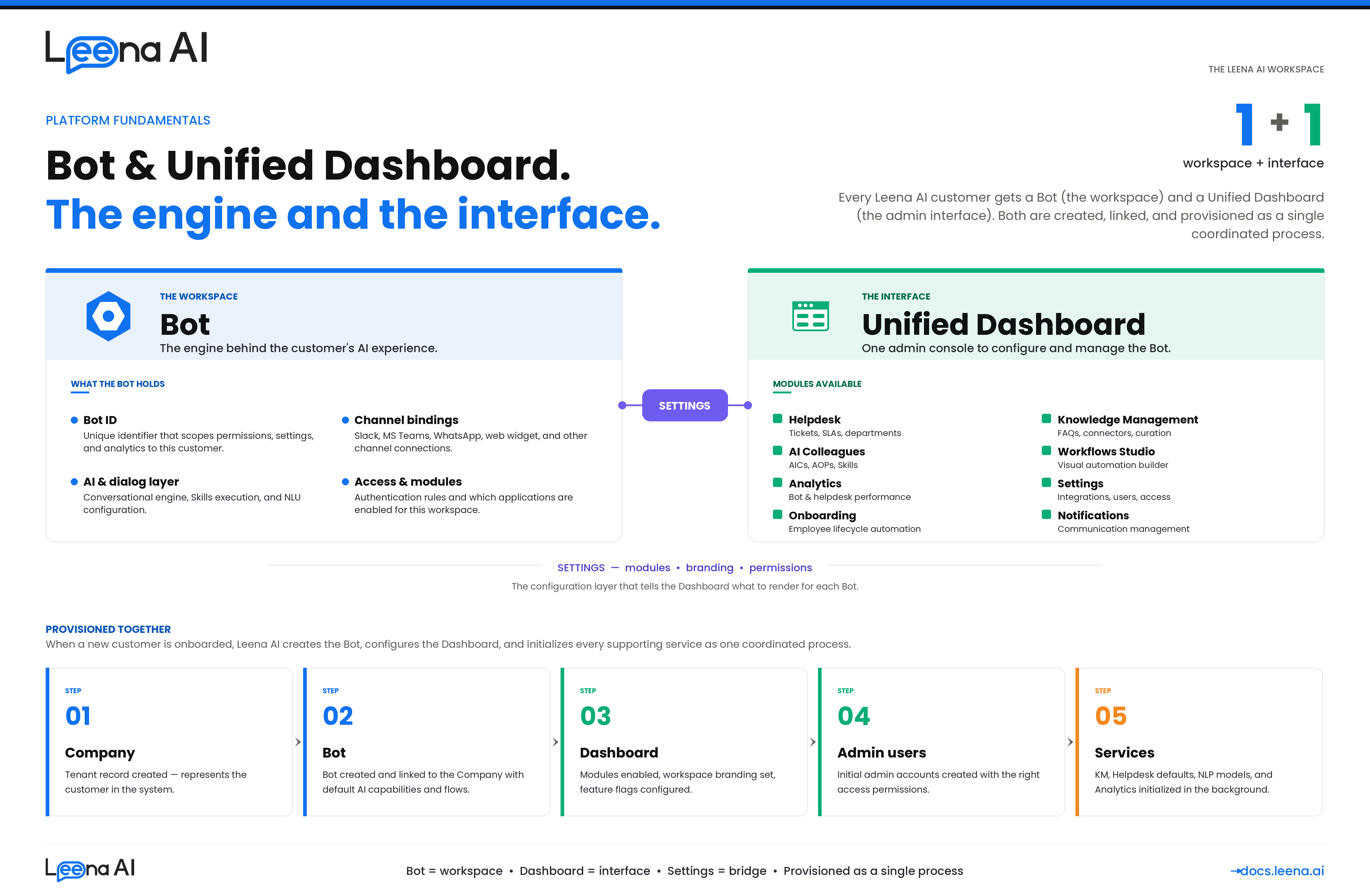
In Leena AI, a Bot is the core workspace that powers a customer's entire AI experience. Think of it as the engine behind everything — it's not just a chatbot that answers employee questions, but the foundational unit that holds all the configuration, channel settings, and AI capabilities for a customer.
Every customer gets their own Bot when they're onboarded onto Leena AI. This Bot is what connects to communication channels (like Slack, MS Teams, WhatsApp, or the web widget), processes employee queries using AI, and ties together all the modules a customer uses — from Helpdesk to Knowledge Management to AI Colleagues.
Each Bot has its own unique identifier (a Bot ID), which acts as a key to scope everything — permissions, settings, analytics, and user access — to that specific customer's workspace.
What is the Unified Dashboard?
The Unified Dashboard is the admin interface that customers use to configure and manage their Leena AI deployment. It's the single control panel where admins can access all operational tools in one place.
When an admin logs into the Unified Dashboard, they're always working within the context of a specific Bot. The dashboard loads the right workspace based on the Bot ID, pulls in the settings and permissions for that workspace, and shows only the modules the customer has access to.
The modules available within the Unified Dashboard include:
- Helpdesk — Ticket management, SLA policies, departments
- Knowledge Management — FAQ management, document connectors, article curation
- AI Colleagues — Build and manage AI Colleagues, AOPs, and Tools
- Workflows Studio — Visual workflow builder for automations
- Analytics — Bot performance, helpdesk insights, engagement metrics
- Settings — Integrations, user management, access control
- Onboarding / Offboarding — Employee lifecycle automation
- Notifications — Communication management
Not every customer sees all modules — what's visible is controlled by the Bot's configuration, which defines which applications are enabled for that workspace.
How Do They Relate?
The simplest way to think about it:
- The Bot is the workspace. It holds everything — AI capabilities, channel connections, authentication rules, and feature settings.
- The Unified Dashboard is the interface to that workspace. It's how admins interact with and configure the Bot.
- The bridge between them is the Bot's settings — a configuration layer that tells the Dashboard which modules to show, what the workspace looks like (logo, name, preferences), and what the admin is allowed to do.
Every time an admin opens the Dashboard, the system identifies which Bot they're working with, loads the relevant settings, checks their permissions, and renders the appropriate modules.
How Are They Provisioned?
When a new customer is onboarded onto Leena AI, the platform automatically provisions both the Bot and the Unified Dashboard together. The process looks like this:
- A Company record is created — This represents the customer's tenant in the system.
- A Bot is created and linked to the Company — The Bot is initialized with default AI capabilities, channel configurations, and dialog flows.
- Dashboard settings are configured — The system defines which modules are enabled, sets up the workspace branding (logo, name), and configures feature flags.
- Admin users are created — Initial admin accounts are set up and linked to the Bot with the right access permissions.
- Supporting services are initialized — Knowledge Management, Helpdesk defaults (departments, SLA policies), NLP models, and Analytics are all set up in the background.
Once this process completes, the customer's workspace is ready — admins can log into the Unified Dashboard and start configuring their AI experience.
Key Takeaway
A Bot is the workspace that powers a customer's Leena AI experience. The Unified Dashboard is the admin interface to manage that workspace. They are always provisioned together — when a new customer is onboarded, the platform creates the Bot, configures the Dashboard, sets up admin access, and initializes all supporting services as a single coordinated process.
Updated 3 months ago