
External AOP API — Authentication & Usage Guide (Beta)
Overview
The External AOP API lets you programmatically trigger and monitor AOP (Agent Operating Procedure) executions from your own systems. You authenticate once with OAuth client credentials, exchange them for a short-lived JWT access token, then use that token to start an AOP run and poll its status until it reaches a terminal state.
All requests use HTTPS and JSON. The API is asynchronous: the execute endpoint queues a run and returns an aop_item_id, which you use to track progress through the status endpoint.
Getting Started
Follow these four steps to get up and running:
- Request an OAuth app from Leena AI team. You will receive a
client_id,client_secret,username, andpassword. Leena AI will share these with you. - Generate an access token by calling
POST https://<region-code>-acl.leena.ai/api/v1.0/oauth/tokenwith your credentials. - Trigger an AOP run by calling
POST https://<region-code>-aic.leena.ai/api/v1/external/aop/executewith theaop_idyou want to execute. - (Optional) Poll the run status at
GET https://<region-code>-aic.leena.ai/api/v1/external/aop/items/{aop_item_id}/statusuntil it reaches a terminal state (completed,failed, oraborted).
How to Get the AOP ID
The aop_id required by the execute endpoint is the AOP's identifier. You can fetch it directly from the Leena AI dashboard.
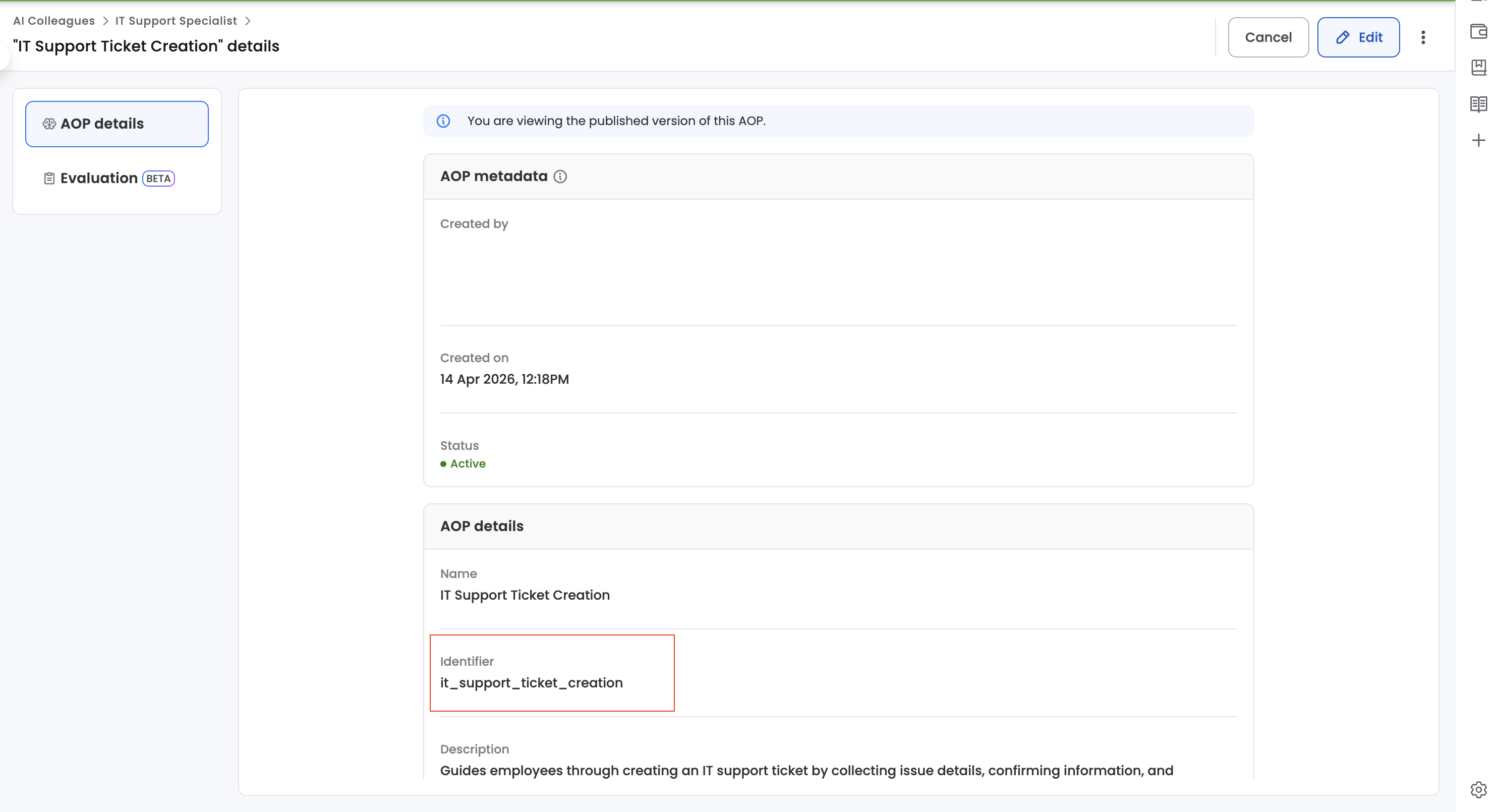
Follow these steps:
- Sign in to the Leena AI dashboard.
- Navigate to AI Colleagues, then open the relevant colleague (for example, "IT Support Specialist").
- Open the AOP whose ID you want to retrieve. This opens the AOP details view.
- In the AOP details section, locate the Identifier field. The value shown there is your
aop_id. - Copy the value and use it as the
aop_idparameter in the Execute AOP request.
Figure 1 — The Identifier value shown on the AOP details view is the
aop_idused in the API.
TipThe Identifier is a human-readable slug (e.g.
it_support_ticket_creation). The execute endpoint also accepts the AOP's ObjectId, but the slug shown here is usually easier to use.
Authentication
All endpoints require a Bearer JWT token in the Authorization header. Tokens are obtained via the platform's OAuth token API.
Step 1 — Register an OAuth App
Request an OAuth app from the Leena AI team. You will receive:
| Credential | Description |
|---|---|
client_id | Unique identifier for your OAuth app |
client_secret | Secret key for your OAuth app |
username | System username for the API execution |
password | Password for the system user for the API execution |
Step 2 — Generate an Access Token
Exchange your credentials for a JWT access token.
POST https://<region-code>-acl.leena.ai/api/v1.0/oauth/tokenHeaders
| Header | Value |
|---|---|
Authorization | Basic auth, with client_id as username and client_secret as password |
Content-Type | application/json |
Request Body
{
  "username": "<username-received-from-leena>",
  "password": "<password-received-from-leena>",
  "grant_type": "password"
}
Example Request
curl -X POST "https://<region-code>-acl.leena.ai/api/v1.0/oauth/token" \
  -H "Content-Type: application/json" \
  -H "Authorization: Basic <Base64-encoded-string-of-clientId:clientSecret>" \
  -d '{
    "username": "<username-received-from-leena>",
    "password": "<password-received-from-leena>",
    "grant_type": "password"
  }'
Response
{
  "access_token": "eyJhbGciOiJIUzI1NiIs...",
  "token_type": "Bearer",
  "refresh_token": "<Refresh-token>",
  "expires_in": 3600
}
Step 3 — Use the Token
Include the token in the Authorization header for all API calls:
Authorization: Bearer eyJhbGciOiJIUzI1NiIs...Endpoints
1. Execute AOP
Initiate an AOP execution. The request is accepted and queued for asynchronous processing.
POST https://<region-code>-aic.leena.ai/api/v1/external/aop/executeHeaders
| Header | Value |
|---|---|
Authorization | Bearer <access_token> |
Content-Type | application/json |
Request Body
| Field | Type | Required | Description |
|---|---|---|---|
aop_id | string | Yes | AOP identifier (slug) or ObjectId |
message_to_start | string | No | Initial message/instruction for the AOP execution (default: "") |
context | object | No | Key-value pairs passed as additional instructions to the AOP (default: {}) |
Example Request
curl -X POST "https://<region-code>-aic.leena.ai/api/v1/external/aop/execute" \
  -H "Authorization: Bearer <access_token>" \
  -H "Content-Type: application/json" \
  -d '{
    "aop_id": "aop-1",
    "message_to_start": "Analyze the ticket shared",
    "context": {
      "ticket_number": "INC0503407",
      "state": "In Progress",
      "priority": "Priority 4",
      "impact": "3 - Low",
      "urgency": "3 - Low",
      "severity": "3 - Low",
      "category": "Request",
      "subcategory": "General Question",
      "short_description": "voucher approval",
      "description": "<Tickets-Description>",
      "comments_and_work_notes": "<comments>",
      "close_notes": "",
      "close_code": "",
      "contact_type": "Phone",
      "opened_at": "04/15/26 03:22:21",
      "closed_at": "",
      "resolved_at": "",
      "opened_by": "",
      "assigned_to": "",
      "assignment_group": "",
      "caller_id": "",
      "resolved_by": "",
      "closed_by": "",
      "location": ""
    }
  }'
Response — 200 OK
| Field | Type | Description |
|---|---|---|
aop_item_id | string | Unique ID of the created AOP execution item |
request_id | string | ID of the underlying request |
run_id | string | null | Human-readable run identifier (e.g. ID_007762) for tracking |
status | string | Always "accepted" — indicates the request was queued for processing |
{
  "aop_item_id": "69e90f247276b2fa8f2766e0",
  "request_id": "69e90f237276b2fa8f2766da",
  "run_id": "ID_007762",
  "status": "accepted"
}
Note
"accepted"is an acknowledgement status (analogous to HTTP 202). It means the execution has been queued, not completed. Use the status endpoint to track progress.
Error Responses
| Status | Condition |
|---|---|
| 400 | Invalid request body or AOP cannot be executed |
| 401 | Missing, expired, or invalid token |
| 403 | Token missing required aic.aop_execute scope |
| 404 | AOP identifier not found |
2. Get AOP Execution Status
Poll the current status of an AOP execution.
GET https://<region-code>-aic.leena.ai/api/v1/external/aop/items/{aop_item_id}/statusHeaders
| Header | Value |
|---|---|
Authorization | Bearer <access_token> |
Path Parameters
| Parameter | Type | Description |
|---|---|---|
aop_item_id | string | The aop_item_id returned from the execute endpoint |
Example Request
curl "https://<region-code>-aic.leena.ai/api/v1/external/aop/items/69e90f247276b2fa8f2766e0/status" \
  -H "Authorization: Bearer <access_token>"
Response — 200 OK
| Field | Type | Description |
|---|---|---|
aop_item_id | string | ID of the AOP execution item |
reference_id | string | Human-readable reference (e.g. ABC000001) |
status | string | Current execution status (see table below) |
initiated_at | string | ISO 8601 timestamp when execution started |
completed_at | string | null | ISO 8601 timestamp when execution finished (null if still running) |
{
  "aop_item_id": "69e90f247276b2fa8f2766e0",
  "reference_id": "RPT000042",
  "status": "in_progress",
  "initiated_at": "2026-04-22T15:50:55.000000",
  "completed_at": null
}
Execution Statuses
| Status | Description |
|---|---|
in_progress | AOP is currently executing |
completed | Execution finished successfully |
failed | Execution encountered an error |
paused | Execution is paused (e.g. waiting for human input or approval) |
aborted | Execution was manually aborted |
Error Responses
| Status | Condition |
|---|---|
| 400 | Invalid aop_item_id format |
| 401 | Missing, expired, or invalid token |
| 403 | Token missing required scope |
| 404 | AOP item not found |
Usage Pattern
A typical integration follows this flow:
1. POST https://<region-code>-acl.leena.ai/api/v1.0/oauth/token
      → get access_token

2. POST https://<region-code>-aic.leena.ai/api/v1/external/aop/execute
      → get aop_item_id (status: "accepted")

3. (Optional) GET https://<region-code>-aic.leena.ai/api/v1/external/aop/items/{id}/status
      → poll until status is terminal
Terminal statuses: completed, failed, aborted.
AIC Total Runs — Report API
The External Analytics API lets you programmatically pull AIC (AI Colleague) run-level analytics for your bot from your own systems. You authenticate with an OAuth bearer token issued by Leena AI, then call a single query endpoint with a date window and pagination parameters to retrieve a paginated list of AIC runs.
The endpoint returns the run records along with rendering metadata and pagination details. A timestamp filter is also supported for incremental polling so you only fetch runs that have been updated since your last call.
Note: Analytics data is aggregated and may be delayed by approximately 2 hours. Runs that have just completed may not appear in the response immediately; allow up to ~2 hours for new or updated runs to be reflected in the API.
Getting Started
Follow these three steps to get up and running:
- Call
GET https://<region-code>-analytics-api.leena.ai/api/analytics/query/externalwith the required query parameters (metricId,responseType,from,to) and optional pagination parameters. - Optionally — for incremental polling, persist the latest timestamp from your previous response and pass it back as
filters[timestamp][gt]to fetch only runs that have changed since.
Endpoint
1. Get AIC Total Runs
Returns a paginated list of AIC runs for your bot over a date window. The endpoint is read-only and idempotent.
GET https://<region-code>-analytics-api.leena.ai/api/analytics/query/externalHeaders
| Header | Value |
|---|---|
| Authorization | Bearer <access_token> |
| Content-Type | application/json |
Query Parameters
| Parameter | Type | Required | Description |
|---|---|---|---|
| metricId | string | Yes | Fixed value: aic:totalRunsTable. |
| responseType | string | Yes | Fixed value: table. |
| from | string (date) | Yes | Start of the date window in YYYY-MM-DD. Filtered by run start. |
| to | string (date) | Yes | End of the date window in YYYY-MM-DD. Filtered by run start. |
| page | integer | No | Page number for pagination. Default: 1. |
| limit | integer | No | Number of records per page. Default: 10. |
| filters[timestamp][gt] | string (ISO 8601) | No | Returns only runs updated after this timestamp. Used for incremental polling. |
Example Request
curl -G 'https://<region-code>-analytics-api.leena.ai/api/analytics/query/external' \
  -H "Authorization: Bearer $TOKEN" \
  --data-urlencode 'metricId=aic:totalRunsTable' \
  --data-urlencode 'responseType=table' \
  --data-urlencode 'from=2026-04-01' \
  --data-urlencode 'to=2026-05-01' \
  --data-urlencode 'page=1' \
  --data-urlencode 'limit=100'
Response — 200 OK
| Field | Type | Description |
|---|---|---|
| isSuccess | boolean | true if the query succeeded; false on a query-level error (the message field will explain). |
| result.columns | array | Rendering metadata for the table. Ignore this when consuming the data programmatically. |
| result.rows | array | The data — each element is a run record (see Row Fields below). |
| result.total | integer | Total count of records across all pages for the supplied window/filters. |
| result.page | integer | The page number echoed back from the request. |
| result.limit | integer | The page size echoed back from the request. |
Example Response
{
  "isSuccess": true,
  "result": {
    "columns": [ ... ],
    "rows":    [ ... ],
    "total":   1234,
    "page":    1,
    "limit":   100
  }
}
Row Fields
Each entry in result.rows represents a single AIC run and contains the following fields:
| Field | Description |
|---|---|
| runId | Unique identifier for the run. |
| requestId | Request ID behind the run; useful as a stable join key. |
| handledBy | Who handled the run — Main Orchestrator and/or AI Colleagues that participated. Array of string. |
| status | Final state of the run — Handled, Unhandled, Failed, Cancelled, etc. |
| initiatedOn | When the run started. |
| initiatedBy | Employee who triggered the run — { id, name, email }. |
| initiatedFor | Employee the run was executed for (often the same as initiatedBy). |
| triggerType | How the run was triggered — manual (chat/UI), workbench (scheduled), or api (REST). |
| completedOn | When the run reached its final state. NA if still in progress. |
| scheduleName | Name of the schedule that triggered the run, if any. |
| escalation | "Yes" if the run was escalated, otherwise "No". |
| associatedSkills | Tools executed by the Main Orchestrator during the run. Array of string. (Field name retained for backward compatibility; will be aliased to associatedTools in a future release.) |
| associatedAops | AOPs executed by AI Colleagues during the run. Array of string. |
| totalTimeTaken | Run duration, pre-formatted (e.g. "2m 13s"). |
| unhandledDueTo | Short reason category when the run wasn't handled (e.g. "Scope/Guardrails"). |
| unhandledReasonText | Full free-text explanation of why the run wasn't handled. |
| inputTokens | Total input tokens consumed by all LLM calls in this run. |
| outputTokens | Total output tokens consumed by all LLM calls in this run. |
| guardrail | Guardrail violations summary — { totalViolations, violations: [{ type, count }, ...] }. |
| participants | Array of participant groups — each { title, sub_title, user_list: [{ userId, displayName, email }] }. Groups include initiator, action owners, escalation contacts, and notification recipients. |
Polling for New Runs — the Timestamp Filter
The timestamp field is the time when a run was last updated on Leena AI's side. Passing filters[timestamp][gt]=<value> returns only runs that have been updated after that timestamp.
If you save the latest timestamp from your previous response and pass it back as filters[timestamp][gt] on the next call, you will only receive runs that have changed — there is no need to re-pull the entire window. Use gt (greater than) so the boundary row is not returned twice.
Recommended Polling Pattern
- On the first call, fetch the full window using
from/toand page through all pages untilresult.totalis exhausted. - Track the maximum
timestampvalue seen across the returned rows. - On subsequent calls, pass that maximum timestamp back as
filters[timestamp][gt]to receive only updated runs. - Persist the new maximum timestamp from the response and repeat.
Errors
| Status | Condition | Notes |
|---|---|---|
| 400 | Malformed query parameter | Returned when a required parameter is missing or has an invalid format (e.g. invalid date). |
| 401 | Missing or expired token, or wrong scope | Verify the token is valid and was issued with the api.response scope. |
200 with isSuccess: false | Query-level error | The HTTP request succeeded but the query failed. Inspect the message field in the response body |
Usage Pattern
A typical integration follows this flow:
- Obtain an OAuth bearer token using token api.
GET https://<region-code>-analytics-api.leena.ai/api/analytics/query/externalwithmetricId,responseType,from,to,page,limit→ returns{ isSuccess, result: { columns, rows, total, page, limit } }- (Optionally) On subsequent polls, pass
filters[timestamp][gt]=<lastSeen>→ returns only runs updated since the last call.
Region Codes and Endpoints
Updated 3 months ago