
MCP server and A2A
Connect your AI Colleague to any third-party application that speaks the Model Context Protocol (MCP) — SAP Joule, Microsoft Copilot, IBM watsonx Orchestrate, a custom agent, an internal LLM app, or any MCP-compatible client. Once connected, your application can talk to your Leena AI Colleague in plain natural language and get back grounded, permission-aware answers and actions, exactly as if the user were chatting in the Leena web app.
Leena also exposes an A2A (Agent-to-Agent) server implementing the A2A 1.0 specification, so any A2A-compatible agent platform can discover your AI Colleague through a standard Agent Card and invoke it over JSON-RPC or REST — with streaming, multi-turn tasks, and webhook push notifications.
For deterministic, machine-to-machine automation with no human in the loop, the External AOP Execution API lets a backend system trigger a specific AOP by name and poll its execution status.
All three surfaces share the same enablement toggle and the same OAuth application, so you configure credentials once and use whichever surface fits your integration.
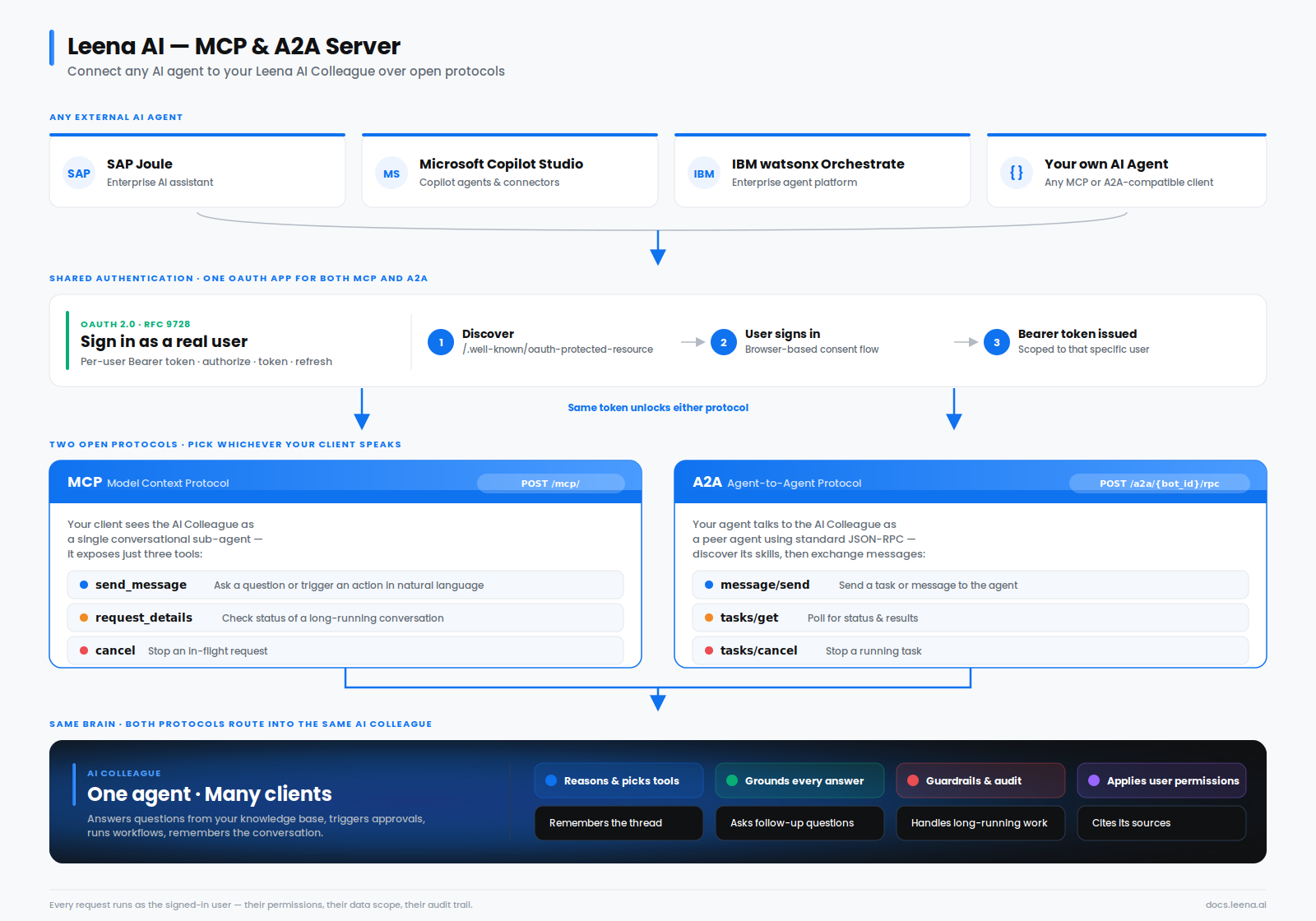
Connecting a specific platform? Step-by-step guides are available for Microsoft Copilot Studio and IBM watsonx Orchestrate. Read this page first for the concepts and credentials, then follow the platform guide for the wiring.
1. Overview
The Leena MCP Server turns your AI Colleague into a sub-agent that any MCP client can use as a single, intelligent tool.
Instead of exposing dozens of individual tools, forms, and workflows to the connecting application, Leena exposes one conversational surface. Your third-party app sends a natural-language instruction; the AI Colleague decides — on its own — which tools, knowledge sources, approval workflows, case-management actions, or organisation-specific AOPs to run, and returns the result. This is the same "agent brain" that powers the Leena web app, Slack, and Teams — only reachable programmatically.
The A2A server exposes that same brain through the open A2A protocol, for platforms that speak A2A rather than MCP.
What you can do once connected:
- Ask HR, IT, and policy questions and get answers grounded in your knowledge base, complete with clickable, authenticated source links.
- Trigger approval workflows, case creation, and custom AOPs through conversation.
- Carry on stateful, multi-turn conversations — the agent remembers the thread, pauses to ask follow-up questions, and resumes paused workflows automatically.
Who it's for: teams who want to embed their Leena AI Colleague inside another assistant or build a custom front-end, rather than using Leena's own channels. The consumer on the other end is typically another AI/LLM application, not a human clicking buttons — so the entire surface is text-in, text-out.
Key idea to keep in mind: every MCP and A2A interaction is tied to a specific Leena end-user. The connection authenticates as a person, so the AI Colleague applies that user's permissions, audience rules, and data access — just like any other channel. It is not an anonymous or "service account" firehose into your data. (The External AOP Execution API is the deliberate exception: it runs headless as a System user — see Section 7.)
Which surface do you need?
All three are enabled by the same toggle and share one OAuth application, but they serve different integration shapes:
| MCP | A2A | AOP Execution API | |
|---|---|---|---|
| Protocol | Model Context Protocol | A2A 1.0 (JSON-RPC or REST) | Plain REST |
| Identity | A specific Leena end-user | A specific Leena end-user | Your application, scoped to one AI Colleague |
| Interaction style | Conversational — natural language in, the agent decides what to run | Conversational — natural language in, the agent decides what to run | Deterministic — you name the exact AOP to execute |
| Best for | Embedding the AI Colleague in another assistant (Joule, Copilot, custom chat) | Agent platforms that speak A2A and want standard discovery | Backend systems and schedulers triggering known workflows |
| Human in the loop | Yes — supports follow-up questions | Yes — supports follow-up questions | No — runs headless as a System user |
| Permissions applied | The signed-in user's permissions and audience rules | The signed-in user's permissions and audience rules | The AOP's own configured access |
| Live updates | Progress notifications | Event streaming plus webhook push notifications | Poll for status |
| Statefulness | Multi-turn threads with memory | Multi-turn tasks with memory | One execution per call; track it via its item ID |
Rule of thumb: if a person is on the other end (even indirectly, through another assistant), use MCP or A2A — pick whichever protocol your platform already speaks. If a system is on the other end and it knows exactly which workflow it wants to run, use the AOP Execution API.
Why a single orchestrator beats a flat list of tools
There are two ways to expose an enterprise system over MCP. The tool method publishes each capability as its own named tool — one for "search the knowledge base," one for "create a ticket," one per workflow — and expects the connecting app's model to pick and sequence them. The orchestrator method, which Leena uses, publishes a single conversational sub-agent and lets Leena's own orchestrator do the routing. For an enterprise assistant, the orchestrator method is the stronger choice:
- One stable contract. Your integration depends on three tools that never change. Tools, workflows, and AOPs can be added, renamed, or retired on the Leena side and your connected app keeps working — no re-integration, no broken tool schemas. With a flat tool list, every catalog change is a breaking change for every connected client.
- The reasoning happens on Leena's side. Choosing the right tool, chaining a multi-step AOP, filling a form, asking a follow-up, and grounding the answer in the knowledge base are all handled by Leena's orchestrator — the model it's tuned for. The connecting app doesn't need to understand dozens of tool schemas or sequence multi-step flows itself.
- Less for the client's model to get wrong. Exposing many tools bloats the connecting model's tool list, costs tokens, and raises the odds it picks the wrong tool or the wrong arguments. One conversational entry point keeps the client focused and the failure modes simple.
- Governance stays server-side. Permissions, audience targeting, guardrails (PII detection, moderation, jailbreak detection), citations, and audit logging are enforced once, inside Leena, for every request. A flat tool list would force each client to re-implement or be trusted to respect these — which doesn't scale and isn't safe.
- Grounding and citations are preserved. Answers come back already grounded, with authenticated source links attached. A raw tool call hands back data that the client then has to assemble, cite, and secure on its own.
- Statefulness is built in. Threads, multi-turn memory, and automatic resumption of paused workflows live in the orchestrator. A flat tool list is inherently stateless and pushes all of that complexity onto the client.
| Orchestrator method (Leena) | Flat tool-list method | |
|---|---|---|
| Integration surface | 3 stable tools | Grows and shifts with every tool |
| Who routes and reasons | Leena's orchestrator | The connecting app's model |
| Adding a new tool | Works automatically | Breaking change for clients |
| Governance and guardrails | Enforced server-side | Re-implemented per client |
| Grounding and citations | Built in | Client's responsibility |
| State and multi-turn | Built in | Client's responsibility |
| Control over the exact tool | Indirect (natural-language intent) | Direct (named calls) |
In short, the tool method gives a client deterministic, low-level control at the cost of a brittle, high-maintenance, governance-heavy integration. The orchestrator method trades that fine-grained control for a single durable surface that stays correct, secure, and grounded as your AI Colleague evolves. And when you do need deterministic "run exactly this workflow" control from a machine, that's precisely what the AOP Execution API is for (Section 7) — so you're not forced to bend one surface to do the other's job.
2. Authentication
Supported method: OAuth 2.0
Every surface uses OAuth 2.0, with the access token sent as a Bearer token in the Authorization header on every call. There is no API-key mode and no anonymous access.
The OAuth roles line up like this:
- Leena MCP/A2A server — the resource server. It validates the bearer token on each request and resolves it to a specific AI Colleague and end-user.
- Leena's chat/auth service — the authorization server. This is where tokens are issued and where users sign in. The authorization, token, and refresh URLs on the settings page all point here.
- Your third-party app — the OAuth client. It holds the Client ID and secret issued from the dashboard and drives the token flow.
MCP, A2A, and the AOP Execution API share the same OAuth application for a given AI Colleague. Enabling external access provisions it automatically; you configure credentials once and every surface accepts it.
Supported grant types
The token endpoint accepts three grants. The client authenticates with its Client ID and secret in all cases.
| Grant | When to use it |
|---|---|
authorization_code | Interactive sign-in. The user logs in through a browser and your app exchanges the resulting code for a token pair. This is what most MCP clients do out of the box. |
refresh_token | Renew a short-lived access token without sending the user back through login. |
urn:ietf:params:oauth:grant-type:jwt-bearer | Enterprise-Managed Authorization (ID-JAG) — redeem an identity assertion minted by your own identity provider, with no interactive browser login. See below. |
Access tokens are JWTs and are short-lived (one hour by default, unless your AI Colleague's web channel overrides the expiry). Refresh tokens are opaque strings. A refresh re-checks the user's eligibility for the AI Colleague on every call, so terminated or de-provisioned employees lose access at the next refresh rather than lingering until the token expires.
Enterprise-Managed Authorization (ID-JAG)
New. The Identity Assertion Authorization Grant (ID-JAG) lets an enterprise identity provider vouch for a user directly, so a connecting application can obtain a Leena token without sending that user through an interactive Leena login.
This is what makes centrally-governed deployments practical. Instead of every employee individually consenting to the connection in a browser, your IdP mints a signed assertion for the user, your application presents it at Leena's token endpoint, and Leena returns a normal user-scoped token. Identity stays anchored in your IdP; Leena remains the resource server.
How it works
- Your identity provider issues an ID-JAG assertion (a signed JWT) for the employee.
- Your application posts it to the token endpoint as the
assertion, together with your Client ID and secret:
POST /api/oauth/token
Content-Type: application/x-www-form-urlencoded

grant_type=urn:ietf:params:oauth:grant-type:jwt-bearer
&assertion=<the ID-JAG assertion>
&client_id=<your client id>
&client_secret=<your client secret>- Leena verifies the assertion against your configured trusted issuer, then runs the same sign-in pipeline every other login uses — sync the employee from your HRIS integration, resolve or provision their AI Colleague user, apply the AI Colleague's access rules — and returns a standard token response (
access_token,refresh_token,token_type,expires_in).
What a valid assertion must carry
- The ID-JAG type header — the JWT
typmust beoauth-id-jag+jwt. Any standards-compliant ID-JAG authorization server sets this automatically; you don't configure it. - An asymmetric signature (RSA or ECDSA). Unsigned assertions and HMAC signatures are rejected.
- An issuer (
iss) matching the trusted issuer configured for your AI Colleague. - An audience (
aud) ofleena-aic. - A valid expiry (
exp). - A subject claim (
subby default) identifying the user. This is required for the pass to be accepted, even though the user is matched by email or employee ID rather than by subject. - An identifier Leena can match the employee on — an email address, or an employee ID if your AI Colleague matches users by employee ID.
Configuration
ID-JAG is off by default and is configured per OAuth application. Enabling it requires, at minimum, the issuer URL and JWKS URL of the identity provider you want to trust; you can optionally override which claims carry the email, subject, and employee ID, and pin an expected resource value. One trusted issuer is configured per AI Colleague.
Signing keys are fetched from your JWKS URL and cached briefly, so routine key rotation at your IdP propagates on its own — no configuration change needed on the Leena side.
ID-JAG is not yet self-serve in the dashboard. Contact your Leena representative to have your trusted issuer configured for your AI Colleague.
Access control parity. ID-JAG does not bypass any of the checks a normal login performs. Terminated and soft-deleted users are denied, restricted AI Colleagues still require the employee to be present in the HRIS, and email-domain allow-lists and custom ACLs are honoured — including before a first-time user is provisioned. Every rejection is logged with a reason code, and successful sign-ins are recorded as login events.
Practical limits. Assertions are verified against your IdP's published keys, which are cached briefly and fetched with a hard timeout, so a slow key server fails fast rather than stalling sign-in. An AI Colleague that matches users by internal user ID cannot use ID-JAG, because an assertion never carries one.
Discovery: automatic where supported
Leena publishes standard OAuth discovery metadata, so a compliant MCP or A2A client pointed at the endpoint URL can find the sign-in endpoints on its own — you don't have to wire them by hand. The metadata advertises all three supported grants, including the ID-JAG profile. For clients that need the endpoints spelled out (for example, a "manual OAuth" configuration), the authorization, token, and refresh URLs are all listed on the settings page.
Identity model
MCP and A2A: identity is per-user. A token represents the person it was issued for, not your application in the abstract. On every call, Leena resolves the token to that user and runs the request under their permissions, audience membership, and data scope. In practice:
- The same connection returns different results for different users — each sees only the data they're entitled to.
- The connecting principal is always a real, provisioned AI Colleague user, whether they signed in interactively or were vouched for through ID-JAG.
- Guardrails and audit logging apply exactly as they do on any human channel.
- On A2A, the skills advertised on the authenticated Agent Card are filtered to that user's audiences — two users can legitimately see different capability lists.
AOP Execution API: identity is per-application. The token carries the AI Colleague's ID and a set of scopes (the execution scope is aic.aop_execute). The AI Colleague identity comes from the token itself — it is never supplied by the caller — so a token issued for one AI Colleague can never trigger workflows on another. Executions run as a synthetic System user in a dedicated thread, isolated from any employee's chat history.
Prerequisite
Authentication only succeeds when external access is enabled for that AI Colleague (see Section 4). Until the toggle is on, even valid tokens are rejected. If Restrict IP addresses is configured, the request must also originate from an allowed IP — see Step 4.
3. The MCP Tools
When your application connects over MCP, the Leena MCP Server advertises exactly three tools. You do not see individual Leena tools as separate MCP tools — you only see these three, and the agent routes everything internally.
send_message
send_messageThe primary tool. Sends a natural-language instruction to the AI Colleague.
- Start a new conversation: call
send_messagewith just yourmessage. A new conversation thread is created and its ID is returned. - Continue a conversation: pass the
thread_idfrom a previous response along with the newmessage. The agent picks up where it left off and automatically resumes any paused workflow.
send_message waits for the agent to finish and then returns one of these outcomes:
| Status | What it means | What your app should do |
|---|---|---|
completed | The agent finished and produced a final answer (in response). | Show the answer to the user. If it includes a Sources section, include those links verbatim. |
input_required | The agent paused to ask the user something (prompt in input_required). | Relay the prompt to the user, then call send_message again with the same thread_id and the user's reply as the message. |
running | The agent is still working after the wait window elapsed. | Poll using request_details(thread_id) until it reaches a final state. |
failed | Something went wrong (reason in error). | Surface the error. |
canceled | The request was stopped. | No action needed. |
While the agent is working, send_message streams lightweight progress updates so your client knows it's alive.
Source and webview links are special. When a response contains a Sources section with markdown links, those are authenticated deep links the user can click to open the underlying article (often jumping straight to the highlighted passage). Links that open a Leena webview — a form, an upload, an approval screen — are automatically stamped with a one-time access token so they open correctly from outside Leena's own channels without exposing long-lived credentials in the URL. Always pass these links through to the user exactly as provided, query parameters included; rewriting or stripping them will break the link.
request_details
request_detailsChecks the current state of a conversation without sending a new message. You pass a thread_id (and optionally a specific request_id) and get back the same status shape as send_message. This is how you poll a long-running request after send_message returns running.
cancel
cancelStops a running or paused request in a thread. Pass the thread_id. Returns canceled on success, or tells you the request was already finished.
Cancel is a hard stop. A request that was merely paused — waiting for the user's answer, or gracefully halted — is also cancellable, and cancelling it ends it for good. The paused workflow cannot be resumed by a later
send_messageon that thread. Usecancelwhen the user genuinely wants to abandon the request, not as a way to park it.
The conversation model in one line
Threads are stateful. Start without a
thread_id, continue with the one you were given, poll withrequest_details, and stop withcancel. Handleinput_requiredby asking the user and replying on the same thread.
4. How to Enable It and Generate Credentials
Everything is configured in the dashboard. You'll need a Leena admin/dashboard user to do this.
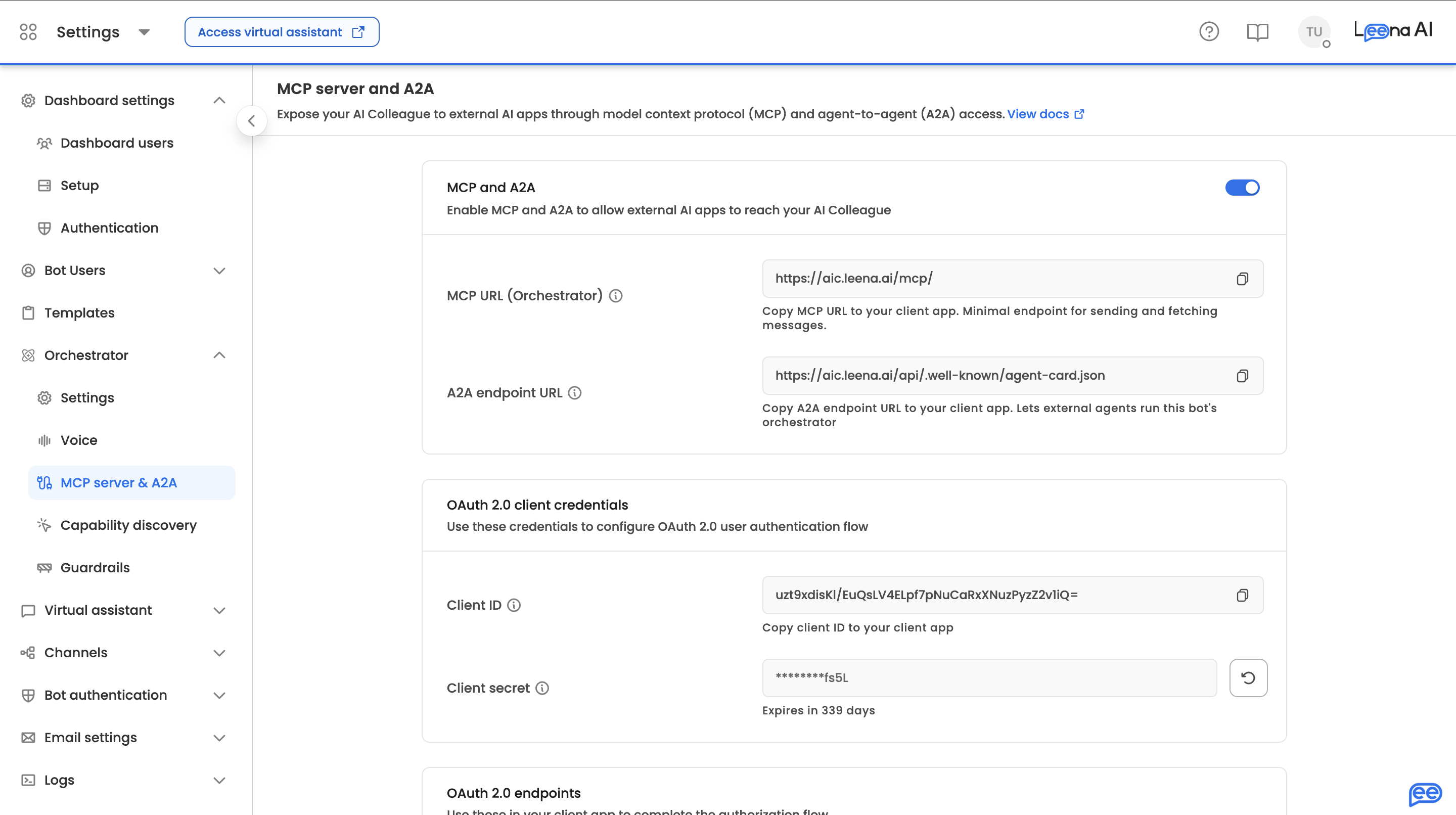
Step 1 — Turn on external access
- Open Admin console → Orchestrator → MCP server & A2A.
- Turn on the MCP and A2A toggle.
MCP and A2A ship together under one toggle. There is no longer a separate switch for each. Turning this on enables the MCP endpoint, the A2A server, and the AOP Execution API for this AI Colleague at once. If you want only one of them in practice, simply don't hand out the URLs for the others — and use the IP allow-list (Step 4) to narrow who can reach the endpoints at all.
Turning the toggle on does two things: it allows external clients to authenticate against this AI Colleague, and it automatically provisions an OAuth application behind the scenes. If that provisioning fails for any reason, the toggle is rolled back automatically — so if it stays on, your OAuth app exists.
Enabling saves immediately; you don't need to press Save.
Step 2 — Read your connection details
Once enabled, the settings page shows everything your third-party app needs:
- MCP URL — the endpoint your MCP client points at (ends in
/mcp/). - A2A endpoint URL — the public Agent Card URL (ends in
/.well-known/agent-card.json). This is the correct starting point for an A2A client: the card itself declares the JSON-RPC and REST endpoints, the supported capabilities, and the OAuth scheme. Note that this URL is deliberately the same for every AI Colleague — your AI Colleague is identified by the OAuth token, not by the URL. - Client ID — the OAuth client identifier for your AI Colleague (shared by all surfaces).
- OAuth endpoints — the authorization URL, token URL, and refresh URL.
- Redirect URIs — currently registered (empty until you add one).
- Client secret status — whether a secret exists and when it expires.
Step 3 — Register your redirect URI(s)
If your client uses the interactive OAuth login flow (most do), you must register the redirect URI(s) it will use. Integrations that authenticate exclusively through ID-JAG don't need this step.
- Redirect URIs must use HTTPS.
- The only exception is loopback addresses (
localhost,127.0.0.1,[::1]) over plain HTTP — useful for local development and desktop MCP clients. - Any other plain-HTTP URI is rejected.
Add your app's callback URL(s) in the redirect-URI field and save.
Step 4 — (Optional) Restrict access by IP address
By default, your endpoints accept requests from any IP as long as the bearer token is valid. If your connecting application calls Leena from a known, fixed set of egress IPs, you can add a network-level check on top of OAuth.
- On the MCP server & A2A settings page, turn on Restrict IP addresses.
- Add each allowed IP address, optionally with a CIDR prefix length to cover a block (e.g.
203.0.113.0with24to allow203.0.113.0/24). - Use Add more for additional entries, then Save.
Once at least one entry is saved, any request originating outside the allowed list is rejected with a 403 before it reaches your AI Colleague — a valid token is not enough on its own. The restriction also applies to the OAuth authorize and token endpoints, so a blocked network cannot obtain a token in the first place.
- An empty list means no restriction. If the toggle is on but no addresses have been saved, access is governed by OAuth alone. The restriction only takes effect once at least one entry is saved.
- The restriction applies to every surface. It is a single list covering MCP, A2A, and the AOP Execution API; you cannot allow-list different ranges per surface.
- Changes take effect immediately — there is no cache delay to wait out after saving.
- The allowlist is preserved when you turn the toggle off, so you can re-enable it later without re-entering your ranges.
- Get your egress IPs from the right place. For a cloud-hosted client, the relevant address is the platform's outbound IP, not your office network. Vendors like Microsoft Copilot Studio and IBM watsonx Orchestrate publish these ranges — allow-list all of them, or connections will fail intermittently as traffic moves between hosts.
- Desktop and local MCP clients are usually a poor fit for IP restriction, since developer machines rarely have stable public IPs.
Step 5 — Generate a client secret
Click Generate secret on the settings page.
- The full secret is shown exactly once, at generation time. Copy it immediately and store it securely — Leena stores only a hashed value and a last-four hint, never the full secret.
- The secret has an expiry date (shown on the settings page). Plan to rotate it before it lapses.
- Rotation is safe. More than one active, unexpired secret can authenticate at the same time, so you can generate a new secret, roll it out to your clients, and retire the old one without downtime.
- The same secret authenticates every surface.
Step 6 — Connect from your third-party app
For MCP: in your MCP client, configure a new MCP server using:
- Server URL: the MCP URL from Step 2.
- Authentication: OAuth, using the Client ID, client secret, and the authorization/token URLs from the dashboard.
Leena follows standard OAuth discovery: a well-behaved MCP client pointed at the MCP URL can discover the authorization server automatically and walk the user through login. After the user logs in, the client receives a token and is connected. The connection is bound to that user's identity — the AI Colleague will only ever see and do what that user is allowed to.
Platform-specific guides. Two of the most common clients have their own step-by-step walkthroughs, covering where each field goes and the platform quirks worth knowing before you start:
Both assume you have already completed Steps 1–5 on this page and have your MCP URL, Client ID, and secret to hand.
For A2A: point your A2A client at the Agent Card URL from Step 2. The card advertises the transports, capabilities, and OAuth scheme; your client then obtains a token and calls the endpoints the card declares. See Section 6.
For the AOP Execution API: obtain an access token, then call the execution endpoints (Section 7) with the token as a bearer header. The token must carry the aic.aop_execute scope.
Turning it off
Toggling external access off immediately blocks all external access, and the dashboard asks you to confirm before it does. The associated OAuth application is deleted and all credentials are invalidated.
Re-enabling is not a resume. Turning the toggle back on provisions a fresh OAuth application: a new Client ID is issued and the client secret is cleared. Every connected client must be reconfigured with the new Client ID and a newly generated secret. Don't toggle this off casually on a production AI Colleague.
5. MCP Limitations and How It Differs from Other Leena Channels
The MCP server runs your request through the same orchestration engine as the Leena web app — same tools, same AOPs, same knowledge base, same case management, same guardrails, and the same audience/permission enforcement. Functionally, the capabilities are identical. What differs is the surface: MCP is a text-only, programmatic channel meant to be driven by another application, whereas web, Slack, and Teams are rich, human-facing channels.
Here's what that means in practice.
Everything comes back as text
Leena's human channels render rich interactive elements natively — forms, tables, charts, carousels, auth cards, and confirmation cards. Over MCP there is no UI to render these, so the agent returns plain text / markdown. Your consuming application is responsible for presenting it.
Forms and file uploads fall back to web links
The MCP channel has no composer, so a user cannot attach files inline the way they can in the web or Slack chat box. When a tool needs a file upload or a structured form, the agent returns a pre-filled webview link instead — the user opens that link in a browser to complete the form or attach the file, then the conversation continues. These links carry a one-time access token, so pass them through unmodified. This is the same fallback used for phone voice calls. (Web, Slack, and Teams support inline attachments directly.)
Long-running work needs polling
For quick answers, send_message returns the final result in a single call. But the agent only waits a bounded amount of time (around 5 minutes) before returning running. Long workflows and AOPs will exceed that, so your app must poll with request_details until the request reaches a terminal state. Human channels handle this invisibly with live UI updates; over MCP you orchestrate the polling. If you need genuine event streaming rather than polling, use the A2A surface instead (Section 6).
Follow-up questions are your app's responsibility
When the agent needs more information it returns input_required with a prompt. In the web app, the user just sees the question and types back. Over MCP, your application must relay that prompt to the user and send the answer back on the same thread. Nothing happens automatically until you do.
It's per-user, not a service connection
Every MCP call is authenticated as a specific Leena end-user via their bearer token. There is no anonymous or shared "machine" access over MCP. The connecting user must be a valid, provisioned user of that AI Colleague, and they will only get the data and actions their permissions and audience rules allow. This is a deliberate safety property, but it means you can't use MCP as a generic bulk-data API. (If your integration genuinely has no human on the other end, use the AOP Execution API — Section 7.)
The agent decides; you don't pick tools
Unlike a traditional tool API where you call a named endpoint, MCP gives you one conversational entry point. You describe what you want in natural language and the AI Colleague chooses the tool/workflow. You gain the agent's reasoning, but you give up direct, deterministic "call exactly this function" control. When you need that control from a machine, the AOP Execution API's named-AOP execution is the right surface.
Network access can be locked down
Endpoints can optionally be restricted to a defined set of IP addresses and CIDR ranges (Step 4). This is a defence-in-depth layer on top of OAuth, not a replacement for it — token validation, per-user permissions, and audience rules still apply on every call. Requests from outside the allow-list are rejected with a 403. If you turn it on, make sure the list covers every egress IP your client can use, including any the hosting platform rotates through.
Credential hygiene
The client secret is shown once and expires. Rotate before expiry to avoid an outage; overlapping secrets make this a zero-downtime operation. Redirect URIs are restricted to HTTPS (plus loopback for local dev).
Quick comparison
| Aspect | MCP server | Web / Slack / Teams |
|---|---|---|
| Primary consumer | Another app / AI client | A human |
| Output | Plain text / markdown | Rich rendered UI elements |
| Forms & attachments | Webview-link fallback | Inline in the chat composer |
| Long-running requests | Your app polls for status | Live UI updates, no polling |
| Follow-up prompts | Your app relays them | Handled in the chat UI |
| Identity | Per-user OAuth bearer token | The signed-in channel user |
| Network controls | Optional IP allow-list | Standard channel access |
| Tools exposed | One sub-agent (3 tools) | One conversational surface |
| Underlying engine | Same orchestration brain | Same orchestration brain |
6. A2A (Agent-to-Agent) Support
Substantially expanded. Leena now implements the A2A 1.0 specification as a full protocol surface. Any A2A-compatible agent platform can discover your AI Colleague through a standard Agent Card and invoke it as a peer agent — with streaming, multi-turn tasks, and webhook push notifications.
Conceptually, A2A gives you the same thing MCP does: one conversational entry point into the orchestrator, running under a specific user's permissions. The difference is the protocol. Use whichever one your platform already speaks.
Discovery: the Agent Card
A2A clients start from the public Agent Card, served unauthenticated so a client can learn what it needs before it has a token:
GET /.well-known/agent-card.jsonThe public card is deliberately generic — it declares the supported transports, the capabilities, and the OAuth scheme, but no AI Colleague-specific detail. It exposes a single free-form skill: a natural-language entry point to the orchestrator.
Once authenticated, fetch the Extended Agent Card for the AI Colleague your token belongs to:
GET /a2a/extendedAgentCard
Authorization: Bearer <OAUTH_TOKEN>
The extended card carries the AI Colleague's actual skill list, filtered to the audiences the authenticated user belongs to. Two users at the same customer can legitimately receive different skill lists — that's the audience model working as intended, not an error.
Protected-resource metadata is also published, so compliant clients can discover the authorization server automatically:
GET /.well-known/oauth-protected-resource/a2aTransports and methods
The Agent Card advertises two interfaces, both on A2A protocol version 1.0:
- JSON-RPC at
/a2a/rpc - HTTP+JSON (REST) at
/a2a
Supported methods:
| Method | What it does |
|---|---|
message/send | Send a message and get the resulting task back. The equivalent of MCP's send_message. |
message/stream | Send a message and receive live status and artifact events as the agent works. |
tasks/get | Fetch the current state of a task — the polling path. |
tasks/cancel | Stop a running task. |
tasks/resubscribe | Re-attach an event stream to an existing task after a disconnect. |
pushNotificationConfig/* | Register, fetch, list, and delete webhook configurations so Leena can call you when a task changes state, instead of you holding a connection open. |
Declared capabilities on the card: streaming, push notifications, and extended agent card. Supported input and output modes are text and application/json.
The task model
An A2A task is the unit of work, and it maps onto the same request lifecycle that powers every other Leena channel. Task state moves through:
| State | What it means |
|---|---|
TASK_STATE_SUBMITTED | Accepted, not yet started. |
TASK_STATE_WORKING | The agent is executing. |
TASK_STATE_INPUT_REQUIRED | The agent paused and needs something from the user. |
TASK_STATE_COMPLETED | Finished successfully. |
TASK_STATE_FAILED | An error occurred. |
TASK_STATE_CANCELED | Stopped, by the user or by the platform. |
Multi-turn is built in. Send another message on the same task_id to continue. If the underlying request is still resumable, your message resumes it; if it has already finished, a new request is created and bound to the same task, so your client keeps one stable task ID across the conversation. Each new turn archives the previous turn's output, so a polling client never re-renders stale results.
Task artifacts and status are persisted, so tasks/get returns a stable, consistent view even across service restarts.
One turn at a time. If you send a message while the task is still in flight, the server responds with an explicit "task busy" failure rather than a generic protocol error. Wait for the current turn to reach a terminal state — or subscribe to the stream — before sending the next message.
Streaming
message/stream emits status and artifact update events as the agent works. tasks/resubscribe first returns a baseline snapshot of the task and then tails new events only, so a client that dropped its connection can catch up without replaying the whole run.
Note that TASK_STATE_INPUT_REQUIRED is treated as terminal for the stream. When the agent pauses for input, the stream closes rather than holding open indefinitely. Relay the prompt to your user, then send their reply as a new message on the same task.
Follow-ups that need OAuth
Some turns pause because a downstream tool needs the user to authorize access to another system. These surface as TASK_STATE_INPUT_REQUIRED with a hint explaining what's needed. After the person completes that authorization in their browser, your client must send a follow-up message on the same task to resume it — it does not resume on its own.
Security properties worth knowing
- The AI Colleague is derived from the token, never from the URL. A2A URLs carry no identifier for your AI Colleague. The server reads it from the validated bearer, so a token for one AI Colleague can never reach another's tasks, even if the caller knows their IDs. Task lookups are scoped the same way.
- Per-user permissions apply. A2A calls run under the authenticated user's permissions and audience rules, exactly as MCP and the web app do. Design your integration expecting user-level access control, not a blanket service account.
- Skills are audience-filtered. The Extended Agent Card reflects what the authenticated user is entitled to, not the AI Colleague's full catalogue.
- Discovery endpoints are intentionally open. The public Agent Card and the OAuth metadata are unauthenticated by design so clients can learn the auth requirements. Everything else on the surface requires a bearer; a missing or invalid one returns
401, and a blocked IP returns403. - Optional network-level allow-listing. The same IP allow-list that governs MCP applies here (Step 4).
- Webview link protection. Links to Leena-hosted forms and uploads returned in task output are stamped with one-time access tokens, the same as on MCP.
Compatibility
Some platforms still parse the older A2A 0.3 Agent Card shape. Leena detects those clients and serves a compatible card, and the operation routes accept both the 1.0 and 0.3 method shapes — so an older client works without changes on your side.
A2A limitations
- Streaming stops at a pause.
INPUT_REQUIREDcloses the stream. Your client resumes by sending a message, not by waiting. - One in-flight turn per task. Concurrent messages on the same task are rejected as busy.
- The agent still decides. Like MCP, A2A is a natural-language entry point. If you need to run one specific named workflow deterministically, use the AOP Execution API.
7. External AOP Execution API
This is the surface for headless, deterministic automation: an external system — a scheduler, a backend service, or another agent — triggers a specific, named AOP on your AI Colleague and tracks its execution to completion. There is no conversation, no human sign-in, and no natural-language routing: your system says exactly which workflow to run, and Leena runs it.
Earlier versions of this page described this API as "A2A". It is a separate surface from the A2A protocol server documented in Section 6. The endpoints below are unchanged.
How it fits together
- Enable external access in Admin console → Orchestrator → MCP server & A2A (Section 4). This provisions the shared OAuth application.
- Obtain a token using your Client ID and secret. The token is issued for this specific AI Colleague and must carry the
aic.aop_executescope. - Trigger an execution with a single API call, naming the AOP and optionally passing context.
- Poll for status using the item ID returned at initiation, until the execution reaches a terminal state.
Triggering an execution
POST /v1/external/aop/execute
Authorization: Bearer <OAUTH_TOKEN>
Content-Type: application/json

{
  "aop_id": "invoice_processor_v1",
  "message_to_start": "Process the attached invoice",
  "context": {
    "invoice_id": "INV-2026-001",
    "callback_url": "https://your-system.example.com/webhook"
  }
}aop_id(required): the AOP to run — either its ID or its human-readable identifier. It must belong to the AI Colleague the token was issued for.message_to_start(optional): the initial instruction or trigger message for the run.context(optional): any JSON-serializable object. Leena threads this into the execution as additional instructions, so the AOP's agent logic can read your external data (record IDs, callback URLs, parameters) with a clear audit trail of where it came from.
The call returns immediately with tracking identifiers — the execution itself runs asynchronously in the background:
{
  "aop_item_id": "65b8f1...",
  "request_id": "65b8f2...",
  "run_id": "123",
  "status": "accepted"
}
Polling for status
GET /v1/external/aop/items/{aop_item_id}/status
Authorization: Bearer <OAUTH_TOKEN>{
"aop_item_id": "65b8f1...",
"reference_id": "EXE000042",
"status": "completed",
"initiated_at": "2026-07-02T10:00:00Z",
"completed_at": "2026-07-02T10:05:00Z"
}| Status | What it means |
|---|---|
in_progress | The agent is currently executing the AOP. |
completed | The execution finished successfully. |
failed | An error occurred during execution. |
paused | The execution is waiting on an external trigger, callback, or approval. |
aborted | The execution was stopped manually. |
Poll until the status is terminal (completed, failed, or aborted). The reference_id (e.g. EXE000042) is the same human-readable execution reference visible in the Leena dashboard, so support and audit conversations can refer to the same run.
Error responses
| Code | Meaning |
|---|---|
400 | Malformed request — invalid ID format or a context that isn't JSON-serializable. |
401 | Missing, expired, or invalid token. |
403 | Token is valid but lacks the aic.aop_execute scope, or the request originated from an IP address outside the configured allow-list. |
404 | The AOP or execution item doesn't exist within this AI Colleague's scope. |
Security properties worth knowing
- Scoping is enforced by the token, not the request. The AI Colleague's identity is read from the validated token — the caller never supplies it. A token for one AI Colleague can never see or trigger anything on another, even if the caller knows the other's AOP IDs.
- Scope minimization. Tokens carry explicit scopes; the execution surface only accepts
aic.aop_execute. Request no more scope than you need. - Optional network-level allow-listing. The shared IP allow-list (Step 4) applies here too, and is a good fit for backend callers, which typically run from stable, known egress IPs.
- System-user isolation. Executions run as a synthetic System user in a dedicated thread — they never mix with, read from, or write into any employee's conversation history.
- Durable execution. Executions are queued for background processing and survive service restarts; an in-flight run interrupted by a graceful shutdown is re-queued rather than lost.
- Same credential hygiene. The shared client secret is shown once, expires, and should be rotated proactively.
Limitations
- One execution per call. There is no multi-turn thread. If a run pauses, it resumes via the workflow's own callbacks and approvals — not via a follow-up call.
- You must know the AOP. This API does not do natural-language intent routing. If your caller only has a fuzzy natural-language request, use MCP or A2A and let the orchestrator route it.
- Status, not transcript. The status API tells you the lifecycle state and timestamps of the run. Rich intermediate output and grounded conversational answers are an MCP/A2A feature.
- No end-user permissions. Because the run is scoped to the AI Colleague rather than to a user, the AOP executes with the access configured for it — design your AOPs accordingly and don't route user-specific, permission-sensitive queries through this API.
Quick comparison
| Aspect | MCP | A2A | AOP Execution API |
|---|---|---|---|
| Entry point | MCP URL (/mcp/), 3 tools | Agent Card → JSON-RPC or REST | Execution + status endpoints |
| You provide | Natural-language message | Natural-language message | Exact AOP identifier (+ optional context) |
| Who decides what runs | Leena's orchestrator | Leena's orchestrator | Your calling system |
| Identity | Signed-in end-user | Signed-in end-user | Your app, scoped to one AI Colleague |
| Runs as | The end-user, with their permissions | The end-user, with their permissions | System user, isolated thread |
| Conversation | Stateful threads, input_required supported | Stateful tasks, INPUT_REQUIRED supported | Single fire-and-poll execution |
| Live updates | Progress notifications | Event streaming + webhook push | Poll only |
| Response | Grounded answer with source links | Grounded answer with source links | Execution status + reference ID |
| OAuth app & secret | Shared | Shared | Shared |
| IP allow-list | Shared | Shared | Shared |
8. Quick Start Checklist
Common (all surfaces)
- Enable the MCP and A2A toggle in Admin console → Orchestrator → MCP server & A2A.
- Copy the Client ID and OAuth endpoints from the settings page.
- Generate a client secret and store it securely (shown only once).
- (Optional) Restrict access to your client's egress IP addresses and CIDR ranges.
- (Optional) Configure ID-JAG with your Leena representative if you want enterprise-managed sign-in without interactive login.
- Rotate your client secret before it expires — overlapping secrets make this zero-downtime.
MCP
- Copy the MCP URL and add your app's redirect URI (HTTPS, or loopback for local dev).
- Configure your MCP client with the URL + OAuth credentials and log in as a valid AI Colleague user. Using Copilot Studio or watsonx Orchestrate? Follow the platform guide instead — Microsoft Copilot Studio or IBM watsonx Orchestrate.
- Send a
send_messagewith nothread_idto start; reuse the returnedthread_idto continue. - Handle
input_required(relay to user) andrunning(poll withrequest_details). - Pass through any Sources and webview links to the user verbatim.
A2A
- Point your A2A client at the public Agent Card URL and complete OAuth.
- Fetch the Extended Agent Card to see the skills available to that user.
- Call
message/sendfor request/response, ormessage/streamfor live events. - Continue a conversation by sending another message on the same
task_id; poll withtasks/getor re-attach withtasks/resubscribe. - (Optional) Register a push notification config so Leena calls your webhook on state changes.
AOP Execution API
- Obtain a token with the
aic.aop_executescope using your Client ID + secret. - Trigger the AOP with
POST /v1/external/aop/execute, passing youraop_idand anycontext. - Poll
GET /v1/external/aop/items/{aop_item_id}/statusuntil the run reachescompleted,failed, oraborted.
Updated about 2 months ago