
Dynamic Audience from Connector Metadata
Documents synced from connectors usually carry metadata — country, department, business unit, and so on — that already describes who the content is meant for. Audience from Metadata lets a KM Admin turn that metadata into live access rules: you map a document metadata field to a user attribute, and Leena AI restricts each document to the users whose attributes match.
The match is evaluated at query time against the user's current attributes, which is what makes these audiences dynamic. When an employee's attributes change — for example, they move from one country to another — their document access updates on their next query, with no need to re-sync the content.
Availability
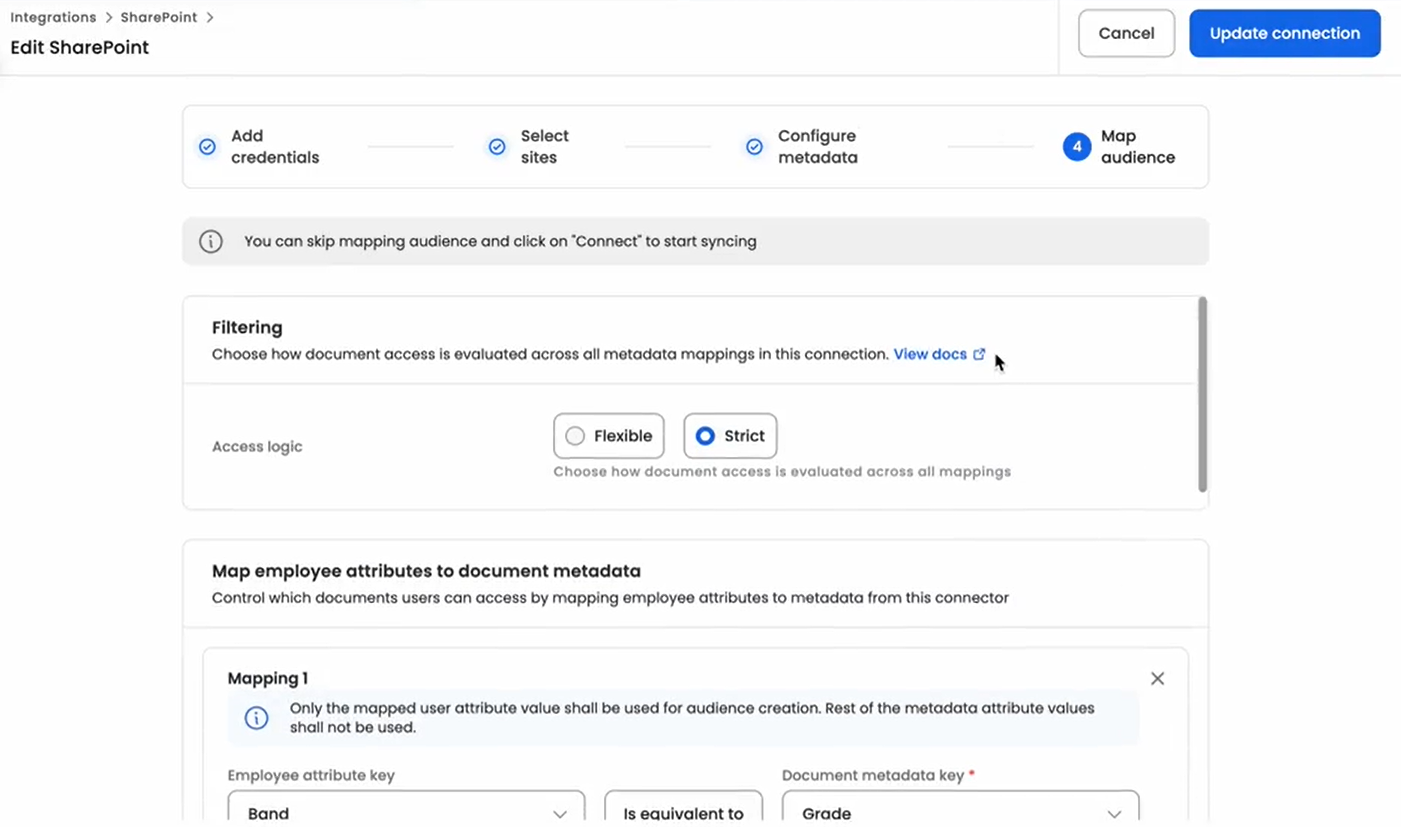
Audience from Metadata is currently supported for SharePoint connector that capture document-level metadata during sync. It will appear in Step 4 — after Site selection and Library metadata configuration.
It is an optional step. A connector can be saved and will sync normally without any audience mapping defined.
Prerequisite: Because rules map document metadata, the metadata fields you intend to use must already be configured for the libraries/folders being synced. This is done in the preceding metadata configuration step of the wizard.
How a Mapping Works
A mapping links one user attribute to one document metadata field, with optional specific values.
- User Attribute — the employee-profile field to evaluate, for example
user.countryoruser.department. - Document Metadata field — the synced metadata field to match it against, for example
Doc.Country. - Values (optional) — specific value pairs, for example user
Country: India→ documentCountry: IND.
When you define more than one mapping or list more than one value, the following logic applies:
| Combination | Logic | Result |
|---|---|---|
| Across different mappings | AND | A user must satisfy every mapping to access a governed document. |
| Multiple values in one mapping | OR | Matching any one of the listed values is sufficient. |
For example, mapping user.country (India, Germany) to Doc.Country (IND, DE) qualifies a user located in either country.
Strict Filtering
A single Strict Filtering toggle at the top of the step governs how documents and values that are not covered by a mapping behave. This is the most important setting on the page.
Strict Filtering: OFF (Inclusive mode)
Broad access by default; restrict only specific groups.
- At least one attribute mapping is required.
- Attribute mapped without values: no restriction is applied. All values of that field remain available to everyone — the mapping only establishes the link.
- Attribute mapped with specific values: the mapped users see the mapped documents, and all other documents (other countries, departments, and so on) remain available to everyone else.
Strict Filtering: ON (Exclusive mode)
Zero-trust — if it isn't mapped, it isn't seen.
- At least one attribute and at least one value mapping are required.
- Attribute mapped without values: Save is disabled. In strict mode, an attribute with no value is treated as an incomplete security rule.
- Attribute mapped with specific values: only the mapped users see the mapped documents. Every document whose metadata value is not covered by a mapping is hidden from all users.
Behaviour at a glance
| Strict Filtering | Mapping configuration | What users see |
|---|---|---|
| OFF | Department (no values) | All Department documents are available to all users. |
| OFF | Department: HR → Doc: Human_Resources | HR users get HR documents; everyone else still gets all other Department documents. |
| ON | Department (no values) | Blocked — the step cannot be saved. |
| ON | Department: HR → Doc: Human_Resources | Only HR users get HR documents. Non-HR users see no documents for that attribute. |
Validation
In strict mode, if you map an attribute but leave its value list empty, a red helper message appears:
"In Strict Mode, you must specify at least one value mapping to secure the connector."
Save remains disabled until at least one value mapping is added.
Saving and the Sample Evaluation
When you click Save & Sync, Leena AI tags each synced document with the audience implied by your mappings, and then shows a Sample Evaluation summarising the impact — for example:
"Based on these rules, X documents will be restricted to specific audiences, and Y documents will remain public."
This lets you confirm the reach of a rule before it takes effect.
How Access Is Enforced
Each document is tagged with an audience derived from your mappings during the sync. At query time, Leena AI matches the requesting user's attributes against the document's audience and returns answers only from documents that user is eligible to see.
Because evaluation always uses the user's current attributes, the audience is re-resolved on every query — no document re-sync is required when a user's profile changes.
Edge Cases
| Scenario | Behaviour |
|---|---|
| Multiple values in a mapping | Values combine with OR. user.country (India, Germany) → Doc.Country (IND, DE) qualifies users in either country. |
| A user's attributes change | Access updates on the user's next query. Documents are not re-synced. |
| Strict ON, document value not in any mapping | The document is hidden from all users. |
Related
- Path-Based Access Control (Connector Filters)
- Folder Level Audience Management
- Content visibility and Permission Management in Knowledge Management
Updated 3 months ago