
Attachments
The Attachments component lets users upload files as part of a form — for example, a receipt on an expense claim, an ID document, or a signed letter. You add it like any other form component and control which files are allowed and how many.
Adding files (end user)
The user clicks the upload field (default prompt: "Click to browse") and selects a file from their device. If multiple uploads are enabled, they can add several files up to the configured limit.
What you can configure (builder)
In the field's settings in the Form builder:
- Allowed file types — restrict which file extensions can be uploaded. By default a broad set is allowed (see below); narrow it to only what you need (for example, just
pdf,jpg,png). - Multiple files — allow more than one file in a single field, and set a maximum number of files.
- Maximum file size — cap the size of each uploaded file.
- Required — make at least one attachment mandatory.
- Help text / placeholder — guide the user on what to upload.
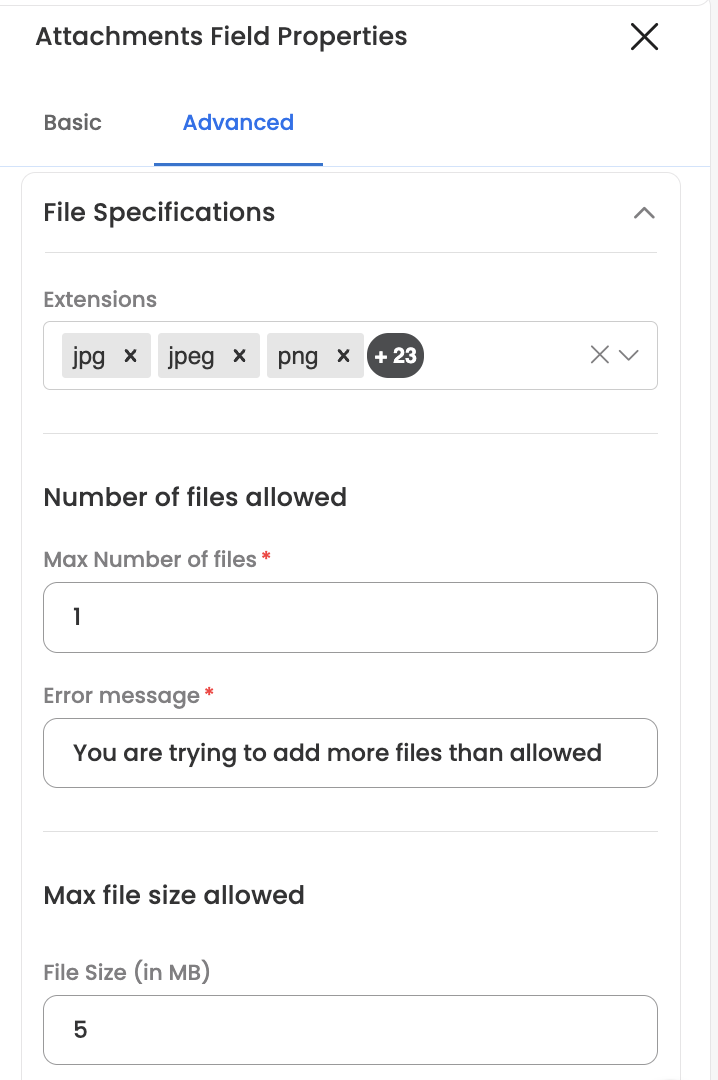
Supported file typesThe default allowed extensions include: images (jpg, jpeg, png, svg, bmp, heic); documents (pdf, doc, docx, xls, xlsx, ppt, pptx, txt, csv); email (eml, msg); media (mp4, mov, avi, wmv, mp3, wav); and other (json, zip, sql). Restrict this list to the types your process actually needs.
Limits
- File type is enforced against the allowed-types list — files with other extensions are rejected.
- File count is capped by the maximum-files setting when multiple upload is on.
- File size is capped by the maximum-size setting.
Using uploaded files downstream
Uploaded files are captured with the request and can be referenced by later steps (for example, sending them to an integration via an Action node). For integrations that need the raw file content, an advanced option can return the file as base64.
Where it's configured
Build it in the Form builder — add an Attachments / upload component to the form and set its allowed types, multiple-file limit, size limit, and required flag in the field's settings. You can also place it inside a Field Array if each row needs its own file.
Updated 3 months ago