
Credential Expiry Notifications
Overview
Every Knowledge Management (KM) connector authenticates to its source system with a credential that can lapse — an OAuth client secret, an API token, a certificate, a service-account key, or a password. Source systems do not expose the expiry date of these credentials through their APIs, so when one lapses the connector simply stops syncing, and the first sign is a failed sync log.
Credential Expiry Notifications let a KM admin record the expiry date of a connector's credential at setup, and have Leena AI email a chosen list of people ahead of that date so the credential can be rotated before syncing is affected.
This is available on all KM connectors: Confluence, SharePoint, ServiceNow, Google Drive, Box, Zendesk, Salesforce, Workday, SFTP, Interact and Unily.
How it works
The Expiry window section appears in the connector setup form (and in the edit flow for an existing connection).
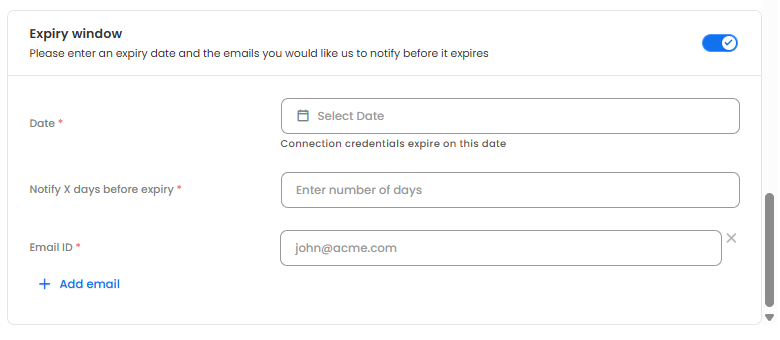
It has three inputs:
| Field | Description |
|---|---|
| Credential expiry date | The date on which the credential stops working in the source system. Enter the date you set (or were given) when the credential was issued. |
| Notify before expiry (days) | How many days before the expiry date reminders should start. Accepts 1–90. |
| Email recipients | One or more email addresses that receive the reminders. Customer stakeholders can be included alongside Leena AI or internal owners. Duplicate addresses are not accepted. |
Once saved:
- Reminders start on expiry date − notify-before days and are sent once per day, up to and including the day before expiry.
- Reminders continue until the admin updates the expiry date (after rotating the credential) or turns the Expiry window off on the connector.
- The email subject and body are fixed and identify the bot, the connector and the expiry date. The content is not configurable.
The Expiry window is optional on every connector except SharePoint (see below). Where it is left off, no reminders are sent and the connector behaves as before.
Connector-specific notes
| Connector | Credential tracked | Notes |
|---|---|---|
| SharePoint | Certificate | The certificate is generated during setup, so the expiry date is set automatically for 2 years from the uploaded certificate date and cannot be edited. Only the reminder start date and recipient list is configurable. |
| ServiceNow | OAuth client secret / refresh token | ServiceNow does not expire client secrets automatically; they lapse when rotated under the customer's security policy (commonly every 6 or 12 months). Enter the rotation date your ServiceNow admin has set. Refresh tokens issued under the deprecated ROPC grant typically expire in ~100 days. |
| Confluence | API token | Atlassian caps API tokens at one year. |
| Zendesk | API token | Zendesk is sunsetting long-lived API tokens; check the current deactivation schedule with your Zendesk admin and enter the earlier of the two dates. |
| Salesforce | OAuth refresh token | Expiry is governed by the Connected App's refresh-token policy. |
| Workday | OAuth refresh token | Expiry is chosen by the Workday admin when the API client is registered. |
| Google Drive | Service-account key | No expiry unless the organisation enforces key rotation. Use the rotation date if one applies. |
| Box | Client secret | No automatic expiry; use the date of your planned rotation. |
| Unily | Client secret | Use the rotation date set by your Unily admin. |
| SFTP / Interact | Password | Use the rotation date defined by your password policy. |
What to do when a reminder arrives
- Rotate or reissue the credential in the source system.
- Open the connector in KM Dashboard → Settings → Integrations, update the credential, and update the Credential expiry date to the new expiry.
- Save. Reminders stop once the new date is outside the notify-before window, and restart automatically as the new date approaches.
- Trigger a sync (or wait for the next scheduled run) and confirm it completes in KM Sync Logs.
FAQs
Q: Does Leena AI detect the actual expiry from the source system?
A: No. Source systems do not expose credential expiry through their APIs. Reminders are driven entirely by the date the admin enters. Keep it accurate when credentials are rotated.
Q: What if the credential expires before the date entered?
A: The connector's sync will fail with an authentication error, visible in the sync logs with an actionable reason. Refer to Visibility of Reason for Failure of Connectors. Update the credential and the expiry date.
Q: Can the reminder email content be customised?
A: No. The subject and body are fixed so that every connector's reminder looks the same and can be routed by mail rules.
Q: I'm receiving reminders for a credential I've already rotated.
A: Reminders continue until the expiry date on the connector is updated. Open the connector and enter the new expiry date.
Q: Where can I see past reminders?
A: Reminder emails are logged under Admin → Logs → Email logs.
Updated about 2 months ago