
Language
Language is where you refine the wording employees see in the Leena AI interface — button labels, headings, prompts, and the other fixed strings around a conversation.
Leena AI ships translations for every supported language. This page lets you override any of them, so the assistant uses your organisation's own terminology rather than the platform default.
This is interface text, not conversation contentLanguage covers the fixed strings in the interface. It does not translate knowledge articles, workflow forms, or the assistant's own replies — those are handled by the modules that own them.
Where to find it
Open the Admin Console, then go to Leena Channels → Language.
Choosing a translation language
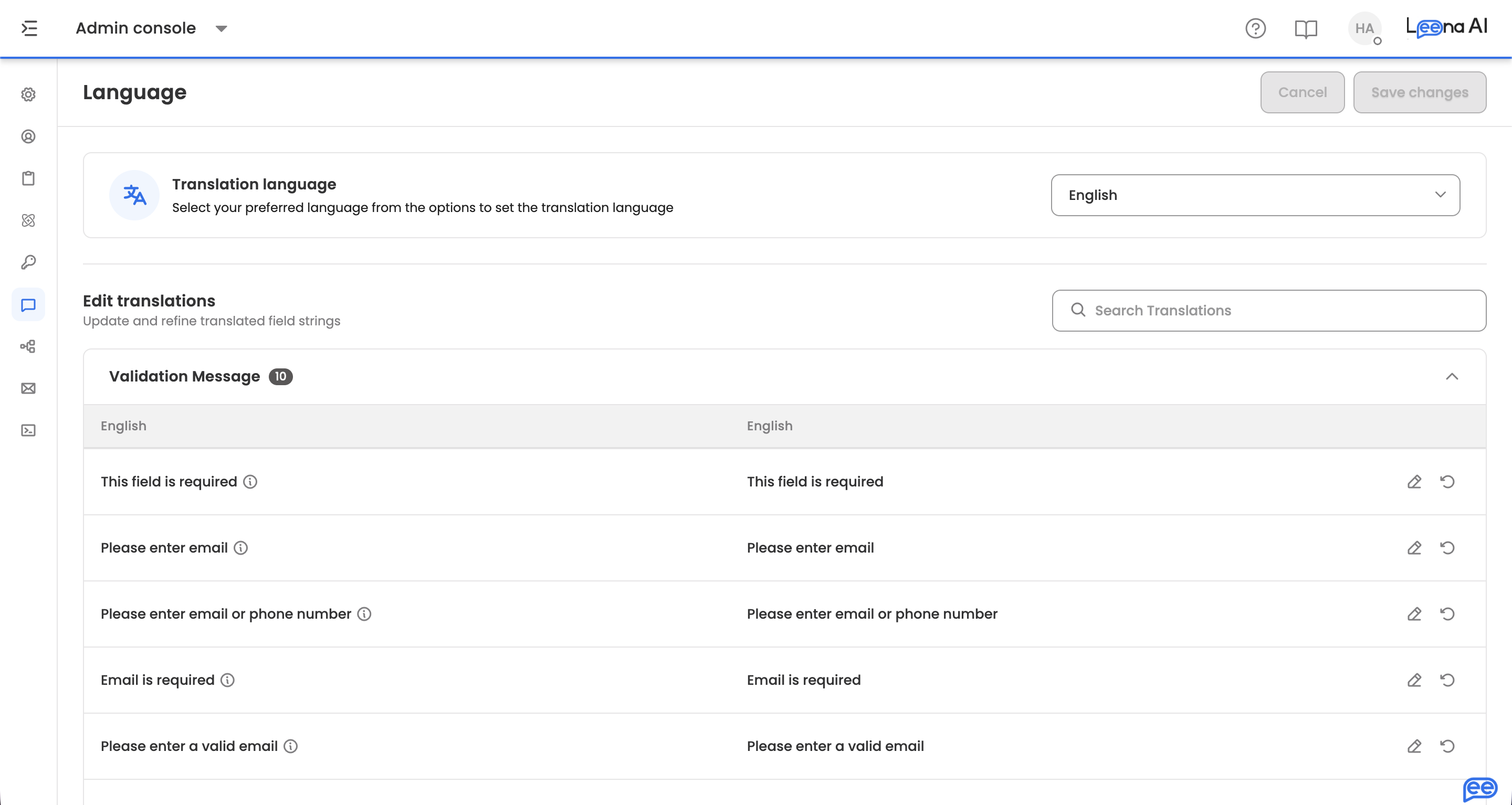
Translation language selects which language you're editing. English is selected by default.
The dropdown lists the languages enabled for your assistant, so if a language you expect is missing, it hasn't been enabled for this workspace yet. English is always available even when it hasn't been added explicitly.
Switching language reloads the table against that language. Any unsaved edits are carried with you rather than lost.
Editing translations
The Edit translations section lists every interface string, grouped by the area it belongs to. Each group shows a count of the strings it contains, and expands to a two-column table:
| Column | What it shows |
|---|---|
| English | The original string, for reference. Read-only. Where a string has extra context, an info icon carries it |
| Your selected language | The translation in use. This is the editable column |
Click a row's edit icon to change the translation, then confirm the row. A translation cannot be left blank — clearing it is rejected with a prompt to enter text.
Groups behave differently depending on whether you're searching. Normally opening one collapses the others, keeping the page manageable. While a search is active, all matching groups stay open so you can see every hit at once.
Finding a string
The search box filters across translations, and the page reports how many results matched. If nothing matches, the table is replaced with a no-results state rather than showing empty groups.
Searching is usually faster than browsing when you're chasing a specific phrase an employee reported.
Resetting to default
Each row carries a Reset to default action that restores Leena AI's shipped translation for that string.
This applies immediately and independently of the Save button — it isn't a pending edit. Use it when an override no longer reads well, rather than trying to retype the original wording.
Saving
Save changes commits every pending edit at once; Cancel discards them and reloads the saved translations. Both stay inactive until something has changed.
Edits accumulate across groups, so you can work through several sections and save once at the end.
Leaving the page with unsaved edits prompts you first, offering to save or exit anyway.
Updated about 2 months ago