Telephony Setup (Voice & SMS)

The Voice & SMS page connects your assistant to a phone number so employees can reach it two ways:

  • SMS — employees text the number and get replies from the assistant.
  • Inbound phone calls — employees call the number and speak to the voice agent.

Both channels share one phone number. SMS is delivered through Twilio; phone calls are handled by the Retell voice agent, with your Twilio number imported into Retell automatically over a SIP trunk — so you never have to touch the Retell dashboard.

Where to find it: Settings → Channels → Voice & SMS


Before you begin

RequirementDetails
A Twilio phone numberEither in your own Twilio account, or provisioned for you in Leena AI's managed Twilio account. The number must already exist in whichever account you select — this page verifies ownership, it does not purchase numbers.
Twilio Account SID + Auth tokenOnly if you are connecting your own Twilio account. Find both on the Twilio Console home page.
Voice enabled on the assistantRequired for Section 4 (Phone call) only. Go to Settings → AIC settings → Voice and enable voice first. This creates the Retell voice agent that the phone number gets bound to. Without it, saving Section 4 fails with "Voice call must be enabled in the web channel before configuring phone call authentication."
Elastic SIP Trunk (own Twilio only)If you use your own Twilio account and want inbound calls, create an Elastic SIP Trunk in Twilio and note its Termination URI and credential list username/password.

Setup order matters. Sections 2, 3 and 4 stay hidden until the section before them is complete. This is deliberate — configuring them out of order would fail against Twilio.


How the setup flow works

The page is a four-step form. Each section saves on its own — there is no single Save button at the bottom of the page. Only one section is open at a time; expanding one collapses the others.

1. Twilio credentials  →  2. Select phone number  →  3. SMS channel  →  4. Phone call
   (choose account)        (verify ownership)          (inbound webhook)   (bind to Retell)

A green Configured chip appears on a section header once it is saved and confirmed.


Step 1 — Twilio credentials

Choose whether to use Leena AI's managed Twilio account or connect your own.

  1. Pick an Account type:
    • Leena AI — uses Leena AI's managed Twilio account. Nothing else to enter. Your Leena AI contact provisions the number for you.
    • Own Twilio account — enter your Account SID and Auth token.
  2. Click Save.

On success you'll see "Credentials successfully added!" and Section 2 appears.

Notes

  • Nothing is preselected — you have to actively choose an account type before Save unlocks.
  • Your credentials are validated against Twilio at save time, so a wrong SID or token fails immediately.
  • The auth token is encrypted at rest and shown afterwards as ••••••••. Leaving the masked value in place means "no change" — you only need to re-enter it if you're rotating the token.
  • Once a phone number has been verified, Account type is locked. To change it, use Edit number from the configuration view — note that this disconnects the current SMS and voice setup.

Step 2 — Select phone number

Enter the Twilio phone number you want to use for SMS and inbound voice calls.

  1. Enter the number in E.164 format — a +, the country code, then the number, no spaces or dashes.
    • Valid: +14155551234, +911234567890
    • Invalid: 14155551234, +1 415 555 1234, (415) 555-1234
  2. Click Verify.

Leena checks the number against the Twilio account you selected in Step 1. On success you'll see "Phone number successfully configured", the field becomes read-only with a Verified tick, and Sections 3 and 4 appear.

If verification fails

MessageWhat to do
Please enter a valid E.164 phone number (e.g. +14155551234)Fix the format — the + and country code are mandatory.
Phone number could not be verified — please check the number and try againThe number isn't present in that Twilio account. Confirm you're looking at the right Twilio project, or that the number was actually purchased.
Save Twilio account settings before verifying a numberGo back to Section 1 and click Save.

To change the number later, use the pencil icon (Edit phone number) or Edit number from the configuration view. See Changing the phone number.


Step 3 — SMS channel

Configure inbound SMS webhooks and delivery tracking.

  1. Click Configure inbound SMS. Leena sets the inbound SMS webhook and the delivery tracking callback directly on your Twilio number — no manual work in the Twilio console.
  2. Once confirmed, a Send a test SMS field appears. Enter a mobile number (E.164) and click Send test SMS. You should receive a message from the assistant's number within a few seconds.
  3. Optionally turn on Show disclaimer in message.
  4. Click Save.

About the disclaimer toggle

This extends your existing disclaimer to text message responses. It only takes effect if the disclaimer is already enabled in Orchestrator settings — turning it on here alone does nothing.

About the test SMS

The message body is a fixed template chosen by Leena; you can't customise the test text. This is intentional — it keeps the endpoint from being used to send arbitrary messages.

What Leena configures for you when SMS is saved

  • Inbound SMS webhook on the Twilio number
  • SMS delivery status tracking
  • Default send rate limits (1 SMS and 1 MMS per second)
  • Automatic URL shortening in SMS replies, so long links don't get split across segments

If Save is blocked

"Please configure inbound SMS webhook before saving." — you must click Configure inbound SMS first. Saving without it would silently store an unconfigured state.


Step 4 — Phone call

Enable inbound calling on the shared number.

  1. Turn on Enable inbound calls — this lets employees interact with the assistant by calling the number.
  2. If you're using your own Twilio account, fill in your Elastic SIP Trunk details:
    • Termination URI — must end in pstn.twilio.com or sip.twilio.com. For example mycorp.pstn.twilio.com, mycorp.pstn.ashburn.twilio.com, or mycorp.sip.twilio.com. A leading sip: is accepted.
    • SIP trunk user name and SIP trunk password — from the credential list attached to your trunk.
    • (On the Leena AI account type these fields don't appear — Leena's own trunk settings are used.)
  3. Click Save phone call settings.

Leena then imports the number into Retell over the SIP trunk and binds it to your voice agent's inbound webhook. Test by calling the number from a mobile phone.

Notes

  • Saving again is safe. If the number is already in Retell, Leena updates the existing entry instead of erroring — so you can re-save after changing trunk credentials.
  • A number can only belong to one assistant. If it's already bound elsewhere, the save is refused and the error names the assistant holding it. Remove it there first, then retry.
  • The SIP trunk password is masked as •••••••• after saving. Leave it as-is unless you're rotating it.

Common errors

MessageCause
Please enter a valid Termination URI ending in pstn.twilio.com or sip.twilio.comThe URI doesn't match Twilio's Elastic SIP Trunking format. Copy it from Twilio → Elastic SIP Trunking → your trunk → Termination.
Please configure a phone number in the previous section before saving phone call settings.Section 2 was never verified and saved.
Voice call must be enabled in the web channel before configuring phone call authentication.Enable voice at Settings → AIC settings → Voice first.
Twilio-SMS channel must be configured before enabling phone call authentication.Complete Section 3 first. Voice calls reuse the SMS channel to send content (payslips, documents) to the caller mid-call.

The configuration view

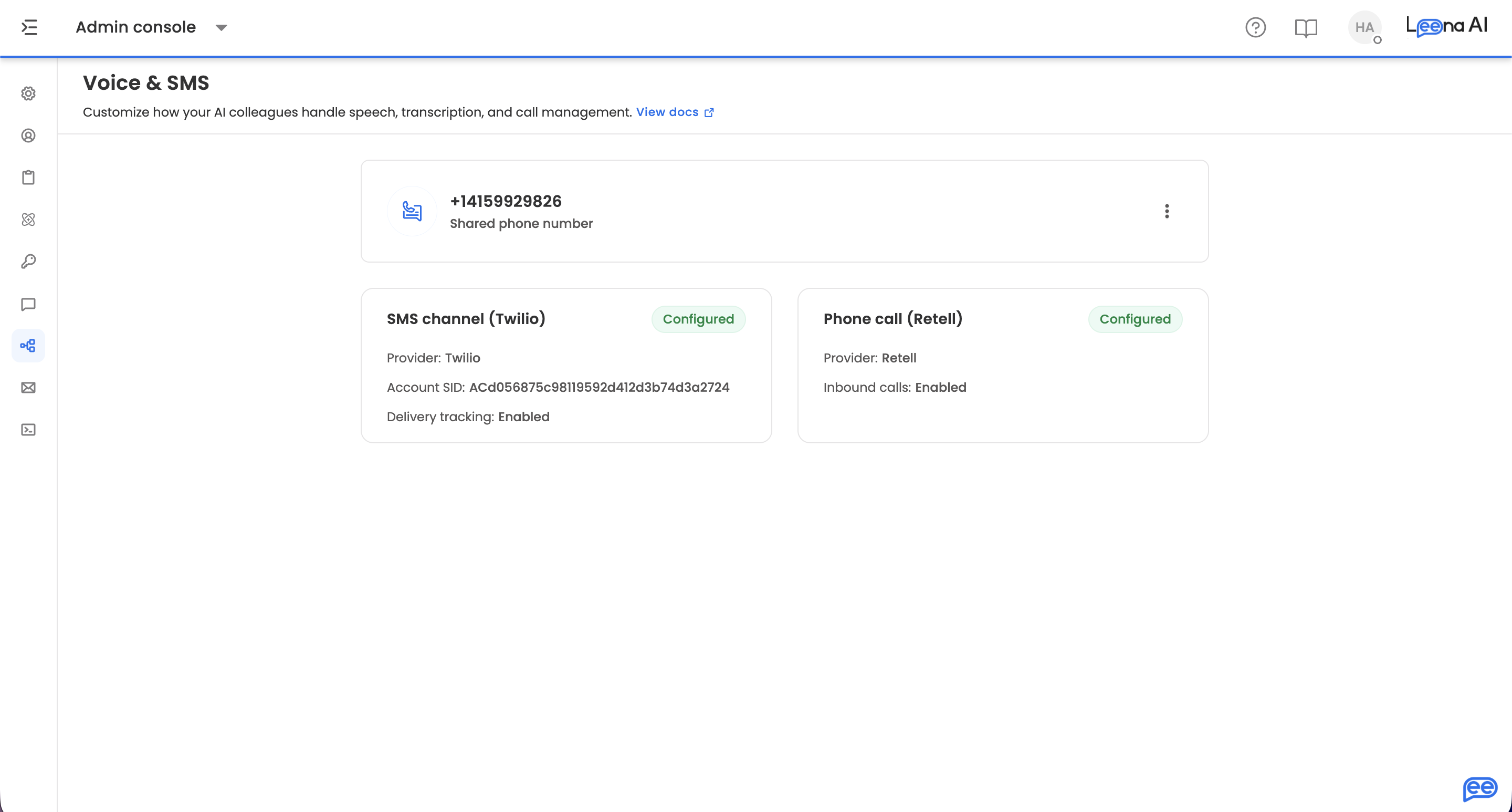
Once setup is complete the page switches to a summary view:

  • Shared phone number — the verified number used by both channels.
  • SMS channel (Twilio) — provider, Account SID, and delivery tracking status.
  • Phone call (Retell) — provider, the voice agent in use, and whether inbound calls are Enabled or Disabled.

Each card carries a Configured or Unconfigured chip. The menu offers:

ActionWhat it does
Edit configurationReopens the four-section form with everything saved intact.
Edit numberReleases the current number so you can verify a different one. Keeps your Twilio credentials.
DisconnectFull reset — removes credentials and unbinds the number from Retell.

Managing an existing setup

Changing the phone number

Choose Edit number, then confirm the "Are you sure?" prompt. Changing the number disrupts both SMS and voice routing, so after confirming you'll need to:

  1. Verify the new number (Section 2)
  2. Reconfigure the inbound SMS webhook (Section 3)
  3. Re-save phone call settings (Section 4)

Your Twilio credentials are preserved, so you don't re-enter the SID and token.

Give the change a moment to settle. When the SMS number changes, Leena updates the stored number across all existing SMS conversations in the background. If you try to change the number again while that's still running, the save is rejected — wait a minute and retry.

Disconnecting Voice & SMS

Choose Disconnect and confirm. This removes your Twilio account credentials and unbinds the phone number from Retell. Reconnecting means setting everything up from scratch, so use Edit number instead if you only want to swap numbers.

Discarding unsaved edits

The Discard button only appears once you've made a change that hasn't been saved. Discarding rolls back your unsaved edits — already-saved sections such as a verified phone number or a configured SMS webhook are not affected.


Troubleshooting

Sections 2, 3 or 4 are missing.
Not a bug. Section 2 appears after Section 1 is saved; Sections 3 and 4 appear after the phone number is verified.

Verification keeps failing on a number I definitely own.
Check you're in the right Twilio project — subaccounts have their own SID, and a number bought in one subaccount won't verify against another. If you chose Leena AI as the account type, the number has to exist in Leena's Twilio account; ask your Leena AI contact to provision it.

SMS replies arrive but inbound calls don't connect.
Confirm voice is enabled at Settings → AIC settings → Voice, then re-save Section 4. If you're on your own Twilio account, double-check the Termination URI and trunk credentials — a wrong password fails at call time, not at save time.

Test SMS never arrives.
Verify the destination is in E.164 format and, if you're on a US number, that A2P 10DLC registration is complete in Twilio. Unregistered US numbers are filtered by carriers regardless of Leena's configuration.

"Choose a Twilio account in Section 1 and save it before continuing."
The page lost its Twilio state — reopen Section 1, re-select the account type, and Save.


Related pages

  • Voice settings — voice selection, denoising, and additional instructions for the voice agent
  • Orchestrator settings — where the disclaimer used by the SMS toggle is enabled

Did this page help you?