
Model selection for Knowledge Management
Knowledge Management lets you choose which large language model composes the answer your employees see. This page explains what the choice actually changes, what our benchmarking found, and how to pick the right option for your deployment.
Where to find the setting
Knowledge Management → Settings → General → LLM Model version
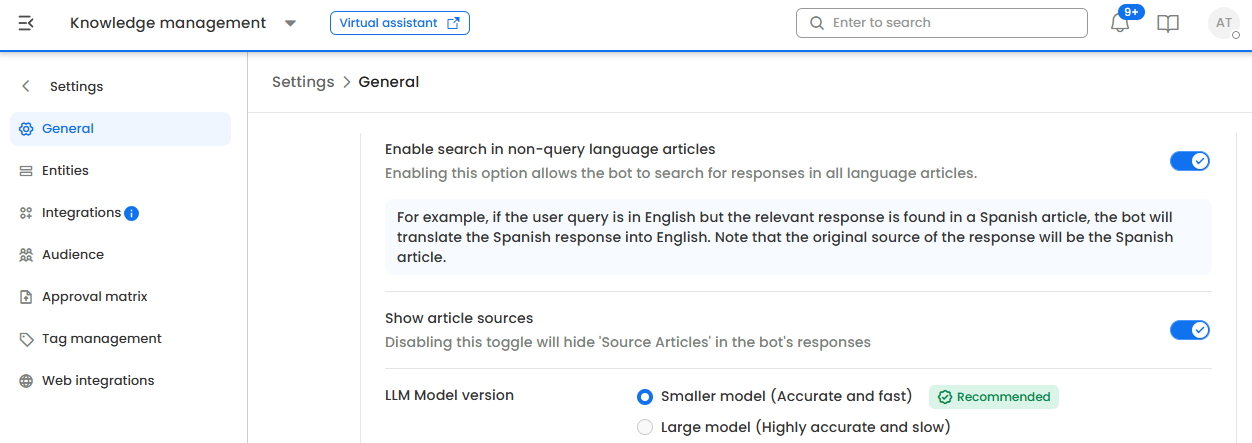
The setting applies to the virtual assistant currently selected at the top of the screen, so different assistants can run on different models.
The two options
| Option in the UI | Model used today | Character |
|---|---|---|
| Smaller model | GPT‑4.1 | Fastest responses, lowest processing overhead |
| Large model | GPT‑5.4 (low reasoning) | Noticeably better at staying inside the source article; slightly slower |
The underlying models are upgraded periodically as newer versions are validated. The behaviour each option represents — "fastest" vs. "most faithful to the source" — stays consistent even when the model behind it changes.
What this setting does and doesn't affect
It changes: how the answer is written — which facts from the retrieved articles are used, how they're phrased, and how confidently the assistant answers when the articles only partially cover the question.
It does not change:
- Which articles are searched or retrieved for a query
- Article permissions, audience rules, or access control
- Whether source articles are shown in the response
- Your articles, tags, entities, or any other configuration
Because only the answer-writing step changes, switching models takes effect on the next query. There is no re-sync or re-indexing.
What our benchmarking found
We replayed 1000+ questions — covering every question type — through seven model configurations. Every configuration received the same questions, the same retrieved articles, and the same instructions. The only variable was the model itself.
Answers were then scored blind by an independent judge model from a different vendor. The judge saw the question, the source documents, and all the candidate answers shuffled and unlabelled, with no answer marked as the official one. It checked every factual claim in every answer against the source documents. Rankings use per-question paired comparisons with 95% confidence intervals, and a second scoring pass on a subsample confirmed the results were stable.
| Rank | Model configuration | Quality (0–100) | Answers with an unsupported claim | Typical response generation time (p50) | Slowest response generation time (p95) |
|---|---|---|---|---|---|
| 1 | GPT‑5.4 (reasoning: medium) | 96.7 | 13% | 5.4 s | 12.0 s |
| 2 | Gemini 3.5 Flash | 96.6 | 14% | 10.6 s | 21.4 s |
| 3 | GPT‑5.4 (reasoning: low) | 96.4 | 9% | 3.2 s | 6.1 s |
| 4 | GPT‑5.6‑terra (reasoning: medium) | 95.4 | 16% | 2.2 s | 7.2 s |
| 5 | GPT‑5.6‑luna (reasoning: medium) | 95.1 | 20% | 2.4 s | 5.0 s |
| 6 | GPT‑4.1 | 95.0 | 25% | 2.2 s | 5.3 s |
| 7 | Gemini 3.5 Flash (thinking: minimal) | 94.9 | 13% | 2.5 s | 4.5 s |
Rows 3 and 6 are the two configurations exposed in the LLM Model version setting. The other five were evaluated to establish where those two sit; they are not selectable.
Why the top two aren't offered. GPT‑5.4 at medium reasoning scores marginally higher than at low reasoning, but takes roughly twice as long and produces more unsupported claims, not fewer. The Gemini configuration with a large thinking budget reaches similar quality only by thinking heavily — at more than three times the typical wait, which is unworkable for a chat assistant. Strip the thinking budget away and its quality drops to the bottom of the table. The mid-table GPT‑5.6 variants are fast and inexpensive but noticeably less grounded.
On the latency figures: these were measured from outside the production network. The absolute numbers are higher than what your users experience; the gap between configurations is the reliable signal.
The headline is groundedness, not raw quality. Both models produce good answers most of the time — a 1.4-point quality gap is small. The meaningful difference is that the larger model invents or over-extends far less often: roughly one answer in eleven contains an unsupported statement, versus one in four.
The larger model also says "I don't know" less often when it shouldn't. On the same set of answerable questions, the newer model wrongly refused only a handful, while the older configuration refused several times as many. Employees are less likely to be told there's no answer when an answer exists in your knowledge base.
The speed difference is about one second. The larger model is slower, but by roughly a second on a typical query — not the order-of-magnitude difference the label suggests.
Which one should you choose?
For most knowledge deployments, choose the large model. The extra second is a good trade for cutting unsupported claims by roughly two-thirds, especially where a confidently wrong answer creates real cost.
Choose the large model if any of these apply
- Answers carry policy, compliance, entitlement, or financial consequence — leave and benefits, payroll, security policy, finance approvals
- Your knowledge base has near-duplicate content: region-specific, entity-specific, or grade-specific variants of the same policy, where blending two articles produces a plausible but wrong answer
- You've had escalations or thumbs-down feedback describing answers that sounded right but weren't
- Your articles are long, dense, or heavily tabular
- Deflection quality matters more to you than a one-second difference in response time
Choose the smaller model if any of these apply
- Response time is your binding constraint — very high query volume, or a channel where users abandon quickly
- Your content is mostly short, single-answer FAQs with little overlap between articles
- You're in a high-iteration authoring or bulk-testing loop and want the fastest turnaround
- Your deployment has a strict throughput or processing ceiling
Not sure?
Run both. Take 30–50 real questions from your query logs — weighted toward the ones users actually get wrong — and run them against each setting. Compare the answers side by side, checking each one against the source article rather than against your own recollection of the policy.
After you switch
- Re-run your test questions. Answer wording will change even where the substance is identical. If you have approved reference answers, expect phrasing differences.
- Watch your 'unhandled' rate for a week. It should go down, not up, on the larger model.
- Watch thumbs-down feedback, especially comments about accuracy rather than tone.
- Check response times against your own baseline. Absolute latency depends on your deployment region and query mix.
You can switch back at any time. The setting takes effect immediately and nothing else in your configuration is affected.
FAQ
Q. Will switching models change my existing articles?
A. No. The setting only affects how answers are composed at query time.
Q. Can different virtual assistants use different models?
A. Yes. The setting is per virtual assistant, so you can run a high-stakes HR assistant on the large model and a lightweight IT FAQ assistant on the smaller one.
Q. Will my answers be worded differently after switching?
A. Yes. If you rely on exact answer text for any downstream process, review it after switching.
Q. Which model is used for search and retrieval?
A. Retrieval is handled separately and is not affected by this setting.
Updated 2 months ago