
Connect Forge MCP to Claude Code
Connect Forge to Claude Code to build, configure, and debug your Leena AI bot from the terminal. Once connected, you can ask Claude Code to create an AOP, find out why a run failed, or update a tool, and Claude Code hands the request to Forge.
The setup takes about 10 minutes.
New to Forge MCP? Read Forge MCP and A2A first for the concepts and credentials, then follow this guide for the wiring.
Before you start
You need:
- Claude Code installed on your computer.
- A Leena AI dashboard account with access to the bot.
- The AI Colleague manage permission, to turn on Forge MCP and generate credentials.
- A web browser on the same computer, for the one-time sign-in.
Step 1 — Turn on Forge MCP in Leena AI
- Open Admin console → Orchestrator → MCP server & A2A.
- Select the Forge tab.
- Turn on the MCP and A2A toggle.
- Copy the MCP URL and the Client ID.
Step 2 — Generate a client secret
- In OAuth 2.0 client credentials, click Generate client secret.
- Copy the secret now. It is shown only once, so store it like a password.
The secret expires after 90 days. Regenerating it stops the old secret immediately. See Rotate the client secret.
Step 3 — Add the Claude Code redirect URL
Claude Code signs you in through a small local page on your computer, so Leena AI must allow that address.
- In Authorized redirect URLs, add:
http://localhost:3334/callback- Click Save.
The port must match.
3334must be the same as the--callback-portvalue in Step 4. If you use a different port, change it in both places. Uselocalhost;127.0.0.1is not accepted.
Step 4 — Add Forge to Claude Code
Open a terminal and run the command below. Replace <MCP_URL> and <CLIENT_ID> with the values you copied in Step 1:
claude mcp add --transport http \
  --scope user \
  --callback-port 3334 \
  --client-id <CLIENT_ID> \
  --client-secret \
  forge <MCP_URL>
Claude Code asks for the client secret. Paste the secret from Step 2.
| Part | Meaning |
|---|---|
--transport http | Forge MCP is a remote HTTP server. |
--scope user | Makes Forge available in all your projects. Leave it out to add Forge to the current project only. |
--callback-port 3334 | The local port for sign-in. Must match the redirect URL from Step 3. |
--client-id / --client-secret | The OAuth credentials from the Forge tab. |
forge | The name of the server inside Claude Code. |
Skipping the secret prompt. To skip the prompt, for example in a script, set the secret as an environment variable:
MCP_CLIENT_SECRET=<secret> claude mcp add ...
Step 5 — Sign in with Leena AI
- Start Claude Code by running
claude. - Type
/mcp, select forge, and choose Authenticate. - Your browser opens the Leena AI sign-in page. Sign in with your dashboard account and allow access.
- The browser confirms that sign-in is complete. Go back to the terminal.
Claude Code renews your access automatically. Access tokens last 15 minutes and refresh tokens last 30 days. After a long break, you might be asked to sign in again.
Step 6 — Check that it works
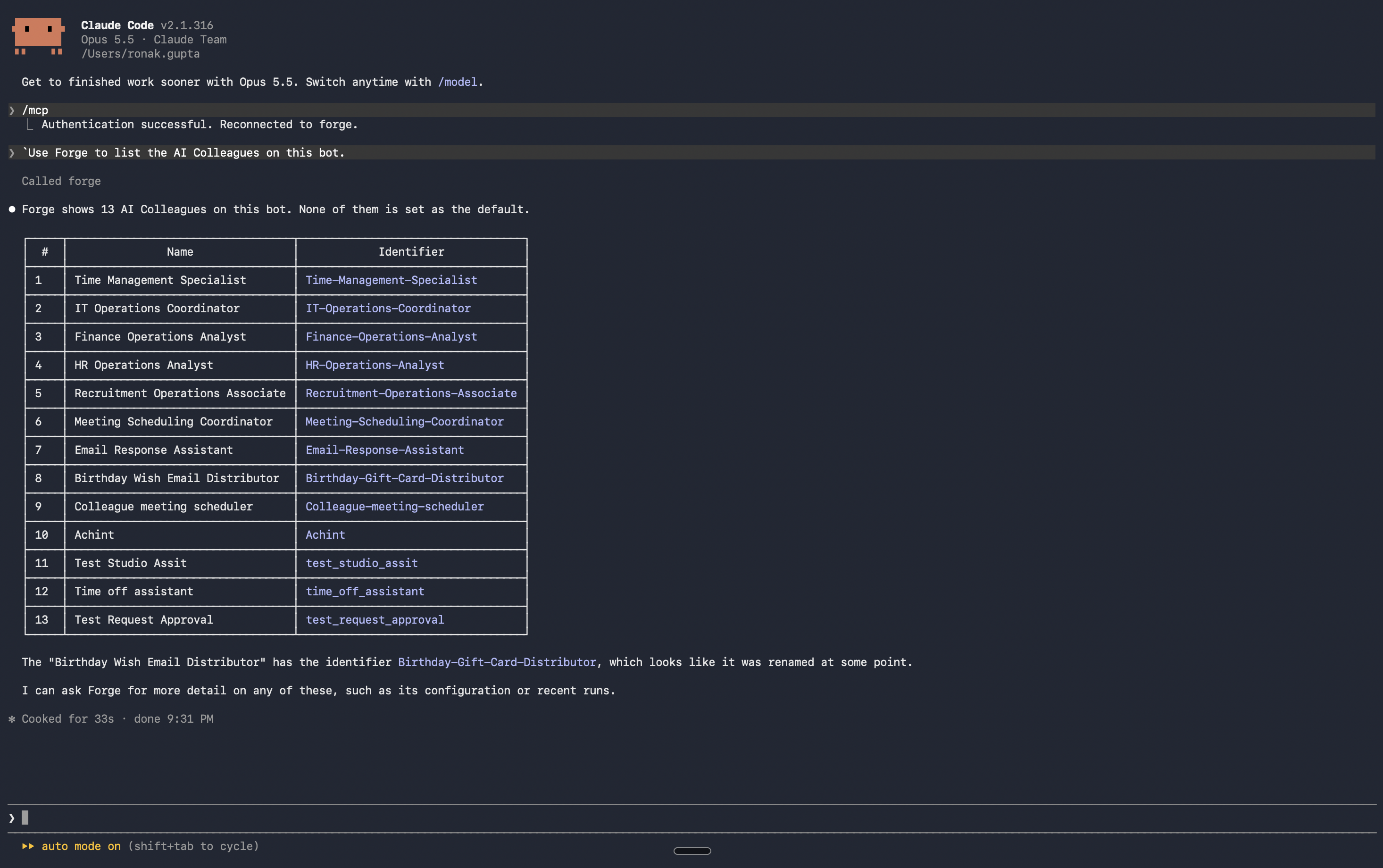
In Claude Code, ask:
Use Forge to list the AI Colleagues on this bot.Claude Code calls the forge tool and shows Forge's answer.
Example requests
| What you want | Example prompt |
|---|---|
| Explore | "Ask Forge which AOPs are live on this bot and what each one does." |
| Debug | "Ask Forge why the last run of the Leave Request AOP failed, and how to fix it." |
| Build | "Ask Forge to create an AOP that raises an IT ticket when a laptop issue is reported." |
| Configure | "Ask Forge to add a knowledge source for the travel policy to the HR AI Colleague." |
Approving plans and answering questions
Before Forge makes changes, it shares a plan and asks for approval. It might also ask questions, such as which AI Colleague to use.
- Answer in the same Claude Code conversation. Claude Code passes your answer back to Forge in the same Forge conversation.
- To approve or decline a plan, say
Approve planorapprove, ordecline. A sentence such as "yes, but add a step" isn't read as a decision. Approve or decline first, then ask for the change. - Steps finished in the dashboard. If Forge says a step must be finished in the Leena AI dashboard, open the link it gives, finish the step there, then reply
Done.
Use Forge on more than one bot
Each connection works with one bot, because the credentials and sign-in are tied to that bot. To work on another bot, repeat Steps 1–5 with that bot's credentials, and give the server a different name, for example forge-hr and forge-it.
Rotate the client secret
A client secret expires after 90 days. Regenerating it stops the old secret immediately, so update Claude Code straight away:
- On the Forge tab, click Regenerate client secret and copy the new secret.
- In a terminal, remove the server and add it again with the new secret:
claude mcp remove forge --scope user
claude mcp add --transport http --scope user --callback-port 3334 \
--client-id <CLIENT_ID> --client-secret forge <MCP_URL>- Sign in again with
/mcp.
Remove Forge from Claude Code
claude mcp remove forge --scope userTroubleshooting
| Problem | Likely cause | Fix |
|---|---|---|
| Sign-in page shows a redirect URL error | The redirect URL isn't registered, or its port doesn't match | Add http://localhost:3334/callback on the Forge tab, and use the same port in --callback-port |
invalid_client during sign-in | Wrong Client ID or secret, or the secret has expired | Copy the Client ID again, regenerate the secret, and add the server again |
bot_forbidden (403) | Your Leena AI account isn't a member of this bot | Ask an admin to give you access to the bot |
session_expired / invalid_token (401) | Your sign-in has expired | Run /mcp and authenticate again |
session_busy | Forge is still working on the previous request in this conversation | Wait for it to finish, then send the next message |
429 rate limit | More than 30 requests a minute, or too many requests at once | Wait a minute and retry |
| The Forge tab is missing | Forge MCP isn't available in your environment yet | Contact your Leena representative |
Updated about 2 hours ago