
How Leena AI Chooses the Response Language
Leena AI replies in the language an employee uses to start a request, and keeps that language until the request is complete. If the employee switches language partway through, replies stay in the starting language. To continue in another language, start a new chat and ask again in that language.
A request is one task: the employee's question plus any answers they give when the AI Colleague asks for more details, such as the dates for a leave request. This page covers the language of conversation replies. The language of the assistant's buttons, labels and menus is set separately from the employee's profile; see Multi-lingual Support.
How the language is detected
Leena AI checks the first message of each new request in the order below and stops at the first confident result.
- Short messages. A message under 10 characters that matches a common English word, such as "hi", "ok" or "thanks", is treated as English.
- Language identification. Longer messages go through a language identification model, and a high-confidence result is accepted.
- AI check with context. If the model is unsure, an LLM reviews the message together with up to four of the employee's recent messages in the same chat. It handles mixed-language text and languages typed in another script, such as Hindi written in Latin letters.
- Earlier language in the chat. If the language is still unclear, Leena AI reuses the language of the employee's previous request, as long as it was in the same chat.
- Assistant default. If none of the above applies, for example when the first message of a new chat is unclear, Leena AI uses the assistant's default language. This is English unless Leena AI has set another for your assistant.
Steps 1 to 3 fix the language for the request straight away. Steps 4 and 5 are provisional: Leena AI checks again on the employee's next message in the same request, then fixes the language whatever the result.
Switching languages in a chat
A new language is picked up only when the employee's message starts a new request. A request stays open while the AI Colleague is waiting for the employee's answer, usually when its last message asked a question.
| The employee writes in a new language… | Reply language |
|---|---|
| While the AI Colleague is waiting for their answer | Starting language of the request |
| After stopping a reply, to continue the same request | Starting language of the request |
| As a new question, after the previous request is complete | Detected again from the new question |
| As the first message of a new chat | Detected again from that message |
Example. An employee asks in German how many leave days they have left, and the AI Colleague asks which year they mean. The employee answers in English and adds a new question. The AI Colleague replies in German, because the employee is still answering inside the German request.
To switch language reliably, start a new chat and write the first message as a full sentence in the new language.
How it works end to end
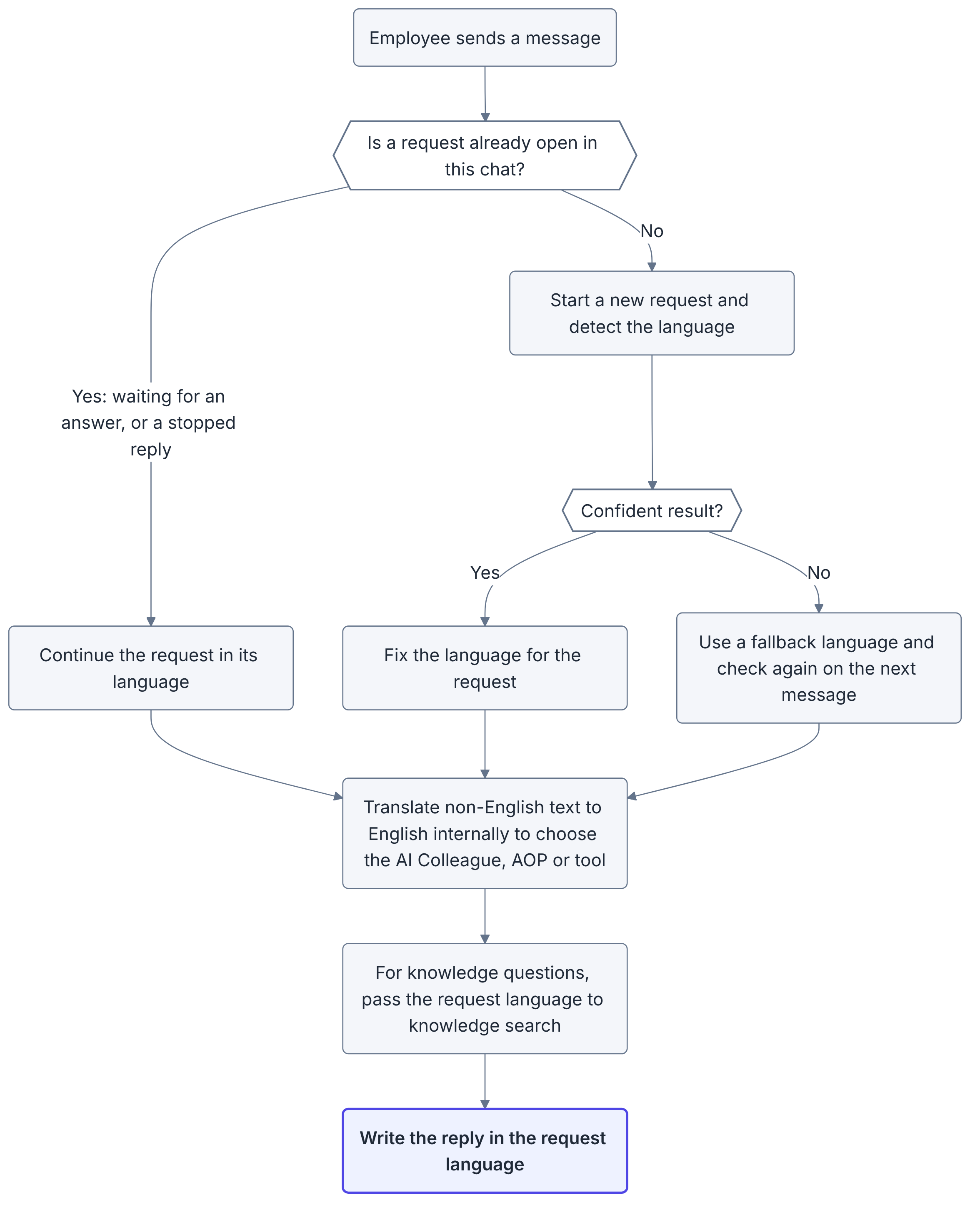
Detection runs when a request starts, plus one re-check if the first result was a fallback. Everything after that, including knowledge answers, uses the language fixed for the request.
What appears in which language
| What the employee sees | Language |
|---|---|
| Replies, including knowledge answers | Request language |
| Status messages while the AI Colleague works (thinking, running, processing) | Request language. Admins set the base wording under AIC streaming placeholder in Orchestrator Settings. |
| Disclaimer | Request language, where a translation applies |
| Step headers generated during a run | Request language |
| Tool and AOP names shown in a step header | As configured, usually English |
| The AI Colleague's reasoning in the thinking section | Usually English; it is not translated |
| Buttons, labels and menus | Employee's profile language; see Multi-lingual Support |
Tool and AOP names appear exactly as they were named in AI Colleagues Studio, so a header that shows only a tool name stays in that language.
Testing tips and FAQs
When testing languages in UAT:
- Start a new chat for each language you test.
- Open with a full question in the target language, not a greeting such as "hi".
- When reporting a language issue, include the request ID and the language the request started in.
An employee asked in English but got a German reply. Why? Their message continued a request that started in German, usually because the AI Colleague was waiting for an answer. Starting a new chat fixes it.
Does a German place or site name in an English question change the reply language? No. Detection reads the whole message, and knowledge search answers in the request's language instead of detecting the language again.
Does the employee's profile language decide the reply language? No. The profile language sets the interface: buttons, labels and menus. Replies follow the language the employee writes in.
How does an employee switch language in a channel without a new chat option? A new conversation starts once the Request session timeout has passed since their last message. Admins set it, between 4 and 12 hours, in Orchestrator Settings. A new question asked after the current request is complete is also detected afresh.
Does this apply to voice calls? No. Voice calls handle language separately; see Voice Call.
Updated about 1 hour ago