
Use Forge from Other Clients (MCP and A2A)
Use Forge — Leena's builder copilot — from your own AI tools. Forge exposes an MCP (Model Context Protocol) server and an A2A (Agent-to-Agent) server, so an MCP client such as Claude Code, or any A2A-compatible agent platform, can ask Forge questions, investigate failed runs, and build on your instance, exactly as you would in the Forge panel.
Both surfaces are turned on by one toggle on the Forge tab of the MCP server & A2A settings page, and share one OAuth application — so you configure credentials once and use whichever protocol your tool speaks.
Connecting Claude Code? A step-by-step guide is available: Connect Forge MCP to Claude Code. Read this page first for the concepts and credentials, then follow the guide for the wiring.
1. Overview
With Forge MCP and A2A turned on, an external AI app can work with Forge on your instance. It can:
- Answer questions about AI Colleagues, run history, knowledge, notifications and settings.
- Investigate failed runs and explain what went wrong.
- Draft and configure AI Colleagues, AOPs, Code tools and MCP tools.
Who it's for: Leena AI dashboard users — builders and admins — not the end users who chat with your AI Colleague.
Key idea to keep in mind: every Forge MCP and A2A call runs as the signed-in dashboard user, with that user's permissions on the instance. Access is re-checked on every request, so a user who loses access to the instance is refused on their very next call. It is not an anonymous or service-account connection.
MCP or A2A?
Both protocols reach the same Forge, run under the same user, and use the same credentials. Pick the one your tool already speaks.
| MCP | A2A | |
|---|---|---|
| Protocol | Model Context Protocol | A2A 1.0 (JSON-RPC and HTTP+JSON), A2A 0.3 (JSON-RPC only) |
| Best for | AI coding tools and assistants, such as Claude Code | Agent platforms that call other agents |
| Entry point | The MCP URL — one tool, forge | The A2A agent card — one skill, forge |
| Continue a conversation | Pass back the conversation_id | Send on the same contextId |
| Follow-up questions | status: input_required | TASK_STATE_INPUT_REQUIRED |
| Stop a turn | notifications/cancelled | tasks/cancel |
| Push notifications | — | Not supported |
Orchestrator vs Forge
The MCP server & A2A settings page has two tabs. This page covers the Forge tab. The Orchestrator tab exposes your AI Colleague to end users — see MCP server and A2A.
| Orchestrator | Forge | |
|---|---|---|
| Who uses it | End users (employees) | Builders and admins (dashboard users) |
| What it does | Runs the AI Colleague — answers questions, runs AOPs | Builds, configures and debugs the instance |
| MCP tools | send_message, request_details, cancel | One tool: forge |
| Identity | The signed-in end user | The signed-in dashboard user |
| Settings | Orchestrator tab | Forge tab — its own toggle, OAuth application and secret |
| IP restriction | Supported | Not available yet |
2. Enable Forge MCP and A2A and generate credentials
Everything is configured in the dashboard. You need the AI Colleague manage permission to change these settings.
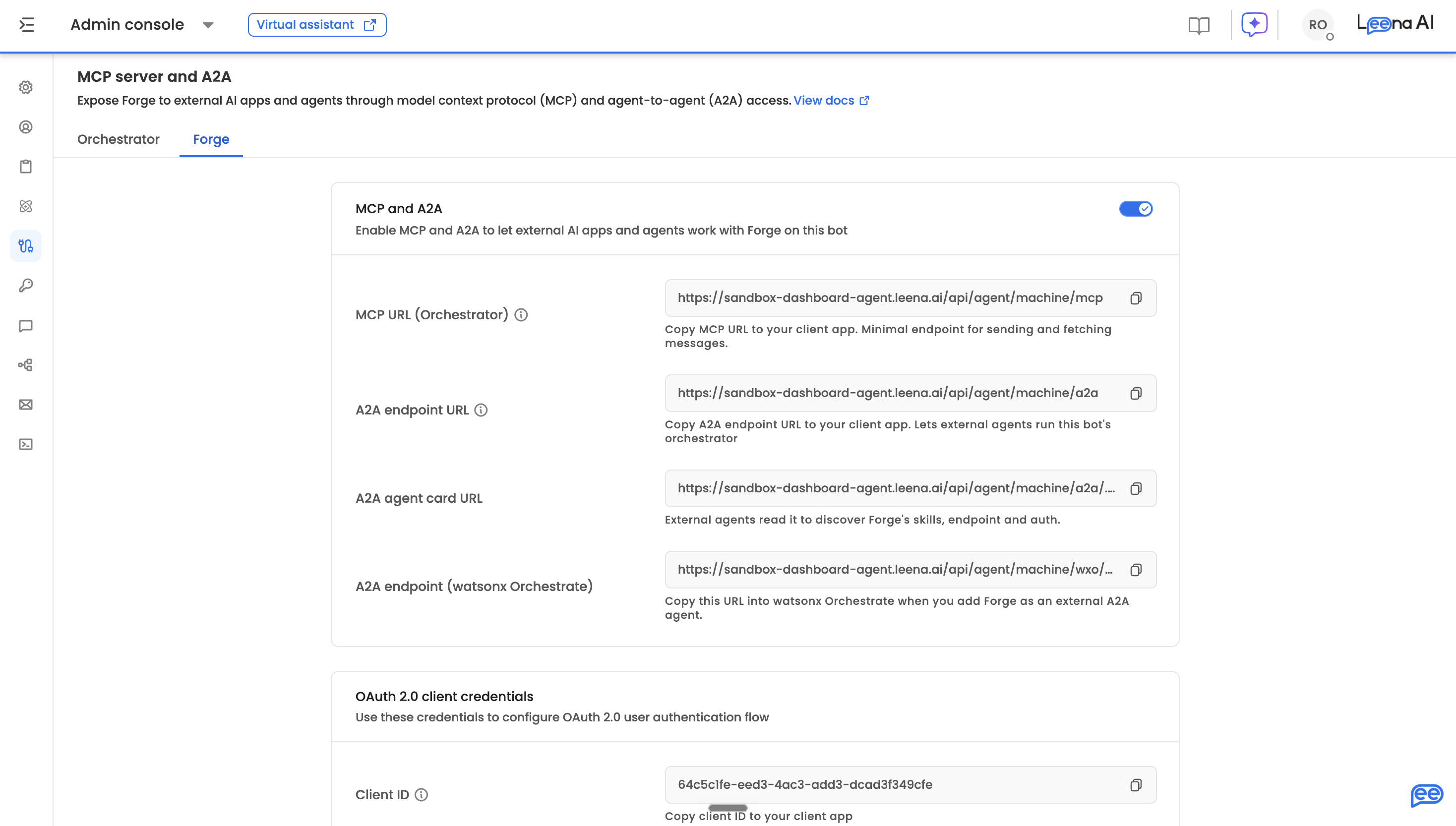
Step 1 — Turn on MCP and A2A
- Open Admin console → Orchestrator → MCP server & A2A.
- Select the Forge tab.
- Turn on the MCP and A2A toggle.
Turning it on enables both Forge surfaces (MCP and A2A) for this instance, and provisions the Forge OAuth application.
Step 2 — Read your connection details
Once enabled, the Forge tab shows:
| Field | What it's for |
|---|---|
| MCP URL | The endpoint your MCP client (for example, Claude Code) points at. |
| A2A endpoint URL | The endpoint external agents call. |
| A2A agent card URL | External agents read it to discover Forge's skill, endpoint and authentication. |
| Client ID | The OAuth client identifier for Forge on this instance. |
| OAuth endpoints | The authorization URL and token URL. |
Note: Copy the URLs from the Forge tab; don't build them yourself. The host depends on your Leena AI environment. For reference, the MCP URL looks like https://<your-leena-host>/api/agent/machine/mcp. It carries no instance ID — the instance is identified by the access token, not by the URL.
Step 3 — Generate a client secret
Click Generate client secret in OAuth 2.0 client credentials.
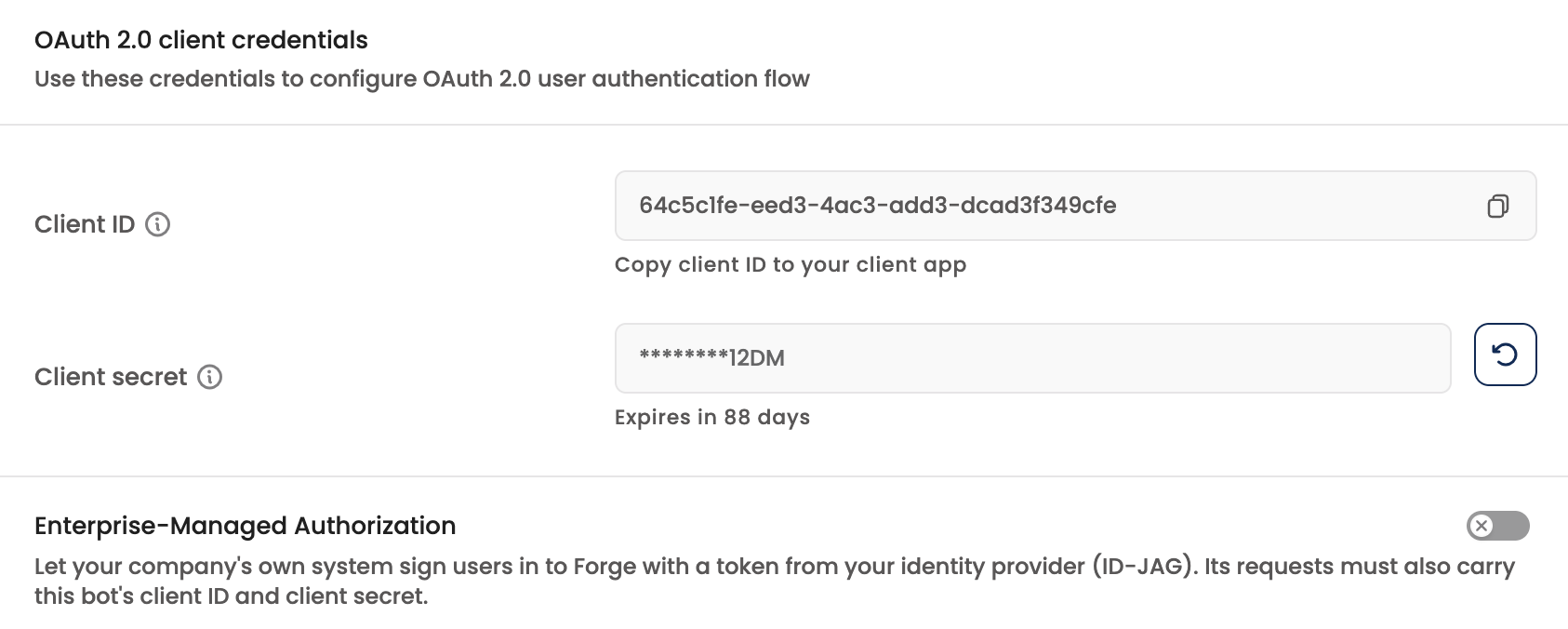
- The full secret is shown exactly once. Copy it immediately and store it securely — Leena keeps only a hashed value and a last-four hint.
- The secret expires after 90 days. The expiry is shown on the Forge tab.
- Regenerating replaces the secret immediately. Forge keeps one secret at a time, so the old secret stops working the moment you regenerate. Update every connected app straight away.
Step 4 — Register your redirect URL(s)
In Authorized redirect URLs, add the callback URL your client app uses, then click Save.
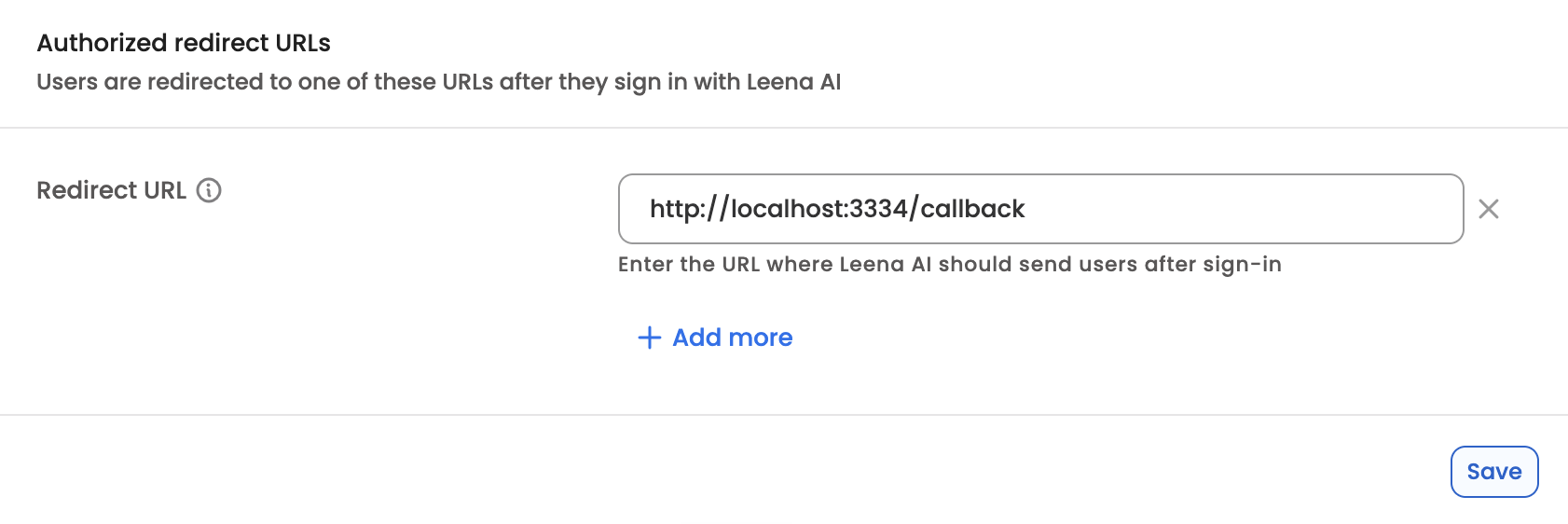
- Redirect URLs must use HTTPS.
- The only exception is
http://localhost, for local tools such as Claude Code. Other loopback forms (127.0.0.1,[::1]) are not accepted on the Forge tab. - The URL must exactly match what your client sends, including the port.
- You can register up to 10 redirect URLs.
Step 5 — (Optional) Enterprise-Managed Authorization (ID-JAG)
Turn on Enterprise-Managed Authorization to let your identity provider sign users in to Forge without an interactive browser login. Your identity provider mints a signed assertion for the user, your app presents it at the token endpoint, and Leena returns a normal user-scoped token.
| You'll need | Details |
|---|---|
| JWKS URL | Your identity provider's JWKS URL. |
| Issuer | Your identity provider's issuer (iss). |
| Email claim | The claim that holds the user's email — for example email or upn. |
| Audience | Forge uses leena-forge. |
Note: The user must already have a Leena AI account with access to the instance, and requests must also carry this instance's Client ID and client secret.
Step 6 — Connect your client
For MCP: in your MCP client, add a new MCP server with:
- Server URL: the MCP URL from Step 2.
- Authentication: OAuth, using the Client ID, the client secret, and the authorization and token URLs from the Forge tab.
The client walks you through sign-in in your browser. Sign in as a dashboard user with access to the instance. Using Claude Code? Follow Connect Forge MCP to Claude Code.
For A2A: point your A2A client at the A2A agent card URL from Step 2. The card declares Forge's skill, endpoints and OAuth scheme; your client then obtains a token and calls the endpoint the card names. See Forge over A2A below.
Turning it off
Toggling MCP and A2A off on the Forge tab immediately blocks all external access to Forge for this instance.
Note: Re-enabling is a resume. The Forge OAuth application is kept when you turn the toggle off, so turning it back on restores the same Client ID and client secret — connected apps work again without reconfiguration.
3. Authentication
Forge MCP and A2A use OAuth 2.0, with the access token sent as a Bearer token in the Authorization header on every call. There is no API-key mode and no anonymous access.
The OAuth roles line up like this:
- Forge's MCP and A2A server — the resource server. It validates the bearer token on each request and resolves it to a specific instance and dashboard user.
- Leena's auth service — the authorization server. This is where users sign in and tokens are issued. The authorization and token URLs on the Forge tab point here.
- Your app — the OAuth client. It holds the Client ID and secret from the Forge tab and drives the token flow.
| Item | Value |
|---|---|
| Grant types | authorization_code with PKCE (S256), and refresh_token |
| Scope | agent.machine |
| Access token lifetime | 15 minutes |
| Refresh token lifetime | 30 days (90 days at most in total) |
| Client secret lifetime | 90 days |
| Dynamic client registration | Not supported — use the Client ID and secret from the Forge tab |
Discovery is automatic. Every 401 carries a WWW-Authenticate header whose resource_metadata link points to the OAuth metadata, so a compliant MCP client finds the sign-in endpoints on its own.
One connection, one instance. Each instance has its own Forge OAuth application, and the access token is tied to that instance. To use Forge on another instance, connect again with that instance's credentials.
4. The forge tool (MCP)
forge tool (MCP)When your application connects over MCP, Forge advertises exactly one tool, forge. You describe what you want in natural language, and Forge plans and does the work.
| Argument | Required | Meaning |
|---|---|---|
message | Yes | The request, written so it stands on its own. Up to 64,000 characters. |
conversation_id | No | Continue an earlier conversation, using an ID the tool returned. |
Every result carries:
| Field | What it holds |
|---|---|
status | completed, input_required, failed, canceled or rejected |
answer | The reply text |
conversation_id | Pass it back to continue the same conversation |
questions | Any questions Forge is asking, as data |
cards | Structured output, such as tables |
Plan approvals and follow-up questions
Before Forge makes changes, it may ask a question or ask you to approve a plan. The result then has status: input_required.
- Answer in the same conversation. Pass back the same
conversation_id— or, if your client supports MCP elicitation, retry the original call with therequestStateyou were given. - To approve or decline a plan, send the exact option text (for example
Approve plan) or a plain word:approve/yes, ordecline/no. A sentence such as yes, but add a step is not a decision. - Time limits. A text answer counts within 15 minutes of the question; after that it is treated as a new request. An elicitation
requestStateis valid for 1 day. - Steps finished in the dashboard. Some steps can only be completed in the Leena AI dashboard. Forge tells you where to go; when you're done, reply
Donein the same conversation.
Note: Never start a new conversation to answer a question. The answer will arrive as a fresh request, and Forge will ask the same question again.
5. Forge over A2A
Forge is also available as a remote agent over A2A.
| Item | Details |
|---|---|
| Agent Card | Copy the A2A agent card URL from the Forge tab. It is served under the A2A path (…/api/agent/machine/a2a/.well-known/agent-card.json), not at the root of the host. |
| Protocols | A2A 1.0 (JSON-RPC and HTTP+JSON) and A2A 0.3 (JSON-RPC only). |
| Skill | One skill, forge. |
| Conversations | You choose the contextId. Messages on the same contextId continue the same conversation. |
| Follow-ups | When Forge asks a question, the task ends in TASK_STATE_INPUT_REQUIRED. Answer on the same contextId. |
| Push notifications | Not supported. |
| Dashboard links | Links to Leena dashboard pages are sign-in links. The user confirms with a 6-digit code sent to their email. |
6. Limits and things worth knowing
| Limit | Default |
|---|---|
| Message length | 64,000 characters |
| Request body | 256 KB |
| Requests per minute, per user per instance | 30 |
| Concurrent turns, per user | 10 |
- One turn at a time per conversation. A second call while one is running returns
status: rejectedwith reasonsession_busy. - Text only. File and data attachments are refused. Send what you want read as text.
- Stopping a turn. On MCP, send
notifications/cancelledfor the running call. On A2A, usetasks/cancel. Closing an A2A connection does not stop the turn — it keeps running, andtasks/getreturns the answer.
Common errors
| Status | Error | What to do |
|---|---|---|
401 | unauthorized / invalid_token / session_expired | Sign in again. |
403 | bot_forbidden | The user is not a member of this instance. |
403 | bot_mismatch | The token belongs to a different instance. |
404 | not_found | Check the instance ID. |
429 | acl_rate_limited | Slow down and retry. |
503 | acl_unavailable | Retry after the Retry-After seconds. |
7. Quick start checklist
Common (MCP and A2A)
- Enable the MCP and A2A toggle on the Forge tab in Admin console → Orchestrator → MCP server & A2A.
- Copy the Client ID and OAuth endpoints.
- Generate a client secret and store it securely (shown only once).
- Add your client's redirect URL (HTTPS, or
http://localhostfor local tools) and Save. - (Optional) Turn on Enterprise-Managed Authorization if your identity provider should sign users in.
- Rotate the client secret before it expires — and update connected apps immediately, as the old secret stops working at once.
MCP
- Copy the MCP URL and add it to your MCP client with OAuth. Using Claude Code? Follow Connect Forge MCP to Claude Code.
- Sign in as a dashboard user with access to the instance.
- Call
forgewith your request; reuse the returnedconversation_idto continue. - Answer follow-up questions and plan approvals in the same conversation.
A2A
- Point your A2A client at the A2A agent card URL and complete OAuth.
- Send messages on a
contextIdyou choose; keep using it to continue the conversation. - Answer
TASK_STATE_INPUT_REQUIREDon the samecontextId.
Related pages
Updated about 1 hour ago